- Mark as New
- Bookmark
- Subscribe
- Mute
- Subscribe to RSS Feed
- Permalink
- Report Inappropriate Content
08-17-2016 12:11 AM
Hi all,
Just want to start in saying that this could be me confusing myself!
From what I can gather - the best way to assign roles is to assign to groups, and then add the users to those groups.
This is fine and dandy - however we do not want to have these groups as assignment groups.
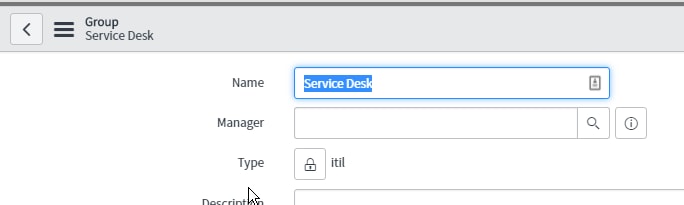
I followed the below wiki article, and assigned the group type as 'itil' and then modified the Assignment group's dictionary entry to contain type 'itil'
Configuring Group Types for Assignment Groups - ServiceNow Wiki


This works great, and as expected, until someone who is a member of more than one group.
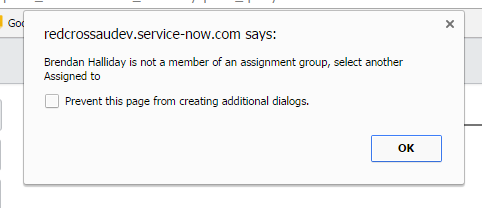
What we have found is if you were to add an assignee in Assigned to before adding an assignment group, it will add the first group they are a member of, whether or not it is an assignment group with the 'itil' type or not.
Does anyone know how I can stop this from happening?
I hope I have explained this well enough......
Thanks in Advance!
Brendan
Solved! Go to Solution.


- Mark as New
- Bookmark
- Subscribe
- Mute
- Subscribe to RSS Feed
- Permalink
- Report Inappropriate Content
12-18-2016 05:32 PM
- Mark as New
- Bookmark
- Subscribe
- Mute
- Subscribe to RSS Feed
- Permalink
- Report Inappropriate Content
12-18-2016 05:12 PM
So I think that I have found the sys id, 3D1cb8ab9bff500200158bffffffffff62

This is the code that I am using in the script includes (line 39 is your addition):
var KSTaskAjax = Class.create();


KSTaskAjax.prototype = Object.extendsObject(AbstractAjaxProcessor, {
});


KSTaskAjax.prototype.checkTaskSLABreached = function() {
   return String(KSTaskUtil.isResolveSLABreached(this.getParameter('sysparm_sysID')));
};


// finds a group to default for the current assigned to person
// just picks the first group; user needs to check this before saving
KSTaskAjax.prototype.getPrimaryGroupInfo = function() {

   var assignedTo = this.getParameter('sysparm_assignedTo');

   var retObj = {};
   retObj.groupID = '';
   retObj.groupName = '';
   retObj.assignedName = '';
   retObj.groupCount = 0;
   if (assignedTo != '') {
   //
   // Get the user record
   //
   var userRec = new GlideRecord('sys_user');
   if (userRec.get(assignedTo)) {
   retObj.assignedName = userRec.name.toString();
   //
   // count how many active assignment groups the assigned to belongs to.
   // only allow groups: with no type set (signifies assignment group)
   //                                   : that are active
   //
   var memberRec = new GlideRecord('sys_user_grmember');
   memberRec.addQuery('user', assignedTo);
   memberRec.addQuery('group.active', 'true');
   memberRec.addQuery('gr.group.type', '3D1cb8ab9bff500200158bffffffffff62');
   memberRec.addNullQuery('group.type');
   memberRec.query();
   while (memberRec.next()) {
   //
   // return the first assignment group encountered to auto populate the group on the task record
   //
   if (retObj.groupCount == 0) {
   if (retObj.groupID == '') {
   retObj.groupID       = memberRec.group.toString();
   retObj.groupName   = memberRec.group.name.toString();
   }
   }
   retObj.groupCount++;
   }
   }
   }

   var json = new JSON();
   var returnData = json.encode(retObj);
   return returnData;
};
However after these changes, it is not only filtering assignment groups to the ITIL type: (Report Administrators does not have the ITIL type)

Am i missing something?
- Mark as New
- Bookmark
- Subscribe
- Mute
- Subscribe to RSS Feed
- Permalink
- Report Inappropriate Content
12-18-2016 05:32 PM
Hello Brendan,
Replace gr.group.type with group.type
- Mark as New
- Bookmark
- Subscribe
- Mute
- Subscribe to RSS Feed
- Permalink
- Report Inappropriate Content
12-18-2016 06:59 PM
Hey Pradeep,
That worked, well sort of.
At first when changing it - I got the error:

In the script, under the line we added was the following:
memberRec.addNullQuery('group.type');
When I commented this out - the auto backfill worked successfully!
My question to you is - Do you think that it is ok to leave the line out of the script? I have been testing, and all seems ok, but just wanted to make sure
- Mark as New
- Bookmark
- Subscribe
- Mute
- Subscribe to RSS Feed
- Permalink
- Report Inappropriate Content
12-18-2016 07:08 PM
Hello Brendan,
Thanks for the update. Basically, addNullQuery here returns the record where group.type is null.
In case you don't want this then you can comment it.
https://wiki.servicenow.com/index.php?title=GlideRecord#addNullQuery&gsc.tab=0
- Mark as New
- Bookmark
- Subscribe
- Mute
- Subscribe to RSS Feed
- Permalink
- Report Inappropriate Content
12-18-2016 07:15 PM
awesome Pradeep, thanks again for your help