- Mark as New
- Bookmark
- Subscribe
- Mute
- Subscribe to RSS Feed
- Permalink
- Report Inappropriate Content
04-22-2016 08:54 AM
Hello,
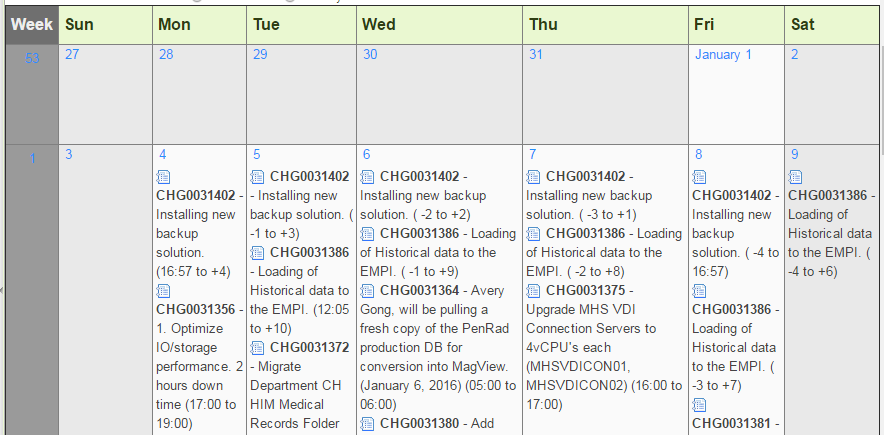
Got a question about calendars. We created a Calendar for Change Requests, and it displays the Change Request number, short description and start/end date. Is there a way to change what information is displayed on the calendar?
Thanks,
Maria

Solved! Go to Solution.
- Mark as New
- Bookmark
- Subscribe
- Mute
- Subscribe to RSS Feed
- Permalink
- Report Inappropriate Content
04-25-2016 08:49 AM
Hi Maria,
You Can change it by configuring calendar attributes..please refer to following link Customizing Calendar Reports - ServiceNow Wiki

- Mark as New
- Bookmark
- Subscribe
- Mute
- Subscribe to RSS Feed
- Permalink
- Report Inappropriate Content
04-22-2016 09:04 AM
Did you create this via a report? What information would you like to display? If you created it via a report you should be able to change the display values pretty easily from the report definition.
- Mark as New
- Bookmark
- Subscribe
- Mute
- Subscribe to RSS Feed
- Permalink
- Report Inappropriate Content
04-22-2016 09:22 AM


- Mark as New
- Bookmark
- Subscribe
- Mute
- Subscribe to RSS Feed
- Permalink
- Report Inappropriate Content
04-22-2016 09:25 AM
Out of the box there is a Change calendar module that's inactive. You can activate it and it shows maintenance windows, blackout windows, and the Change numbers.
- Mark as New
- Bookmark
- Subscribe
- Mute
- Subscribe to RSS Feed
- Permalink
- Report Inappropriate Content
04-25-2016 08:45 AM
Here is an article that includes the BR. Change Management Integration with Outlook - ServiceNow Wiki