Change Calendar - Platform Analytics

- Mark as New
- Bookmark
- Subscribe
- Mute
- Subscribe to RSS Feed
- Permalink
- Report Inappropriate Content
04-07-2026 02:40 AM
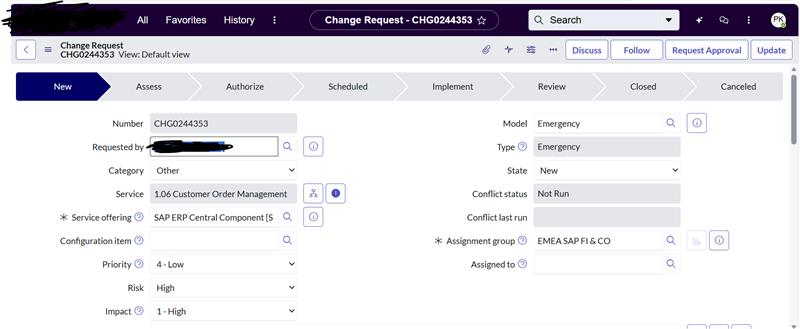
In the Change Calendar dashboard available under Platform Analytics, clicking on a Change event currently routes the user to the Native UI change form.
How can this navigation be changed so that clicking a Change from the calendar opens the record in Service Operations Workspace (SOW) instead of the Native UI?
Is there a supported configuration, URL override, or navigation setting in Platform Analytics / Calendar components that controls the record drill‑down behavior?
please find attached screenshot.

- Mark as New
- Bookmark
- Subscribe
- Mute
- Subscribe to RSS Feed
- Permalink
- Report Inappropriate Content
04-07-2026 03:21 AM
The Change Calendar in Platform Analytics uses the platform's default navigation resolver to build the drill-down URL, so the fix is typically about telling the platform which experience to use for change_request records rather than modifying the calendar component itself.
Here are approaches from supported to custom:
1. Set Service Operations Workspace as the Default Experience for Change
This is the cleanest, platform-supported approach. ServiceNow uses Navigation Environment records to determine which UI experience opens for a given table.
Go to sys_ux_app_route_config (or navigate to Now Experience Framework → App Routes) and ensure there's a route entry that maps the change_request table to the SOW app shell. When this is configured correctly, any platform-level navigation to a change_request record — including from Platform Analytics drill-downs — should resolve to the workspace URL pattern (/now/sow/record/change_request/{sys_id}) instead of the classic /nav_to.do?uri=change_request.do?sys_id=....
Also check the Workspace Experience configuration under Service Operations Workspace → Administration → Workspace Configuration to confirm SOW is set as the preferred experience for the Change Management application.
2. System Properties to Force Workspace Redirect
There are a couple of relevant properties:
glide.ui.default_experience— controls the global default (set topolarisfor workspace)sn_change_cab.use_workspace— specifically for CAB-related change views- Check for any
workspace.redirect.*properties insys_propertiesthat govern change_request table routing
If SOW is already deployed but the calendar still opens native UI, it likely means the Platform Analytics calendar component is constructing a classic-style URL directly rather than going through the experience resolver.
3. URL Override via Platform Analytics Dashboard Configuration
Open the dashboard in Dashboard Builder (or PA Dashboard editor) and inspect the calendar widget's configuration. Some calendar/list visualizations expose a Drilldown URL or Link template property. If one exists, you can override it with a workspace URL pattern like:
/now/sow/record/change_request/${sys_id}
However, the Change Calendar is an OOB component, and this property may not be exposed depending on your release.
4. Navigation Interceptor (Fallback Approach)
If the calendar is hardcoding a classic URL and none of the above work, you can use a UI Script (global, runs on the client side in classic UI) to intercept navigation:
// UI Script - Redirect change_request from classic to SOW
(function() {
    var defined = typeof g_form !== 'undefined';
    // Check if current URL is a change_request classic form
    if (window.location.href.indexOf('change_request.do') > -1) {
        var sysId = new URLSearchParams(window.location.search).get('sys_id');
        if (sysId) {
            window.location.href = '/now/sow/record/change_request/' + sysId;
        }
    }
})();
This is more of a workaround than a proper config, but it catches cases where the platform resolver is bypassed.
5. Check Your Release
Which release are you on? I noticed the calendar shows April 2026, so you're likely on Yokohama or later. In recent releases (Washington DC+), ServiceNow improved the experience routing so that PA drill-downs respect the workspace default experience setting. If you're on an older release, option 4 might be your best bet.
Recommended investigation path:
- First, check sys_ux_app_route_config for
change_requestentries and verify SOW is mapped - Then test — if the calendar still opens native UI, the calendar widget is likely bypassing the route resolver
- Inspect the calendar component in Dashboard Builder for any drilldown URL override
- If no config option exists, apply the interceptor as a short-term fix

- Mark as New
- Bookmark
- Subscribe
- Mute
- Subscribe to RSS Feed
- Permalink
- Report Inappropriate Content
04-08-2026 07:09 AM
I’ve tried the approach outlined above, but I’m still facing the issue. I’d appreciate more guidance on this issue.