cross-scope access policy

- Mark as New
- Bookmark
- Subscribe
- Mute
- Subscribe to RSS Feed
- Permalink
- Report Inappropriate Content
08-22-2022 06:59 PM
Hello, I ask for your help.
I added a business rule to the application and created a script to get the values of the tables of other applications.However, an error similar to the phrase below appears.
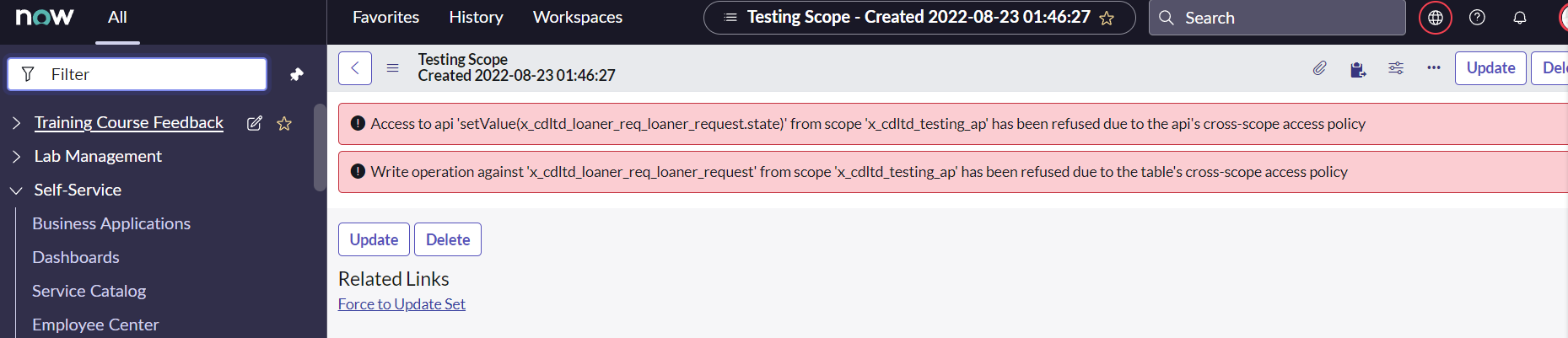
Access to api 'setValue(x_cdltd_loaner_req_loaner_request.state)' from scope 'x_cdltd_testing_ap' has been refused due to the api's cross-scope access policy
While looking for workarounds, I found a way to add a record to cross-scope privileges.
However, status is not changed to allowed. Does anyone know how to do it?
<script>
(function executeRule(current, previous /*null when async*/) {
// When closed complete is triggerd it also inactivates the task
var loanerRecs = new GlideRecord('x_cdltd_loaner_req_loaner_request');
loanerRecs.addQuery('state','!=',3);//not closed complete
loanerRecs.query();
while(loanerRecs.next()){
loanerRecs.setValue('state',3);
loanerRecs.update();
}
})(current, previous);
<error page>

- Labels:
-
Scoped App Development
- Mark as New
- Bookmark
- Subscribe
- Mute
- Subscribe to RSS Feed
- Permalink
- Report Inappropriate Content
10-16-2024 09:11 AM
I'm also having same issue like I wanna update "Priority" field of Needit Table from another application called "Untrustworthy Application". But instead of doing following thing:

I'm not able to do this when writing code in Scripts-Background and running it in the untrustworthy scope.
This code is written in the Scripts-Background:
// Create a GlideRecord object for the NeedIt table
var gr = new GlideRecord('x_58872_needit_needit');
// Query the database and return all the NeedIt records
gr.query();
// Iterate through the NeedIt records.  Set the Priority to Critical
// Update the NeedIt record in the database
while(gr.next()){
  gr.priority = 1;
  gr.update();
}

- Mark as New
- Bookmark
- Subscribe
- Mute
- Subscribe to RSS Feed
- Permalink
- Report Inappropriate Content
08-23-2022 06:54 PM
https://support.servicenow.com/kb?id=kb_article_view&sysparm_article=KB0727180
In place of 'Can Create' use 'Can Update' in the above article.
Further to understand your first error and if you have not understand my previous reply:
follow the steps mentioned in resolution section of below article:
https://support.servicenow.com/kb?id=kb_article_view&sysparm_article=KB0690133
Set following fields
Source Scope : x_cdltd_testing_ap ( this is auto populated based on your current scope so set you scope to same )
Target Scope: x_cdltd_loaner_req_loaner_request
Target Name: x_cdltd_loaner_req_loaner_request (name of table)
Target Type: Table
Operation: Write
Status: Allowed
This would have solved your issue and yet you could have your business rule or script include in you own scope instead of global.
Mark my answer as HELPFUL / CORRECT if this help resolve your issue.
Regards,
Vamsi S