- Mark as New
- Bookmark
- Subscribe
- Mute
- Subscribe to RSS Feed
- Permalink
- Report Inappropriate Content
06-02-2015 10:40 PM
Hi,
I cannot seem to make my custom UI Macro work in my catalog variable with reference field type. I have already placed 'ref_contributions=mySampleMacro' in variable attributes field of my reference variable. When I go to my catalog item. Nothing happens. Care to enlighten me on this?
Solved! Go to Solution.
- Labels:
-
Instance Configuration


- Mark as New
- Bookmark
- Subscribe
- Mute
- Subscribe to RSS Feed
- Permalink
- Report Inappropriate Content
06-02-2015 11:18 PM
Hi Dalton,
That's correct. You have to create a client script to make this work for catalog items. Please go through the below link for more info.
» How to Add a UI Macro to a Non-reference Field in ServiceNow
I hope this answers your question.
- Mark as New
- Bookmark
- Subscribe
- Mute
- Subscribe to RSS Feed
- Permalink
- Report Inappropriate Content
06-02-2015 10:49 PM
HI Daltion,
Can you paste your code here so that we can give it a try.
- Mark as New
- Bookmark
- Subscribe
- Mute
- Subscribe to RSS Feed
- Permalink
- Report Inappropriate Content
06-02-2015 10:58 PM
Hi Pradeep Sharma,
I am recreating a UI macro from a blog I have read previously,
I am utilizing the Add_Me UI Macro.
add_me UI Macro
<?xml version="1.0" encoding="utf-8" ?>
<j:jelly trim="false" xmlns:j="jelly:core" xmlns:g="glide" xmlns:j2="null" xmlns:g2="null">
<j:set var="jvar_n" value="add_me_${ref}"/>
<a id="${jvar_n}" onclick="addMe('${ref}')">
<img border="0" src="images/icons/user_obj.gifx"/>
</a>
<script>>
function addMe(reference) {
//Get the user reference field and populate the current user
var s = reference.split('.');
var referenceField = s[1];
g_form.setValue(referenceField, '$[gs.getUserID()]');
}
</script>>
</j:jelly>
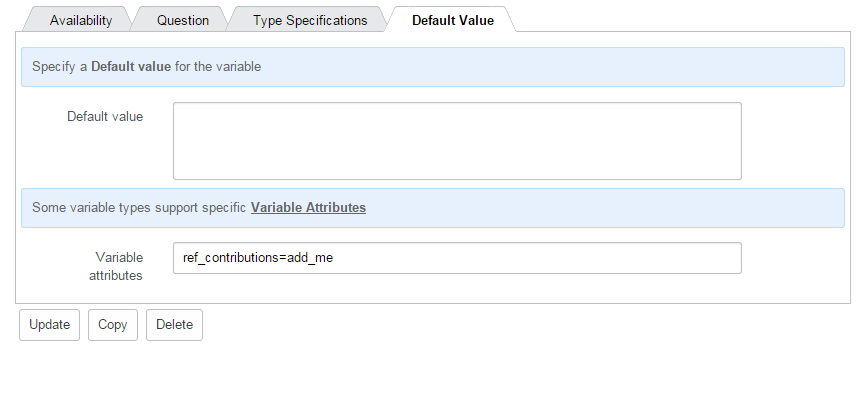
add_me UI Macro reference in a catalog item variable

When I navigate to the catalog item, the button does not appear, There was an article I have read just now that UI macros are not supported in variable attributes for catalog items. Can you verify this?
- Mark as New
- Bookmark
- Subscribe
- Mute
- Subscribe to RSS Feed
- Permalink
- Report Inappropriate Content
06-02-2015 11:18 PM
Hi Dalton,
That's correct. You have to create a client script to make this work for catalog items. Please go through the below link for more info.
» How to Add a UI Macro to a Non-reference Field in ServiceNow
I hope this answers your question.
- Mark as New
- Bookmark
- Subscribe
- Mute
- Subscribe to RSS Feed
- Permalink
- Report Inappropriate Content
06-02-2015 11:36 PM
But this article refers to Non-reference fields. Am using a reference field type for my variable used in catalog item.