
- Mark as New
- Bookmark
- Subscribe
- Mute
- Subscribe to RSS Feed
- Permalink
- Report Inappropriate Content
11-28-2018 01:48 PM
Hi,
I need help in customizing our existing Approval notifications on Requests. In our current system(Asset mgmt) when a user request let's say 2 items , our approval notifications will provide the details of each and every Requested item(RITM) as shown below:

Sometimes, our requests that have 100 request items and the notification looks very clumsy. I am trying to update this into the following format which consists of a table for all the Requested items(RITMs)

Can someone please help me how to achieve this kind of notification so that all the items are in a table.
Regards,
Manoj
Solved! Go to Solution.


- Mark as New
- Bookmark
- Subscribe
- Mute
- Subscribe to RSS Feed
- Permalink
- Report Inappropriate Content
12-11-2018 11:23 AM
Can you change it to
Short Description: ${sysapproval.short_description}
Priority: ${sysapproval.priority}
Requested For: ${sysapproval.requested_for}
Requested By: ${sysapproval.opened_by}
Total Price: ${sysapproval.price}
<hr/>
<mail_script>
var item = new GlideRecord("sc_req_item");
item.addQuery("request", current.sysapproval);
item.query();
if (item.getRowCount() > 0) {
template.print('<table border="1"><th colspan="4" style="text-align:center">Summary of Requested items</th>');
while(item.next()) {
template.print('<tr><th>'item.number + '</th><th>' + item.quantity + '</th><th>' + item.cat_item.getDisplayValue() + '</th><th>' + item.price.getDisplayValue() + '</th></tr>')
}
template.print('</table>');
}
</mail_script>
if that doesnt work, try this as well
Short Description: ${sysapproval.short_description}
Priority: ${sysapproval.priority}
Requested For: ${sysapproval.requested_for}
Requested By: ${sysapproval.opened_by}
Total Price: ${sysapproval.price}
<hr/>
<mail_script>
var item = new GlideRecord("sc_req_item");
item.addQuery("request", current.sysapproval);
item.query();
if (item.getRowCount() > 0) {
template.print('<table border="1">');
while(item.next()) {
template.print('<tr><th>'item.number + '</th><th>' + item.quantity + '</th><th>' + item.cat_item.getDisplayValue() + '</th><th>' + item.price.getDisplayValue() + '</th></tr>')
}
template.print('</table>');
}
</mail_script>
- Mark as New
- Bookmark
- Subscribe
- Mute
- Subscribe to RSS Feed
- Permalink
- Report Inappropriate Content
11-28-2018 02:04 PM
You can definitely achieve this. Below thread should help
Looks at the comment below. script marked in bold are important which you can use
Hi Ramesh,
Please try with the below code:
var baseUrl = gs.getProperty("glide.servlet.uri");
var gr = new GlideRecord("change_request");
gr.addEncodedQuery("active=true");
gr.query();
if (gr.getRowCount() > 0) {
template.print('<table border="1"><th colspan="4" style="text-align:center">Change Request Report</th>');
while (gr.next()) {
template.print('<tr><th><a href=' + baseUrl + gr.getLink() + '>' + gr.getValue('number') + '</a></th><th>' + gr.short_description +'</th><th>'+ gr.getDisplayValue('state') + '</th><th>'+ gr.getDisplayValue('type') +'</th></tr>');
}
template.print('</table>');
}
- Mark as New
- Bookmark
- Subscribe
- Mute
- Subscribe to RSS Feed
- Permalink
- Report Inappropriate Content
12-11-2018 10:37 AM
Hi Sanjiv,
I have updated my Email template (request.itil.approve.role) with the script as mentioned above. But somehow it is still not working as intended,
Short Description: ${sysapproval.short_description}
Priority: ${sysapproval.priority}
Requested For: ${sysapproval.requested_for}
Requested By: ${sysapproval.opened_by}
Total Price: ${sysapproval.price}
<hr/>
<mail_script>
var item = new GlideRecord("sc_req_item");
item.addQuery("request", current.sysapproval);
item.query();
if (item.getRowCount() > 0) {
template.print('<table border="1"><th colspan="4" style="text-align:center">Summary of Requested items</th>');
while(item.next()) {
template.print('<tr><th>'item.number + '</th><th>' + item.quantity + '</th><th>' + item.cat_item.getDisplayValue() + '</th><th>' + item.price.getDisplayValue() + '</th></tr>')
}
template.print('/table');
}
</mail_script>
The output of the preview is attached below.
Regards,
Manoj
- Mark as New
- Bookmark
- Subscribe
- Mute
- Subscribe to RSS Feed
- Permalink
- Report Inappropriate Content
12-11-2018 11:23 AM
Can you change it to
Short Description: ${sysapproval.short_description}
Priority: ${sysapproval.priority}
Requested For: ${sysapproval.requested_for}
Requested By: ${sysapproval.opened_by}
Total Price: ${sysapproval.price}
<hr/>
<mail_script>
var item = new GlideRecord("sc_req_item");
item.addQuery("request", current.sysapproval);
item.query();
if (item.getRowCount() > 0) {
template.print('<table border="1"><th colspan="4" style="text-align:center">Summary of Requested items</th>');
while(item.next()) {
template.print('<tr><th>'item.number + '</th><th>' + item.quantity + '</th><th>' + item.cat_item.getDisplayValue() + '</th><th>' + item.price.getDisplayValue() + '</th></tr>')
}
template.print('</table>');
}
</mail_script>
if that doesnt work, try this as well
Short Description: ${sysapproval.short_description}
Priority: ${sysapproval.priority}
Requested For: ${sysapproval.requested_for}
Requested By: ${sysapproval.opened_by}
Total Price: ${sysapproval.price}
<hr/>
<mail_script>
var item = new GlideRecord("sc_req_item");
item.addQuery("request", current.sysapproval);
item.query();
if (item.getRowCount() > 0) {
template.print('<table border="1">');
while(item.next()) {
template.print('<tr><th>'item.number + '</th><th>' + item.quantity + '</th><th>' + item.cat_item.getDisplayValue() + '</th><th>' + item.price.getDisplayValue() + '</th></tr>')
}
template.print('</table>');
}
</mail_script>
- Mark as New
- Bookmark
- Subscribe
- Mute
- Subscribe to RSS Feed
- Permalink
- Report Inappropriate Content
12-14-2018 02:18 PM
Hi Sanjiv,
It worked, few chnages have to be done for the script as item.number will not work for the html script, so I used item.getValue.
Also now after chnaging the script I have another question:

As shown in the image above each cell is divided individually and I am looking to combine them as shown below:

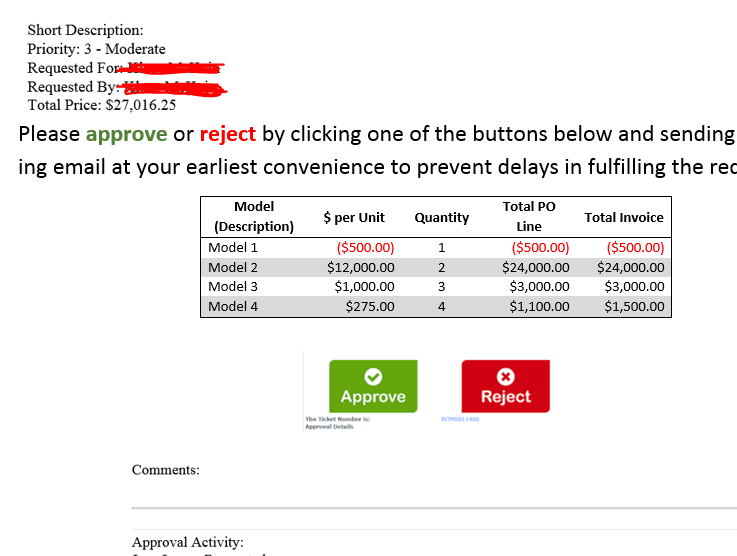


Do you have any idea?
Regards,
Manoj


