- Mark as New
- Bookmark
- Subscribe
- Mute
- Subscribe to RSS Feed
- Permalink
- Report Inappropriate Content
02-01-2026 09:29 PM
I am creating ne Doc template.
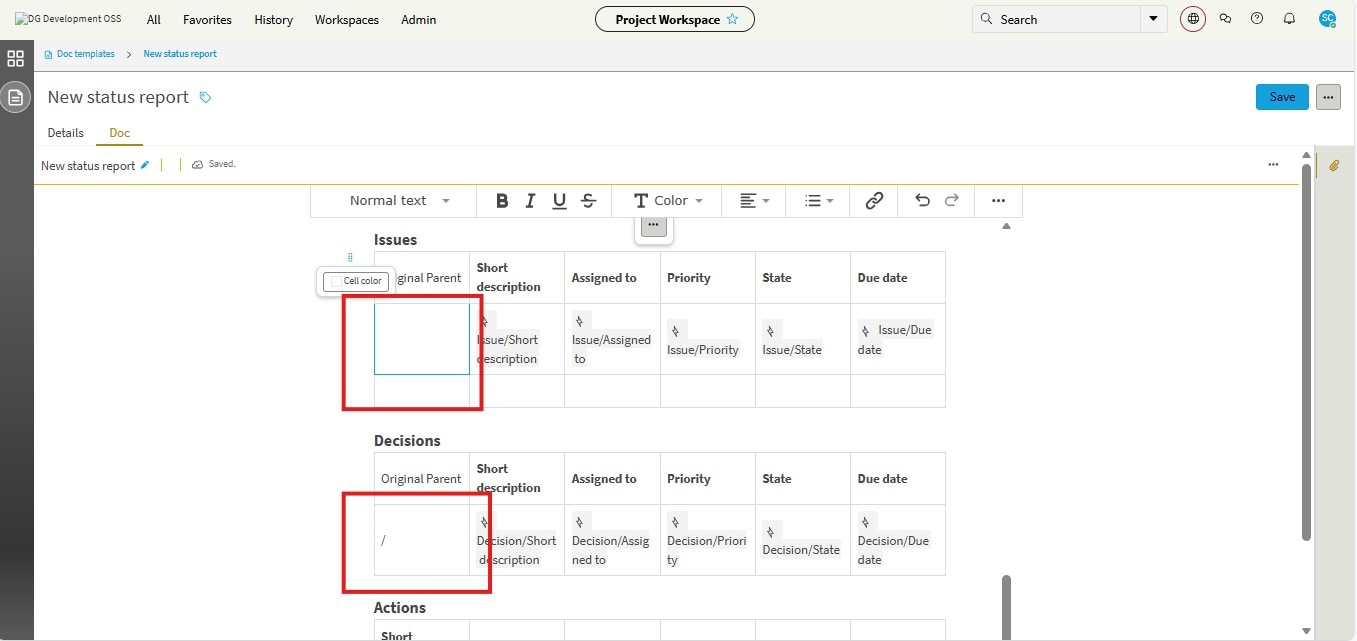
On Status report I want to add a column name "Original Parent" for Issue and Decision report
But field Original Parent is not populating there.
Please suggest how to add it.
Solved! Go to Solution.

- Mark as New
- Bookmark
- Subscribe
- Mute
- Subscribe to RSS Feed
- Permalink
- Report Inappropriate Content
02-06-2026 07:29 AM
Hi My Friend,
Whats happening there I believe maybe simple: the “Original Parent” column header is added, but there’s no field mapped in the cell underneath it. The other columns work because they contain data tokens like Issue/Assigned to, Issue/Priority, etc..... That blank column dont have one, so nothing shows.
My recommendation to fix it:
Click inside the empty cell under Original Parent.
Use the field picker, same way you added Assigned to, Priority, State.
For Issues, insert the Parent/Original Parent field from the Issue data source.
Do the same in the Decisions section using the Decision data source.
Save and regenerate the report.
If you dont see “Original Parent” in the field picker then that field isnt exposed in the status report data model. In that case you’ll need to use the Parent field instead and dot-walk to number/name or have the template extended to include the original_parent field.
That’s why it looks like it should work visually, but the column stays empty.
@SNOWSBC24 - If answered for you, Please mark Accepted Solution and Thumbs Up.
- Mark as New
- Bookmark
- Subscribe
- Mute
- Subscribe to RSS Feed
- Permalink
- Report Inappropriate Content
02-06-2026 07:29 AM
Hi My Friend,
Whats happening there I believe maybe simple: the “Original Parent” column header is added, but there’s no field mapped in the cell underneath it. The other columns work because they contain data tokens like Issue/Assigned to, Issue/Priority, etc..... That blank column dont have one, so nothing shows.
My recommendation to fix it:
Click inside the empty cell under Original Parent.
Use the field picker, same way you added Assigned to, Priority, State.
For Issues, insert the Parent/Original Parent field from the Issue data source.
Do the same in the Decisions section using the Decision data source.
Save and regenerate the report.
If you dont see “Original Parent” in the field picker then that field isnt exposed in the status report data model. In that case you’ll need to use the Parent field instead and dot-walk to number/name or have the template extended to include the original_parent field.
That’s why it looks like it should work visually, but the column stays empty.
@SNOWSBC24 - If answered for you, Please mark Accepted Solution and Thumbs Up.