- Mark as New
- Bookmark
- Subscribe
- Mute
- Subscribe to RSS Feed
- Permalink
- Report Inappropriate Content
09-28-2015 07:57 PM
Hi All,
We have "Requested_for" field in "Request(sc_request) table. In requested item table instead of creating a new field we have used this field by using the dot walking functionality(request.requested_for), same for the catalog tasks.
Now we have requirement like defining field style for the VIP users in "catalog Tasks" list. We have defined the style for "requested_for" for request table and it works great. But, for requested item and catalog tasks the field styles are not working because the field(requested_for) is not available in these table.
Is there any way to define styles(highlighting) for VIP users in the list of request item and catalog task records?
Thanks in advance
Thanks & Regards,
Swamy
Solved! Go to Solution.
- Mark as New
- Bookmark
- Subscribe
- Mute
- Subscribe to RSS Feed
- Permalink
- Report Inappropriate Content
09-29-2015 12:24 AM
Oh, I see, my apologies for misunderstanding.
You can make styling work with dot-walked fields by customizing the style in the following way:

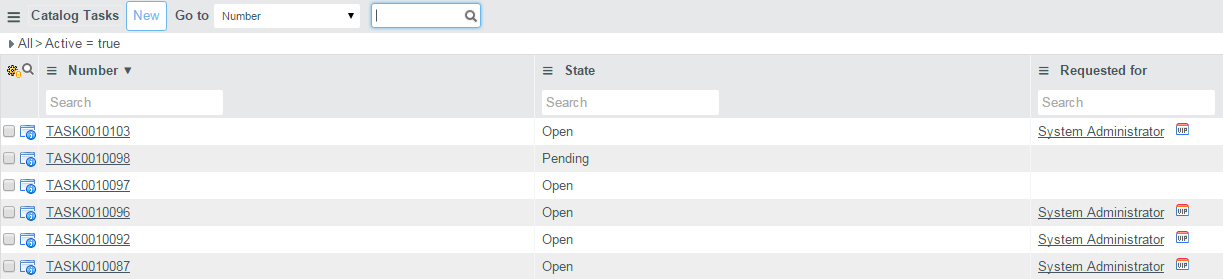
I've added sc_task.request.requested_for to the list and the styling works:


- Mark as New
- Bookmark
- Subscribe
- Mute
- Subscribe to RSS Feed
- Permalink
- Report Inappropriate Content
09-28-2015 10:20 PM
I'm not an expert with Jelly/ UI Macros.
You may need to create fields on the table and copies the values, then style those fields.
ServiceNow Nerd
ServiceNow Developer MVP 2020-2022
ServiceNow Community MVP 2019-2022
- Mark as New
- Bookmark
- Subscribe
- Mute
- Subscribe to RSS Feed
- Permalink
- Report Inappropriate Content
09-28-2015 11:01 PM

- Mark as New
- Bookmark
- Subscribe
- Mute
- Subscribe to RSS Feed
- Permalink
- Report Inappropriate Content
09-28-2015 11:03 PM
The problem is that styling does not work with dot walked fields.
Also he is using Eureka.
ServiceNow Nerd
ServiceNow Developer MVP 2020-2022
ServiceNow Community MVP 2019-2022
- Mark as New
- Bookmark
- Subscribe
- Mute
- Subscribe to RSS Feed
- Permalink
- Report Inappropriate Content
09-29-2015 12:24 AM
- Mark as New
- Bookmark
- Subscribe
- Mute
- Subscribe to RSS Feed
- Permalink
- Report Inappropriate Content
09-29-2015 12:27 AM
OP is using "request.requested_for"
I think the best solution here is just to copy the value from 'request.requested_for' into 'Requested for' on the Catalog task level and style it as per solution provided.
Disregard
ServiceNow Nerd
ServiceNow Developer MVP 2020-2022
ServiceNow Community MVP 2019-2022