Flow Designer: How to Wait Until a RITM Variable Equals “Yes” Before Updating State?

- Mark as New
- Bookmark
- Subscribe
- Mute
- Subscribe to RSS Feed
- Permalink
- Report Inappropriate Content
11-21-2025 01:07 AM
Hi Community,
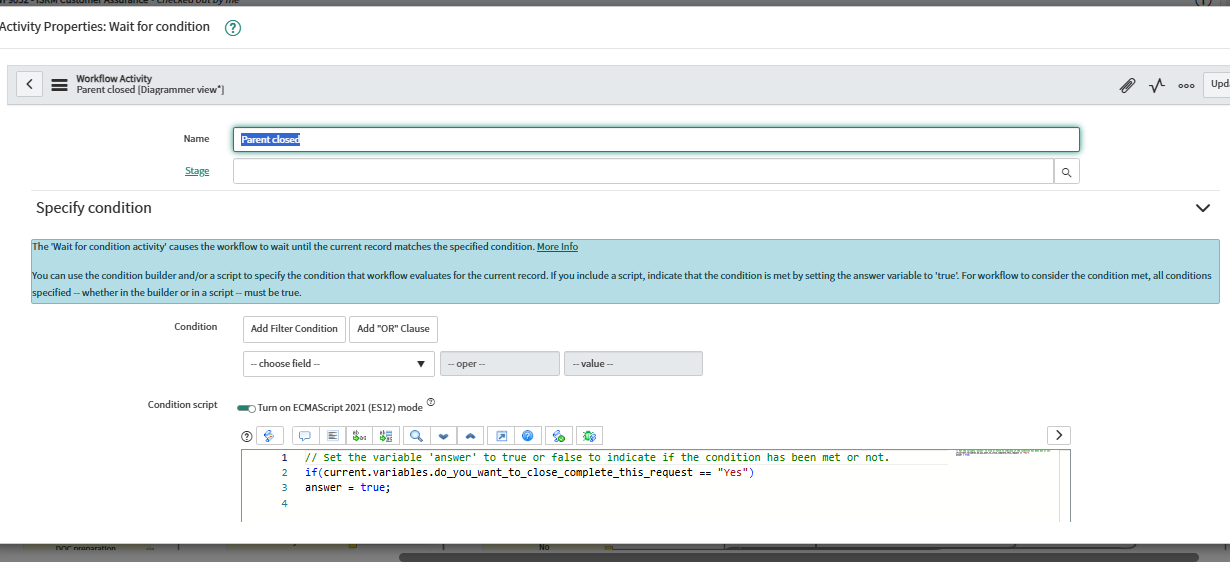
I have a scenario that is currently working in Workflow Designer, and I want to achieve the same in Flow Designer:
- I have a catalog variable (Eg: do_you_want_to_close_complete_this_request ) on the Requested Item (RITM).
- After the RITM is submitted, the flow should:
- Wait until this variable is set to “Yes” (it may be updated later by a fulfiller).
- Once the variable equals “Yes”, update the RITM state to “Complete”.
- Also update the Request (REQ) state accordingly.
Note: This variable is hidden in the Service Portal visible only in the RITM level.

- Mark as New
- Bookmark
- Subscribe
- Mute
- Subscribe to RSS Feed
- Permalink
- Report Inappropriate Content
11-21-2025 06:55 AM
You have discovered a major drawback to Workflow Studio / Flow Designed vs Workflow Editor. Short answer is this is not supported and doesn't work reliably. There are two often-referenced workarounds that are sketchy at best when put into actual use. The best workaround unfortunately is to have a Business Rule that updates a field on the RITM record when a variable is updated per your conditions, then have the Flow wait for this field to contain the target value, or be not empty or whatever. I have created new RITM fields for clarity, but you can re-purpose unused ones.