Format of Time Picker on Service Portal

- Mark as New
- Bookmark
- Subscribe
- Mute
- Subscribe to RSS Feed
- Permalink
- Report Inappropriate Content
03-08-2018 06:35 AM
Hi All,
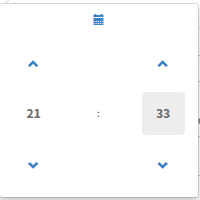
Is there a way to change the format of the time portion of the datetime picker on the Service Portal? Our system default time format is hh:mm:ss:a and all fields in our time and date time fields show properly, but when using the date/time picker users are forced to pick from 24 hour time format. It's confusing for some.... Any ideas how I can get this to show in AM/PM 12 hour format?
Users currently see:

But translates to :

Just looking for consistency.
Thanks,
Jim
- Labels:
-
Service Portal Development
- Mark as New
- Bookmark
- Subscribe
- Mute
- Subscribe to RSS Feed
- Permalink
- Report Inappropriate Content
03-14-2018 05:19 AM
I have the exact same question. Any solution to this?
- Mark as New
- Bookmark
- Subscribe
- Mute
- Subscribe to RSS Feed
- Permalink
- Report Inappropriate Content
03-14-2018 07:24 AM
No solution as of yet, but due to no response here I did open a HI ticket. If/When I get a solution, I'll be sure to post it here.

- Mark as New
- Bookmark
- Subscribe
- Mute
- Subscribe to RSS Feed
- Permalink
- Report Inappropriate Content
03-15-2018 12:42 AM
Hi Jim,
To fix this while you wait for official fix from SNOW you can create a custom AngularJS directive, and include it as a UI script dependency on any page/widget you need:
angular.module('sn.$sp').directive('spDatePickerCustom', function(spConf, $rootScope, $document, spAriaUtil, i18n, spDatePickerUtil) {
  var dateFormat = g_user_date_format || spConf.SYS_DATE_FORMAT;
  var dateTimeFormat = g_user_date_time_format || spConf.SYS_TIME_FORMAT;
  if ($rootScope.user && $rootScope.user.date_format)
    dateFormat = $rootScope.user.date_format;
  if ($rootScope.user && $rootScope.user.date_time_format)
    dateTimeFormat = $rootScope.user.date_time_format;
  return {
    template: '<div ng-class="{\'input-group\': !snDisabled, \'has-error\': field.isInvalid}" style="width: 100%;">' +
      '<input id="sp_formfield_{{::field.name}}" type="text" name="{{field.name}}" class="form-control" placeholder="{{field.placeholder}}" title="{{g_accessibility ? translations[\'Enter date in format\']: \'\'}}{{g_accessibility ? format : \'\'}}" tooltip-top="true" tooltip-enable="{{g_accessibility}}" ng-model="formattedDate" ng-model-options="{updateOn: \'blur\', getterSetter: true}" ng-readonly="snDisabled" />' +
      '<span class="input-group-btn" ng-hide="snDisabled">' +
      '<input type="hidden" class="datepickerinput" ng-model="formattedDate" ng-readonly="true" />' +
      '<button class="btn btn-default" type="button" tabindex="-1" aria-hidden="true">' +
      '<glyph sn-char="calendar" />' +
      '</button>' +
      '</span>' +
      '<span ng-if="field.isInvalid" class="sp-date-format-info" style="display:table-row;" aria-hidden="true">{{translations[\'Enter date in format\']}} {{format}}</span>' +
      '</div>',
    restrict: 'E',
    replace: true,
    require: '?ngModel',
    scope: {
      field: '=',
      snDisabled: '=',
      snIncludeTime: '=',
      snChange: '&'
    },
    link: function(scope, element, attrs, ngModel) {
      scope.g_accessibility = spAriaUtil.isAccessibilityEnabled();
      var includeTime = scope.snIncludeTime;
      var format;
      format = includeTime ? dateTimeFormat.trim() : dateFormat.trim();
      format = format.replace(/y/g, 'Y').replace(/d/g, 'D').replace(/a/g, 'A');
      scope.format = format;
      var dp = element.find('.input-group-btn').datetimepicker({
        keepInvalid: true,
        pickTime: includeTime,
        format: format,
        locale: g_lang,
        language: g_lang
      }).on('dp.change', onDpChange);

      function validate(formattedDate) {
        scope.field.isInvalid = false;
        return spDatePickerUtil.validate(dp, format, formattedDate, function(error) {
          if (error) {
            spAriaUtil.sendLiveMessage(scope.translations["Entered date not valid. Enter date in format"] + " " + format);
            scope.field.isInvalid = true;
          }
        });
      }

      function closeOnTouch(evt) {
        if (!jQuery.contains(dp.data('DateTimePicker').widget[0], evt.target)) {
          dp.data('DateTimePicker').hide();
        }
      }

      function bindTouchClose() {
        $document.on('touchstart', closeOnTouch);
      }

      function unBindTouchClose() {
        $document.off('touchstart', closeOnTouch);
      }
      dp.on('dp.show', bindTouchClose).on('dp.hide', unBindTouchClose);

      function onDpChange(e) {
        scope.formattedDate(e.date.format(format));
        if (!scope.$root.$$phase)
          scope.$apply();
      }
      if (ngModel) {
        ngModel.$parsers.push(validate);
        ngModel.$render = function() {
          validate(ngModel.$viewValue);
        };
        scope.formattedDate = function(formattedValue) {
          if (angular.isDefined(formattedValue)) {
            ngModel.$setViewValue(formattedValue);
            if (scope.snChange) scope.snChange({
              newValue: formattedValue
            });
          }
          return ngModel.$viewValue;
        };
      } else {
        scope.formattedDate = function(formattedValue) {
          if (angular.isDefined(formattedValue)) {
            scope.field.value = validate(formattedValue);
            if (scope.snChange) scope.snChange({
              newValue: formattedValue
            });
          }
          return scope.field.value;
        };
        scope.$watch('field.value', function(newValue, oldValue) {
          if (newValue != oldValue)
            validate(newValue);
        });
      }
      scope.$on('$destroy', function() {
        dp.off('dp.change', onDpChange);
        unBindTouchClose();
      });
      scope.translations = [];
      i18n.getMessages(["Enter date in format", "Use format", "Entered date not valid. Enter date in format"], function(msgs) {
        scope.translations = msgs;
      });
    }
  }
});
Most of this code I took from https://YOURINSTANCE.service-now.com/scripts/js_includes_sp.jsx (thanks to this thread), and now this custom date picker respects the date and time format selected in current user's profile.
- Mark as New
- Bookmark
- Subscribe
- Mute
- Subscribe to RSS Feed
- Permalink
- Report Inappropriate Content
08-22-2018 08:24 AM
Did they resolve your HI? Also looking for a solution.