- Mark as New
- Bookmark
- Subscribe
- Mute
- Subscribe to RSS Feed
- Permalink
- Report Inappropriate Content
12-18-2015 09:40 AM
There's a "Switch to UI15" button in the System Settings window that allows users with the "admin" role to "downgrade" to UI15:

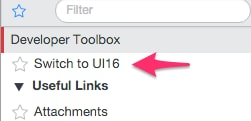
...and there's a "Switch to UI16" button on the Settings drop down in my dev instance running patch0-hotfix1:

... but it has disappeared in a client's patch1 version:

I know it is controlled by the "use.concourse" User Preference, but what happened to the switch button?
Solved! Go to Solution.
- Mark as New
- Bookmark
- Subscribe
- Mute
- Subscribe to RSS Feed
- Permalink
- Report Inappropriate Content
01-04-2016 02:28 PM
Turns out it was due to the "glide.product.help_show" system property being set to false. Setting it to "true", logging out then back in solved the issue, BUT, if you have it set to false, it's because you probably want to hide the help icon in the first place:

You might have a reason for that and will not want to set the property back to "true". In that case, you can create a Module as a workaround:

Create the Module with the following details:
Roles: admin
Link type: HTML (from Arguments:)
Arguments: <a id="u_switch_to_ui16" class="menu nav_menu_header" onclick="top.location.href = '/navpage.do?sysparm_userpref_use.concourse=true'"> Switch to UI16</a>
Add it to whatever Application you want (Self-Service or whatever). It will only show up for your admins. It will be there even in UI16, but it's just not worth writing a client script hack to fix a very small issue.
Why they used the "glide.product.help_show" system property for 2 different purposes is a whole other issue.

- Mark as New
- Bookmark
- Subscribe
- Mute
- Subscribe to RSS Feed
- Permalink
- Report Inappropriate Content
12-28-2015 02:09 AM
We got all of the 3 active in on our instance but still doesn't work.
We get the button to switch to UI15 when in UI16. But when we are in UI15 the button is missing to switch back to UI16. Hopefully HI can help sort this out.
- Mark as New
- Bookmark
- Subscribe
- Mute
- Subscribe to RSS Feed
- Permalink
- Report Inappropriate Content
12-28-2015 12:09 PM
Same here. Added the property to make sure that was not an issue, and the plugins are active, but the "Switch to UI16" button does not appear on the client's Geneva Patch 1 instance. It does in my Patch 0, Hotfix 1 personal dev instance however.
The "Switch to UI15" one appears fine in both versions. The issue is switching back to UI16.
- Mark as New
- Bookmark
- Subscribe
- Mute
- Subscribe to RSS Feed
- Permalink
- Report Inappropriate Content
12-29-2015 12:17 AM
Same for us, our instance is on Geneva Patch 1

- Mark as New
- Bookmark
- Subscribe
- Mute
- Subscribe to RSS Feed
- Permalink
- Report Inappropriate Content
01-22-2016 11:44 AM
glide.ui.ui15_switch_roles did the trick for me. Value = 'admin,itil'. Now my itil users are able to switch UIs.
thank you!
- Mark as New
- Bookmark
- Subscribe
- Mute
- Subscribe to RSS Feed
- Permalink
- Report Inappropriate Content
12-28-2015 12:04 PM
Who all do you want to be able to do this?
Create a New sys_propertie
Name: glide.ui.ui15_switch_roles
Description: After you enable UI16, users with the admin role see a button in the System Settings window that allows them to switch between UI16 and UI15. You can add a system property to configure other roles that are allowed to switch UI versions.
Type: String
Value: itil (this will give admin by default, and Itil users the ability to switch back to UI15.
This works perfectly on my system.
On a side note...... SN, fix the dang HTML boxes. they are still messed up.