Hide embedded list with UI Policy

- Mark as New
- Bookmark
- Subscribe
- Mute
- Subscribe to RSS Feed
- Permalink
- Report Inappropriate Content
12-04-2020 09:22 AM
Hello,
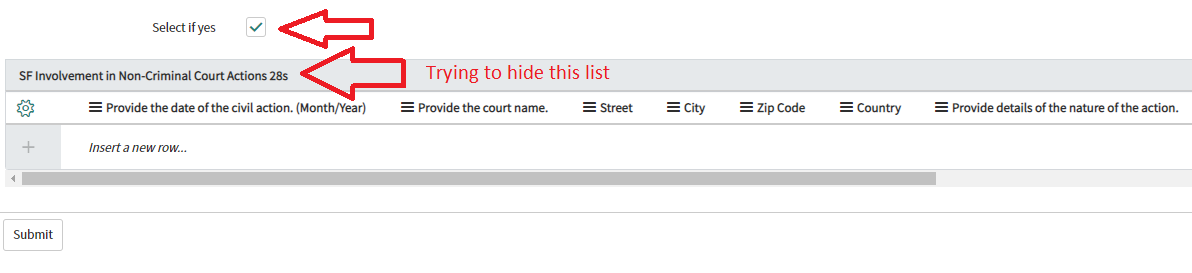
I have a checkbox field, when it is selected I would like the embedded list underneath to be hidden. How can I do this?
Here is what I have so far in my UI Policy:
Condition: when checkbox is true
Script:
g_form.hideRelatedList('SF Involvement in Non - Criminal Court Actions 28');
Here is a picture of the form:


- Mark as New
- Bookmark
- Subscribe
- Mute
- Subscribe to RSS Feed
- Permalink
- Report Inappropriate Content
12-04-2020 09:55 AM
Did you check the blog which i had shared, DOM manipulation required here.
tested script , make sure Isolate script field has set false
function onChange(control, oldValue, newValue, isLoading, isTemplate) {
	if (isLoading || newValue === '') {
		return;
	}
	if(newValue){ // check the condition here
		var list = $$('div[tab_caption="Approvers"]')[0];
		if(list.hasClassName('embedded')){
			list.hide();
		}

	}
	else{
		var list = $$('div[tab_caption="Approvers"]')[0];
		if(list.hasClassName('embedded')){
			list.show();
		}
}- Mark as New
- Bookmark
- Subscribe
- Mute
- Subscribe to RSS Feed
- Permalink
- Report Inappropriate Content
12-04-2020 02:30 PM
This did not work, I used this script in my UI policy and it didn't hide the embedded list
I want to make sure we are on the same page, I am not hiding a tab or section, I am trying to hide an embedded list
I got this error:

Here is the code I used:
var list = $$('div[tab_caption="SF Involvement in Non-Criminal Court Actions 28"]')[0];
    if (list.hasClassName('embedded')) {
        list.hide();
}- Mark as New
- Bookmark
- Subscribe
- Mute
- Subscribe to RSS Feed
- Permalink
- Report Inappropriate Content
12-04-2020 08:00 PM


- Mark as New
- Bookmark
- Subscribe
- Mute
- Subscribe to RSS Feed
- Permalink
- Report Inappropriate Content
12-05-2020 08:34 AM


- Mark as New
- Bookmark
- Subscribe
- Mute
- Subscribe to RSS Feed
- Permalink
- Report Inappropriate Content
12-06-2020 08:55 PM
Can you check the browser console log ? are you getting any error?
also is it possible just for testing can you try to add OOTB embedded list eg: the one which i have added, and test it .
I am just guessing here if its not working due to the embedded list name, give a try to hide OOTB for testing purpose.
Lets add some alert in your UI Policy, let me know exactly its returning you.
below line will return true
function onCondition() {

	var list = $$('div[tab_caption="Approvers"]')[0];
	alert(list.hasClassName('embedded')); // is this giving true?
	if(list.hasClassName('embedded')){
		list.hide();
	}
}
Note: New client-scripts are run in strict mode, with direct DOM access disabled. Access to jQuery, prototype and the window object are likewise disabled. To disable this on a per-script basis, configure this form and add the "Isolate script" field. To disable this feature for all new globally-scoped client-side scripts set the system property "glide.script.block.client.globals" to false.