- Mark as New
- Bookmark
- Subscribe
- Mute
- Subscribe to RSS Feed
- Permalink
- Report Inappropriate Content
10-12-2016 10:11 AM
I have created a specific View Rule, as seen below:

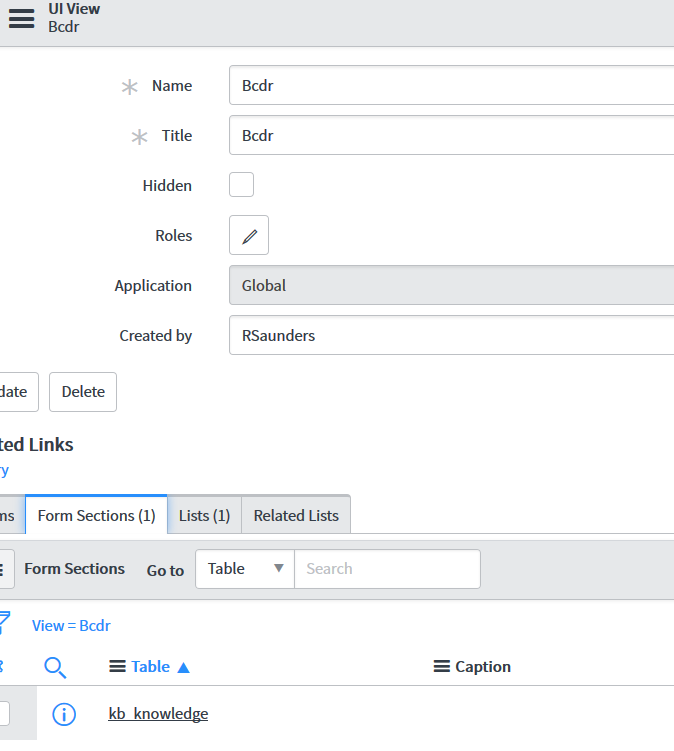
Then this is the System UI > View that I created:

What appears to be working for this View Rule is the specific Form View (Bcdr) when editing an existing record.
What is NOT working is when I click New in this specific KnowledgeBase AND the form list view does not change, even though I have a specific BCDR list layout created.
What am I doing wrong?
Solved! Go to Solution.
- Mark as New
- Bookmark
- Subscribe
- Mute
- Subscribe to RSS Feed
- Permalink
- Report Inappropriate Content
10-14-2016 08:36 AM
Thank you Samiul!
You got me thinking the ways in which the View Rule is fired and figured it out! I thought to look at the System Definition > Modules and searched for the specific Knowledge Base module item, based on the screenshot below. I clicked on the Link Type and sure enough there was a field for View name. I put in the specific System UI > Views view name and it solved my problem without the need for the View Rule.

- Mark as New
- Bookmark
- Subscribe
- Mute
- Subscribe to RSS Feed
- Permalink
- Report Inappropriate Content
10-12-2016 06:37 PM
When you are creating new record, is that field "knowledge base" available on the form and has it's value set to "Business Cont..." ?
- Mark as New
- Bookmark
- Subscribe
- Mute
- Subscribe to RSS Feed
- Permalink
- Report Inappropriate Content
10-14-2016 08:36 AM
Thank you Samiul!
You got me thinking the ways in which the View Rule is fired and figured it out! I thought to look at the System Definition > Modules and searched for the specific Knowledge Base module item, based on the screenshot below. I clicked on the Link Type and sure enough there was a field for View name. I put in the specific System UI > Views view name and it solved my problem without the need for the View Rule.