- Mark as New
- Bookmark
- Subscribe
- Mute
- Subscribe to RSS Feed
- Permalink
- Report Inappropriate Content
05-16-2016 06:26 AM
I am putting a Reference field on a form to another record. I don't want people to edit the field but I want them to be able to click the 'Info' so they can view / go to the record.
Read Only:

Non-Read Only:

I've tried making the field Read Only via a Client Script and a UI Policy, both get rid of the Info button. Any ideas?
Solved! Go to Solution.

- Mark as New
- Bookmark
- Subscribe
- Mute
- Subscribe to RSS Feed
- Permalink
- Report Inappropriate Content
05-16-2016 07:18 AM
Hi Wayne,
Create a UI Policy on the reference field that you wanted to make as 'read-only'. Then, set the System Property "glide.ui.reference.readonly.clickthrough" to true.
This will allow you to access the Info button in read-only mode.

If you got the answer, please dont forget to mark this as 'Correct Answer', thank you.
- Mark as New
- Bookmark
- Subscribe
- Mute
- Subscribe to RSS Feed
- Permalink
- Report Inappropriate Content
08-25-2020 10:45 AM
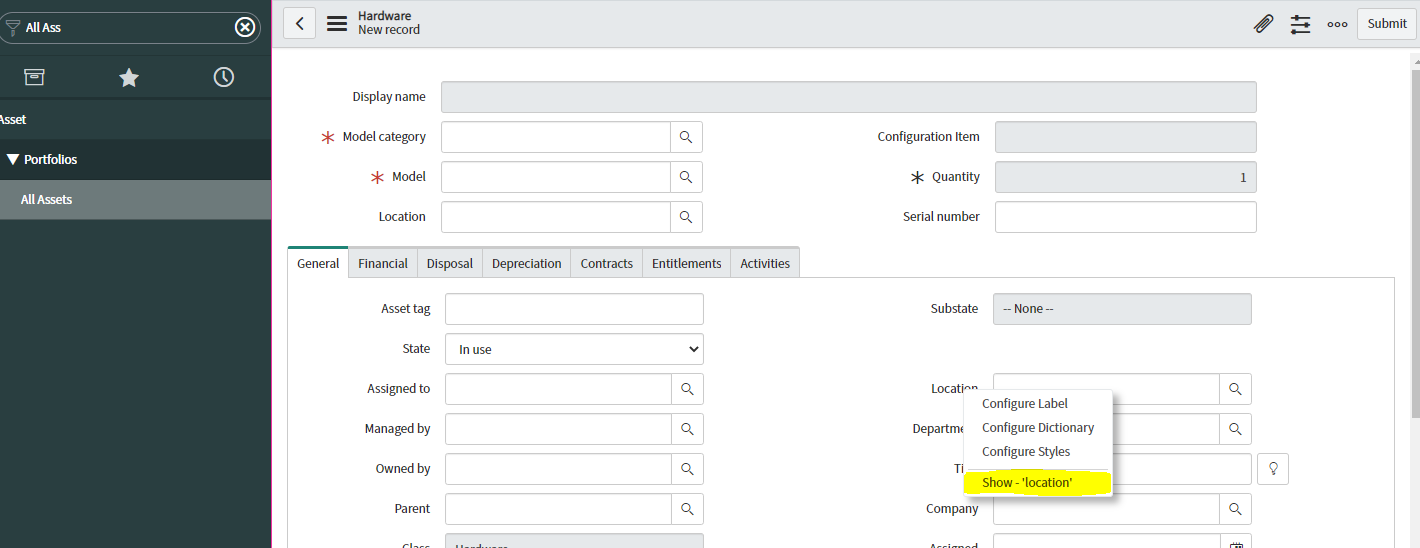
What ever fields right clicked then take Full Qualified Label Name please see the attachment
EX : All ASSETS => NEW => GENERAL TAB => LOCATION(Right clicked) => SHOW LOCATION (Clicked) => "assigned_to.location" (see the first line), This is the full qualified label name.
If you want to make location read only : UI POLICY (type search) => TABLE NAME('Hardware') => SCRIPT => RUN SCRIPT => EXECUTE IF TRUE (Java Script Function) =>
if(!g_user.hasRoleExactly('u_testrole')){
g_form.setReadOnly('assigned_to.location',true);
}
- Mark as New
- Bookmark
- Subscribe
- Mute
- Subscribe to RSS Feed
- Permalink
- Report Inappropriate Content
03-13-2025 04:25 PM
This party is probably over long long ago, but I found this could be done at field level, if needed by updating the Reference field attribute - readonly_clickthrough=true