How to access the catalog item fields in client scripts.

- Mark as New
- Bookmark
- Subscribe
- Mute
- Subscribe to RSS Feed
- Permalink
- Report Inappropriate Content
02-27-2017 06:08 AM
Hi Team,
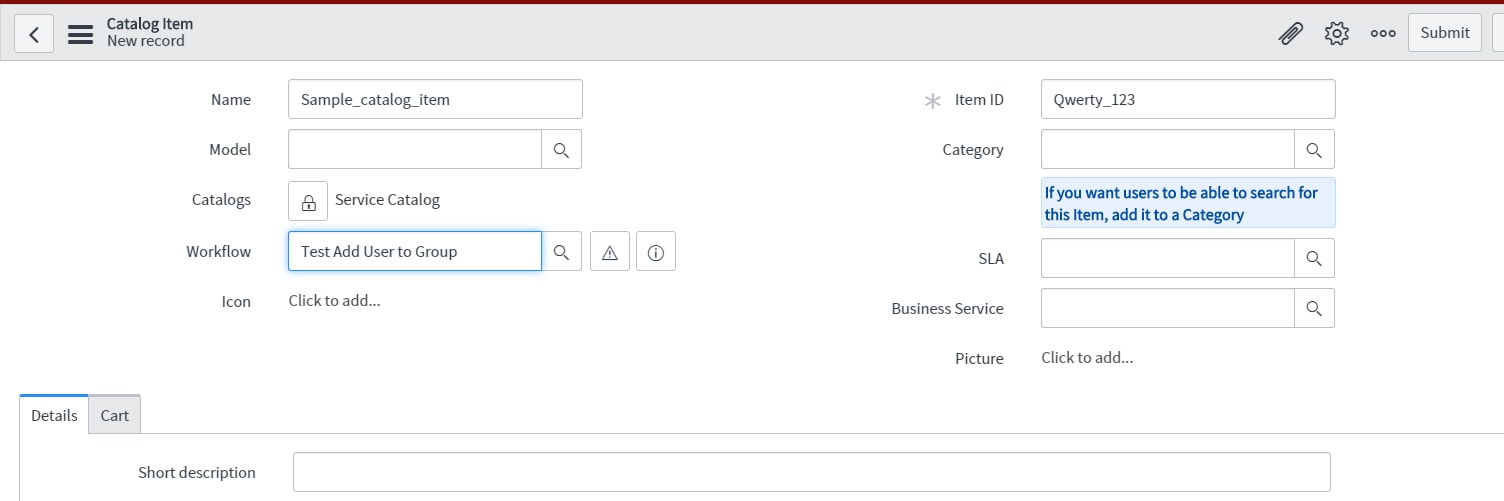
I am just trying to access the catalog item field in the On submit catalog client script. Is that feasible? Please find the below screenshot :
Here I am trying to Change the workflow, based on some selection in the catalog form, I wrote an On submit catalog client script.
My logic is actually not working here.
I wanted to know is my approach to achieve this is correct.

Thanks in Advance.
smitha.
- Labels:
-
Best Practices
-
Scripting and Coding

- Mark as New
- Bookmark
- Subscribe
- Mute
- Subscribe to RSS Feed
- Permalink
- Report Inappropriate Content
02-27-2017 06:12 AM
Hi Sangeetha,
To access these fields from a client script, you need to do a GlideAjax call. Because you mentioned an onSubmit client script, this is one of the few cases where you need to do a Sychronous Ajax call. The server can provide you information to those fields either by dot-walking or a GlideRecord lookup based on the cat_item field.
Docs: Client Scripts
Docs: GlideForm
Docs: GlideAjax
Client Script Best Practices - ServiceNow Wiki
- Mark as New
- Bookmark
- Subscribe
- Mute
- Subscribe to RSS Feed
- Permalink
- Report Inappropriate Content
02-27-2017 06:31 AM
Hi Tomasi,
Thanks for the reply.
Instead of writing GlideAjax, can't we just use g_form.getValue () to access the catalog item variables?
- Mark as New
- Bookmark
- Subscribe
- Mute
- Subscribe to RSS Feed
- Permalink
- Report Inappropriate Content
02-27-2017 06:37 AM
Yes, you can access the variables. I thought you said you wanted to access the fields on the catalog item (like the workflow field for example.) Sorry if I misunderstood.


- Mark as New
- Bookmark
- Subscribe
- Mute
- Subscribe to RSS Feed
- Permalink
- Report Inappropriate Content
02-27-2017 06:12 AM
Hi Sangeetha,
Any variables you create under the catalog item you can access it in onLoad, onChange and onSubmit catalog client script using g_form.getValue("variableName");
Mark Correct if this solves your issue and also hit Like and Helpful if you find my response worthy based on the impact.
Thanks
Ankur
Ankur
✨ Certified Technical Architect || ✨ 10x ServiceNow MVP || ✨ ServiceNow Community Leader