- Mark as New
- Bookmark
- Subscribe
- Mute
- Subscribe to RSS Feed
- Permalink
- Report Inappropriate Content
04-05-2026 11:00 PM
I am working on ServiceNow Workspace in Zurich.
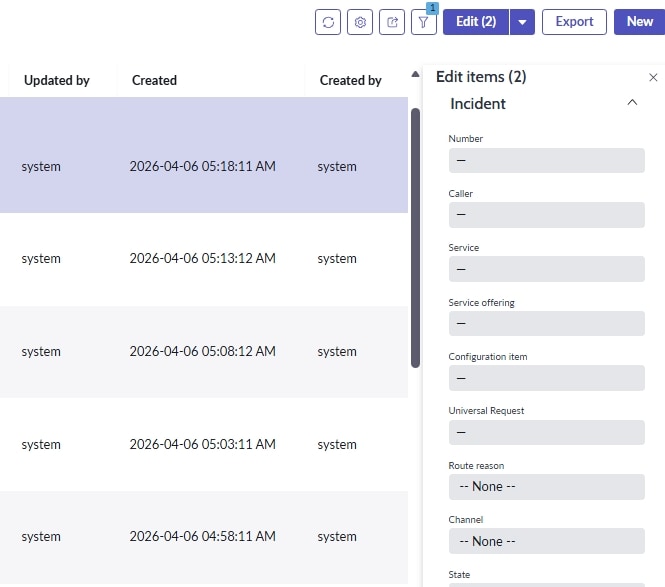
In Workspace list view, when selecting multiple records and clicking "Edit" button, Incident form is visible.
I would like to add a "custom field" to that form for bulk edit.
is there any supported way to add a custom field to the Workspace Bulk Edit dialog?
Thanks in advance!
Solved! Go to Solution.
- Mark as New
- Bookmark
- Subscribe
- Mute
- Subscribe to RSS Feed
- Permalink
- Report Inappropriate Content
04-06-2026 05:05 AM
Hi @Rekhasree Naras ,
If you are working on Service Operations Workspace, there is a view called Service Operations Workspace on incident add that custom field to that view and it will appear on the Bulk Edit View.


If my response helped, mark it as helpful and accept the solution.
- Mark as New
- Bookmark
- Subscribe
- Mute
- Subscribe to RSS Feed
- Permalink
- Report Inappropriate Content
04-06-2026 05:05 AM
Hi @Rekhasree Naras ,
If you are working on Service Operations Workspace, there is a view called Service Operations Workspace on incident add that custom field to that view and it will appear on the Bulk Edit View.
If my response helped, mark it as helpful and accept the solution.


- Mark as New
- Bookmark
- Subscribe
- Mute
- Subscribe to RSS Feed
- Permalink
- Report Inappropriate Content
04-06-2026 05:20 AM
When you click Edit it opens the Service Operations Workspace view for that table and renders fields on that form view
Simply add your custom field to that view and it will start showing up
How to add a fields to bulk record update on list in Service Operation Workspace(or any other).
💡 If my response helped, please mark it as correct ✅ and close the thread 🔒— this helps future readers find the solution faster! 🙏
Ankur
✨ Certified Technical Architect || ✨ 10x ServiceNow MVP || ✨ ServiceNow Community Leader
- Mark as New
- Bookmark
- Subscribe
- Mute
- Subscribe to RSS Feed
- Permalink
- Report Inappropriate Content
04-06-2026 06:45 AM
Hi Dinesh & Ankur,
The solution worked for me.
Is there any supported way to open the Bulk Edit (Edit items) form in a custom view instead of the default Workspace view?
The developed workspace is custom workspace.