- Mark as New
- Bookmark
- Subscribe
- Mute
- Subscribe to RSS Feed
- Permalink
- Report Inappropriate Content
01-30-2019 02:53 AM
Hi All
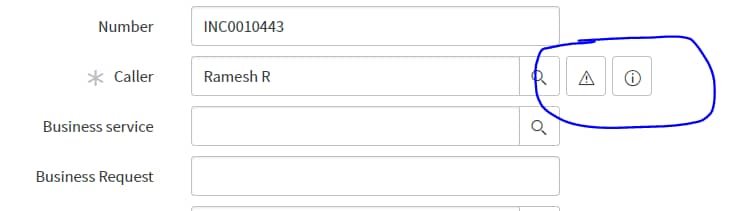
I want to add the below icon in the reference field, Please help me how to do this
like this


Solved! Go to Solution.
- Labels:
-
Scripting and Coding

- Mark as New
- Bookmark
- Subscribe
- Mute
- Subscribe to RSS Feed
- Permalink
- Report Inappropriate Content
01-30-2019 03:34 AM
Hi
You need to add Attribute in this case. Create a Ui Macro. And in the dictionary of a field (Where you want the icon) add attribute something like this :-
ref_contributions=add_edit_user;
//add_edit_user is the Ui Macro.
Go through the below example for the same :-
https://www.servicenowguru.com/system-ui/ui-macros/add-me-ui-macro-user-group-fields/
Regards.
- Mark as New
- Bookmark
- Subscribe
- Mute
- Subscribe to RSS Feed
- Permalink
- Report Inappropriate Content
01-30-2019 03:06 AM
You need to set that in your custom UI Macro for the tag <g:reference_decoration
- Mark as New
- Bookmark
- Subscribe
- Mute
- Subscribe to RSS Feed
- Permalink
- Report Inappropriate Content
01-30-2019 03:22 AM
hi
u can create ui macro ana add attribute in a table on particular field
- Mark as New
- Bookmark
- Subscribe
- Mute
- Subscribe to RSS Feed
- Permalink
- Report Inappropriate Content
01-30-2019 03:34 AM
Hi
You need to add Attribute in this case. Create a Ui Macro. And in the dictionary of a field (Where you want the icon) add attribute something like this :-
ref_contributions=add_edit_user;
//add_edit_user is the Ui Macro.
Go through the below example for the same :-
https://www.servicenowguru.com/system-ui/ui-macros/add-me-ui-macro-user-group-fields/
Regards.
- Mark as New
- Bookmark
- Subscribe
- Mute
- Subscribe to RSS Feed
- Permalink
- Report Inappropriate Content
02-17-2025 05:33 AM
working for native ui and how in csm workspace?