How to change the collection box on edit members

- Mark as New
- Bookmark
- Subscribe
- Mute
- Subscribe to RSS Feed
- Permalink
- Report Inappropriate Content
01-06-2020 11:19 PM
Hi all,
I'm looking for a way to change collection box on edit members of related list.
I added two related lists in my table 'Group Members' and 'Test Team Members'.
If I click the 'Edit...' button on Group Members, It shows users list in collection box on Edit members page and I can add columns to the related list.
I think it shows 'sys_user'.

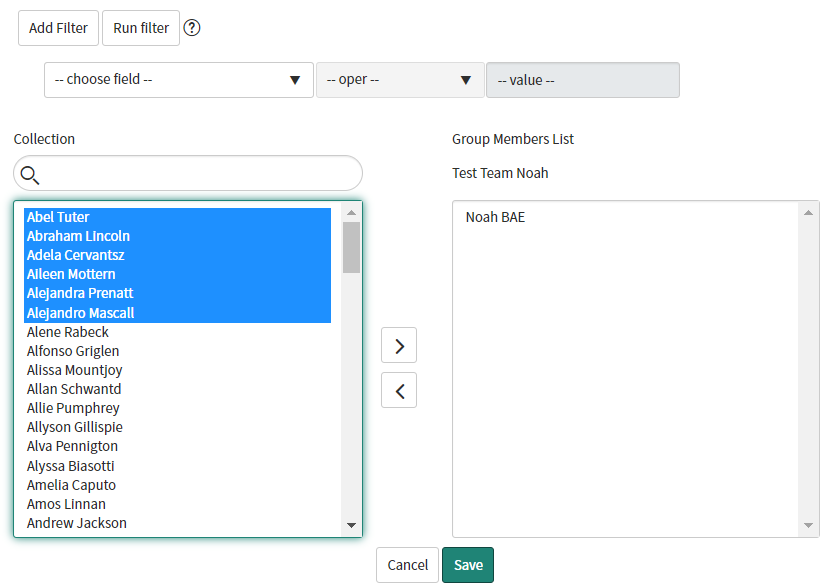
But 'Test Team Members' doesn't show users list. It just shows own records.
Do you know how to change the collection box like 'Group Members'?
↓ Edit Members page of Group Members.

↓ Edit Members page of Test Team Members.




- Mark as New
- Bookmark
- Subscribe
- Mute
- Subscribe to RSS Feed
- Permalink
- Report Inappropriate Content
01-31-2020 07:04 AM
Hi there,
Did this solve your question? Or do we need to follow-up on this?
Please mark this answer as correct if it solves your question. This will help others who are looking for a similar solution. Also marking this answer as correct takes the post of the unsolved list.
Thanks.
Kind regards,
Mark
2020 ServiceNow Community MVP
2020 ServiceNow Developer MVP
---
LinkedIn
Community article list
Kind regards,
Mark Roethof
Independent ServiceNow Consultant
10x ServiceNow MVP
---
~444 Articles, Blogs, Videos, Podcasts, Share projects - Experiences from the field
- Mark as New
- Bookmark
- Subscribe
- Mute
- Subscribe to RSS Feed
- Permalink
- Report Inappropriate Content
02-17-2020 08:17 AM
Hi there,
Did this solve your question? Or do we need to follow-up on this?
Please mark this answer as correct if it solves your question. This will help others who are looking for a similar solution. Also marking this answer as correct takes the post of the unsolved list.
Thanks.
Kind regards,
Mark
2020 ServiceNow Community MVP
2020 ServiceNow Developer MVP
---
LinkedIn
Community article list
Kind regards,
Mark Roethof
Independent ServiceNow Consultant
10x ServiceNow MVP
---
~444 Articles, Blogs, Videos, Podcasts, Share projects - Experiences from the field
