How to connect a Declarative action button to a modal in Playbook

- Mark as New
- Bookmark
- Subscribe
- Mute
- Subscribe to RSS Feed
- Permalink
- Report Inappropriate Content
01-05-2026 08:20 PM
Hello everyone,
How can I set a declarative action that was created for playbook to be able to show a modal upon clicking? I tried searching articles in the internet and what's common in them is to create an UX Add-on Event Mappings which is not visible in the declarative action for playbook, only Playbook Experience Mapping related list. Is there a workaround for this? I appreciate any of your help, thank you very much.


- Mark as New
- Bookmark
- Subscribe
- Mute
- Subscribe to RSS Feed
- Permalink
- Report Inappropriate Content
01-05-2026 09:40 PM
not very sure then
Ankur
✨ Certified Technical Architect || ✨ 10x ServiceNow MVP || ✨ ServiceNow Community Leader
- Mark as New
- Bookmark
- Subscribe
- Mute
- Subscribe to RSS Feed
- Permalink
- Report Inappropriate Content
01-06-2026 01:11 AM
Hi @tidert_24 ,
Create an custom event in the UI Builder Page Where you created the custom modal,
I will guide you how to create the Custom Event,
1. Open your page in UI Builder, in the left panel click on the Body.
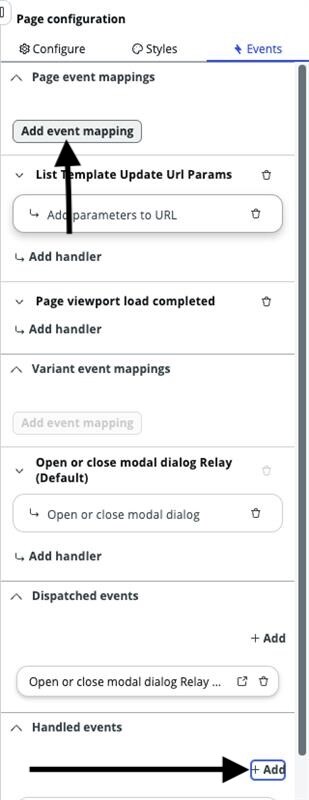
2. On the right select the Events Tab, scroll down you will see the Handled Events . Click on Add and create New event and on the same event you find add event mapping on the top .
3. Click on Add Event Mapping , and select the event which you had created and add event handler for that event as open or close modal and select your modal while adding that event handler.
With this you can create the Custom Handled Event In UI Builder Page.
Now Open your declarative action record(make sure your declarative action implemented as UXF Client Action), by default it will open in Form Action View, change the View to Default.
Now You can see the UX-Add-on Event Mappings Related List, create a new record in that
a.) Enter Event Mapping and Description
b.) Mention Source Element Id as In Your UI Builder Page check the Component ID of the Action Bar, check once in your page and mention that here.To check the Component ID, open the page in UI Builder ,scroll down in the left side and select the action bar. Now check on the right side you can see the ID like below and mention ID as the Source Element ID.

c.) Select the Parent Macroponent value as the your Page name (where you created Modal)
d.) Select Target Event as the Event you created in the UI Builder Page.
e.) Paste the following JSON in the Target Payload Mapping
{
    "container": {
        "fields": {
            "binding": {
                "address": [
                    "fields"
                ]
            },
            "type": "EVENT_PAYLOAD_BINDING"
        }
    }
}
If you follow all the steps i mentioned , now your declarative action will work as expected
@tidert_24 If my response helped, please mark my solution as the accepted solution so it will be helpful for future readers.
- Mark as New
- Bookmark
- Subscribe
- Mute
- Subscribe to RSS Feed
- Permalink
- Report Inappropriate Content
01-06-2026 09:54 PM
@Dinesh Chilaka , thank you for the step by step guide.
I can't perform the step #3 because the Action Assignment created is for Playbook and its view is "Playbook Action". I could not change the view to Default because there is no option to change the view to Default.