
- Mark as New
- Bookmark
- Subscribe
- Mute
- Subscribe to RSS Feed
- Permalink
- Report Inappropriate Content
04-03-2017 11:26 PM
Hi All,
We use a HTML field in the Incident module, but in the list, HTML tags is displayed.
How should we hide it?

Best regards,
Tomoaki
Solved! Go to Solution.
- Labels:
-
Best Practices
- Mark as New
- Bookmark
- Subscribe
- Mute
- Subscribe to RSS Feed
- Permalink
- Report Inappropriate Content
04-03-2017 11:58 PM
Hi,
In order to hide the HTML Contents, please follow the below steps:
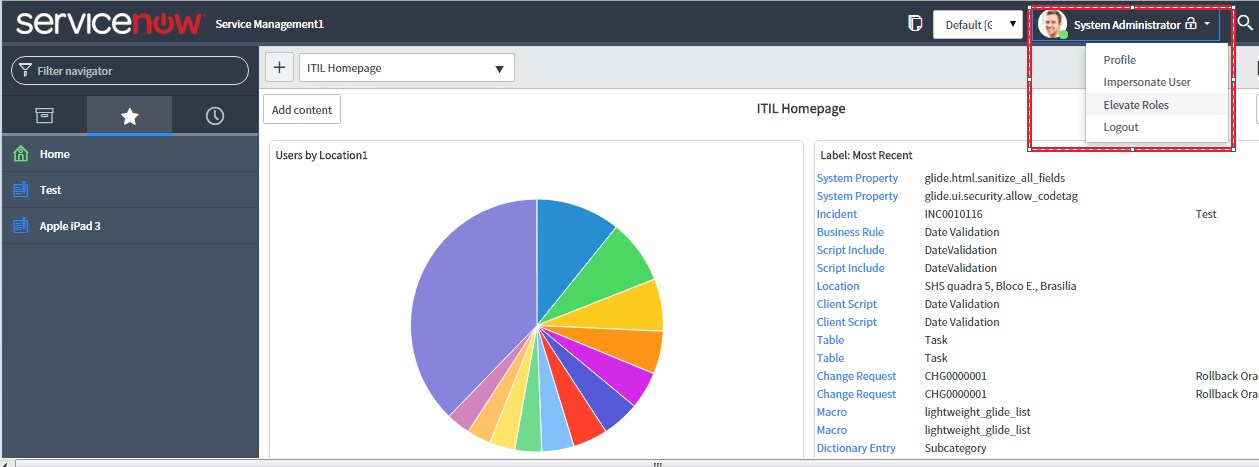
1) You would require to activate the Elevated privileges as shown in the screen shot below:


2) Once this has been activated, Navigate to System properties by typing sys_properties.LIST from Application Navigator search and search for the Property "glide.ui.escape_html_list_field" and set it to False as shown below:


This would be a Global Change and cannot be done for Specific Tables.
Hope this helps.Mark the answer as correct/helpful based on impact.
Regards,
Shloke
Regards,
Shloke
- Mark as New
- Bookmark
- Subscribe
- Mute
- Subscribe to RSS Feed
- Permalink
- Report Inappropriate Content
04-03-2017 11:58 PM
Hi,
In order to hide the HTML Contents, please follow the below steps:
1) You would require to activate the Elevated privileges as shown in the screen shot below:
2) Once this has been activated, Navigate to System properties by typing sys_properties.LIST from Application Navigator search and search for the Property "glide.ui.escape_html_list_field" and set it to False as shown below:
This would be a Global Change and cannot be done for Specific Tables.
Hope this helps.Mark the answer as correct/helpful based on impact.
Regards,
Shloke
Regards,
Shloke
- Mark as New
- Bookmark
- Subscribe
- Mute
- Subscribe to RSS Feed
- Permalink
- Report Inappropriate Content
04-04-2017 12:45 AM
Thanks Shloke!
Now tags are disappeared!
But some description field (HTML) is too long that one record got tall height.
Is it possible to limit the number of display character of HTML field in List?
Tomoaki
- Mark as New
- Bookmark
- Subscribe
- Mute
- Subscribe to RSS Feed
- Permalink
- Report Inappropriate Content
04-04-2017 05:15 AM
Hi,
Regarding the field height I amnot sure on the property name if it exists or not. Nut you can give a try with the property "glide.sc.html_width".
Else you can try the below Option also by trying to adjust the setting "Wrap Longer Text in List Columns" and "Compact the User Interface" from the Setting s gear Icon as shown below:



Hope this helps.Mark the answer as correct/helpful based on impact.
Regards,
Shloke
Regards,
Shloke


- Mark as New
- Bookmark
- Subscribe
- Mute
- Subscribe to RSS Feed
- Permalink
- Report Inappropriate Content
11-13-2018 08:36 AM
Export to excel,how to hide html tags?
