- Mark as New
- Bookmark
- Subscribe
- Mute
- Subscribe to RSS Feed
- Permalink
- Report Inappropriate Content
07-30-2026 04:16 AM
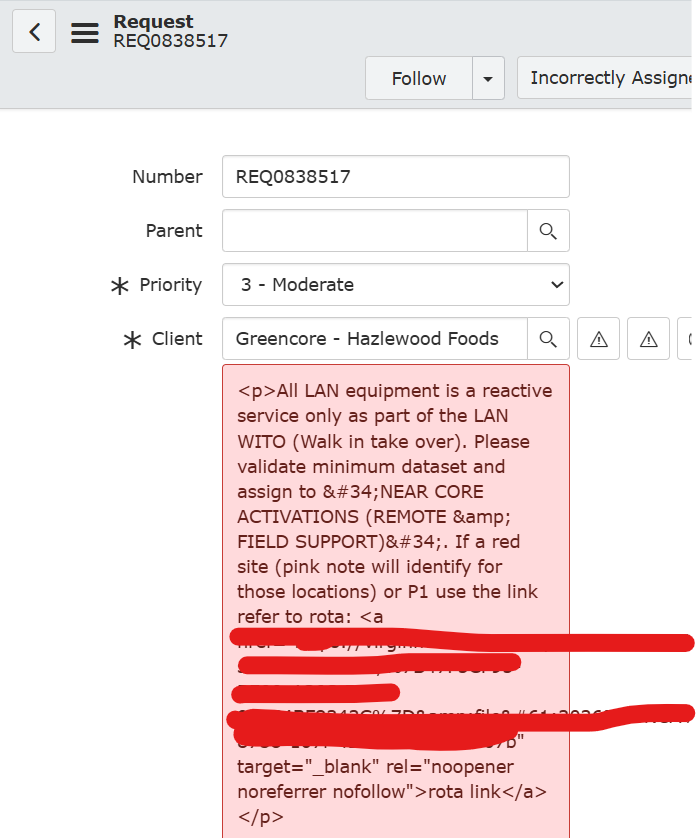
How to make the HTML field as a plain text in incident or request view with a hyperlink. Please help me on this. Screenshot for reference
Solved! Go to Solution.


- Mark as New
- Bookmark
- Subscribe
- Mute
- Subscribe to RSS Feed
- Permalink
- Report Inappropriate Content
07-30-2026 05:31 AM
If it's HTML field type it will render HTML
if it's string field then it will hold text and even if you enter HTML text it will render as plain text and not as HTML
💡 If my response helped, please mark it as correct ✅ and close the thread 🔒— this helps future readers find the solution faster! 🙏
Ankur
✨ Certified Technical Architect || ✨ 10x ServiceNow MVP || ✨ ServiceNow Community Leader

- Mark as New
- Bookmark
- Subscribe
- Mute
- Subscribe to RSS Feed
- Permalink
- Report Inappropriate Content
07-30-2026 04:26 AM
You can try with Calculated HTML Field.
Note : Anyday ,if you need to hyperlink in Worknote/comment (Journal field), you need to use [code] [/code] tag to insert hyperlink in worknotes and comments.
You can add following code snippet to the existing BR which is creating incident to include the hyperlink :
Sample Code:
current.work_notes = 'Incident [code]<a href="'+gs.getProperty('glide.servlet.uri')+'nav_to.do?uri=incident.do?sys_id='+sysID+'" target="_blank">INC Number </a>[/code] has been created.';
Regards
Tanushree Maiti
ServiceNow Technical Architect
LinkedIn: https://www.linkedin.com/in/tanushreemaiti
- Mark as New
- Bookmark
- Subscribe
- Mute
- Subscribe to RSS Feed
- Permalink
- Report Inappropriate Content
07-30-2026 04:33 AM
Hi Tanushree,
Thankyou for the response. My issue is like I have a company table in that short note field is a string. customer need to add text and hyperlink in it. I added it html but while testing its coming a html . I need text and hyperlink. how to get this. please help me
- Mark as New
- Bookmark
- Subscribe
- Mute
- Subscribe to RSS Feed
- Permalink
- Report Inappropriate Content
07-30-2026 04:39 AM
Hello,
The issue is because the field type is String, so ServiceNow treats the entered HTML (<a href="">...</a>) as plain text and displays the HTML tags instead of rendering the hyperlink.
Option 1: Change the field type to HTML
Option 2: Keep String field and create a Display HTML field
Option 3: Use a URL field separately
- Mark as New
- Bookmark
- Subscribe
- Mute
- Subscribe to RSS Feed
- Permalink
- Report Inappropriate Content
07-30-2026 04:42 AM
This is Servicenow's recommendation:
KB0759336 How to add hyperlinks to string fields?
Resolution
This can be done in 3 ways:
1. You can change the field to a URL field.
2. You can change it to an HTML field and add the link using the insert/edit link button.
3. You can do a customization. I found a few community articles on how other people did this. This is not supported by ServiceNow support.
https://community.servicenow.com/community?id=community_question&sys_id=95ad036ddb9cdbc01dcaf3231f96...
https://community.servicenow.com/community?id=community_question&sys_id=feaa0b2ddb5cdbc01dcaf3231f96...
Regards
Tanushree Maiti
ServiceNow Technical Architect
LinkedIn: https://www.linkedin.com/in/tanushreemaiti