- Mark as New
- Bookmark
- Subscribe
- Mute
- Subscribe to RSS Feed
- Permalink
- Report Inappropriate Content
07-30-2026 04:16 AM
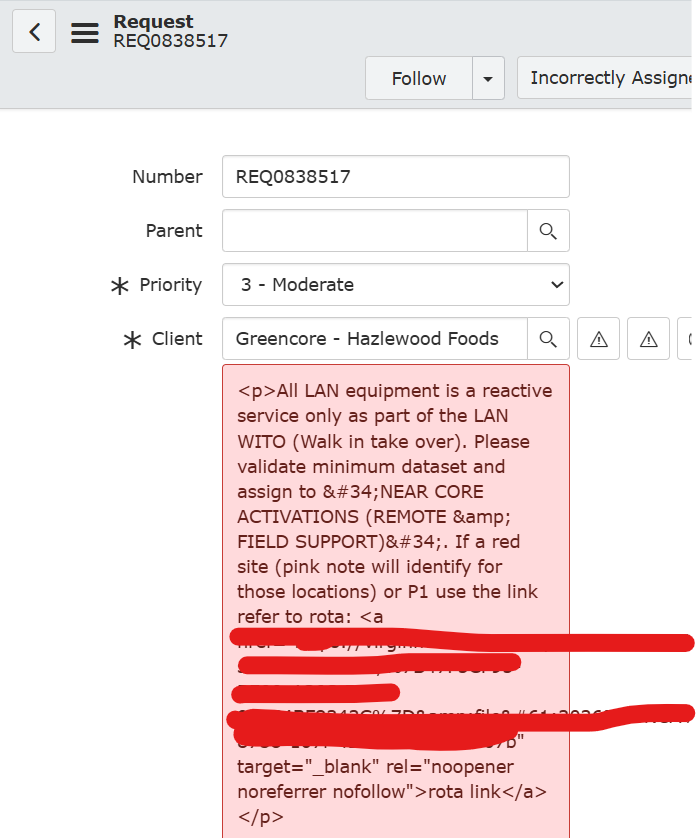
How to make the HTML field as a plain text in incident or request view with a hyperlink. Please help me on this. Screenshot for reference
Solved! Go to Solution.


- Mark as New
- Bookmark
- Subscribe
- Mute
- Subscribe to RSS Feed
- Permalink
- Report Inappropriate Content
07-30-2026 05:31 AM
If it's HTML field type it will render HTML
if it's string field then it will hold text and even if you enter HTML text it will render as plain text and not as HTML
💡 If my response helped, please mark it as correct ✅ and close the thread 🔒— this helps future readers find the solution faster! 🙏
Ankur
✨ Certified Technical Architect || ✨ 10x ServiceNow MVP || ✨ ServiceNow Community Leader
- Mark as New
- Bookmark
- Subscribe
- Mute
- Subscribe to RSS Feed
- Permalink
- Report Inappropriate Content
07-30-2026 05:31 AM
If it's HTML field type it will render HTML
if it's string field then it will hold text and even if you enter HTML text it will render as plain text and not as HTML
💡 If my response helped, please mark it as correct ✅ and close the thread 🔒— this helps future readers find the solution faster! 🙏
Ankur
✨ Certified Technical Architect || ✨ 10x ServiceNow MVP || ✨ ServiceNow Community Leader
- Mark as New
- Bookmark
- Subscribe
- Mute
- Subscribe to RSS Feed
- Permalink
- Report Inappropriate Content
07-30-2026 08:30 AM
Hi Ankur, I agree with you. Please correct me if I am wrong . I have company table in that short note field is a HTML and we added text and hyperlink in that short note field. We tested it but in the form list view its showing in html and entire like and make it look clumsy. Please see screenshot for reference. Please help me on this issue.
Regards,
Naganandini N