- Mark as New
- Bookmark
- Subscribe
- Mute
- Subscribe to RSS Feed
- Permalink
- Report Inappropriate Content
08-08-2016 03:13 PM
Somewhat interesting use case:
Users want the ability to list-edit a certain table when on list-view. The columns that need quick editing are reference fields.
Since they update many records at a time by holding CTRL or SHIFT, they don't want the risk of clicking on the link in the reference field on the list-view. They'd rather have that not be linked, but would still need to be able to edit that field once double-clicked like any normal reference field.
Any ideas?
Solved! Go to Solution.
- Labels:
-
User Interface (UI)

- Mark as New
- Bookmark
- Subscribe
- Mute
- Subscribe to RSS Feed
- Permalink
- Report Inappropriate Content
08-08-2016 05:04 PM
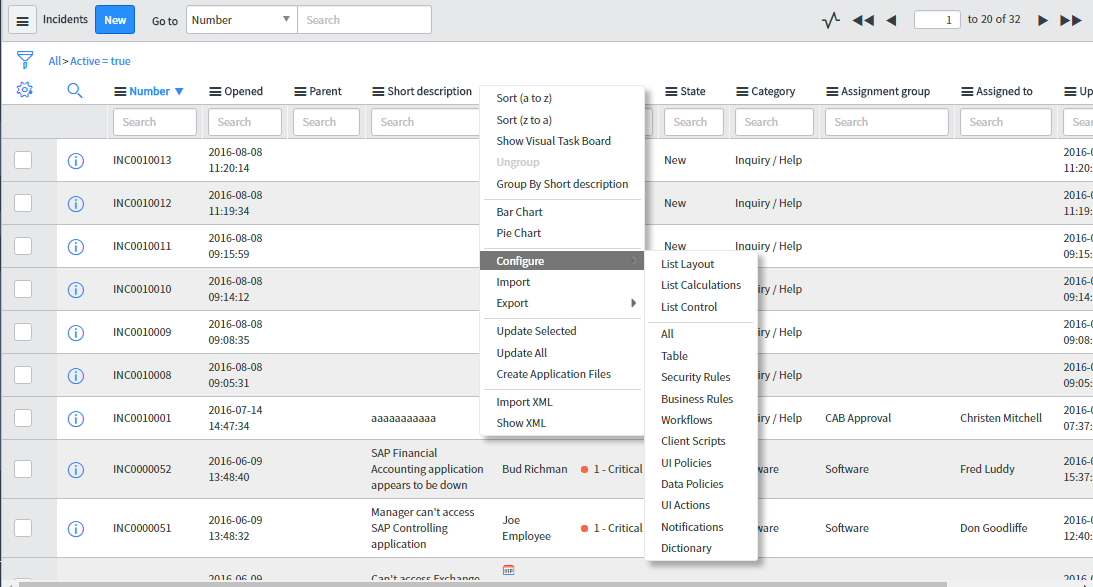
You can remove link in the list view by going into the list control. Right click on the list header go to Configure -> List Control and check the Omit Links checkbox as shown in the below snapshots


- Mark as New
- Bookmark
- Subscribe
- Mute
- Subscribe to RSS Feed
- Permalink
- Report Inappropriate Content
10-09-2018 05:02 PM
This may not help the OP, but anyone else who finds this who had a similar issue to me...
Brad Tilton had a similar answer to this here which helped me: https://community.servicenow.com/community?id=community_question&sys_id=a62347e1dbd8dbc01dcaf3231f96...
Basically in the list layout, instead of referencing the record in the column ie cmdb_ci.business_manager instead reference a FIELD on the record ie cmdb_ci.business_manager.name. That will make that column no longer a link to the reference (because the field is a string not a reference).
Hope that helps.

- Mark as New
- Bookmark
- Subscribe
- Mute
- Subscribe to RSS Feed
- Permalink
- Report Inappropriate Content
11-04-2020 09:28 AM
Great answer, and should really be marked as the solution