- Mark as New
- Bookmark
- Subscribe
- Mute
- Subscribe to RSS Feed
- Permalink
- Report Inappropriate Content
09-12-2022 04:20 AM
Hi Friendly crowd.
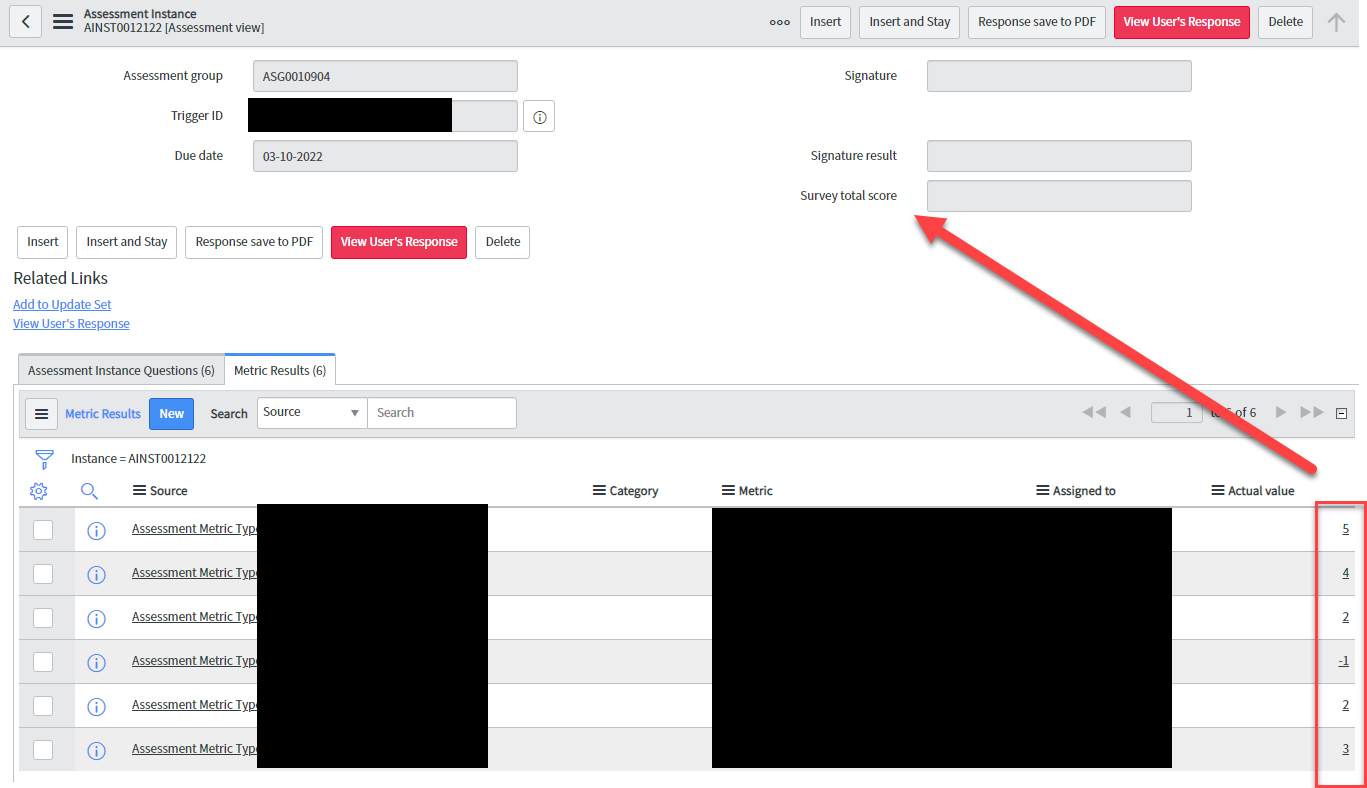
How can I sum up values from the survey instance and then place it in the 'Survey total score' (u_survey_total_score)

The end goal is to create a notification based on the score. Any help very much appreciated.
Matt
Solved! Go to Solution.
- Labels:
-
Scripting and Coding
- Mark as New
- Bookmark
- Subscribe
- Mute
- Subscribe to RSS Feed
- Permalink
- Report Inappropriate Content
09-15-2022 01:19 PM
Here is what I've come up with.
The Business Rule runs on the asmt_assessment_instance_question table after insert/update and combines both GlideRecord to get the instance that needs to be updated and GlideAggregate to get to SUM you've requested to put into the u_survey_total_score field on the instance.
var ir = new GlideRecord('asmt_assessment_instance');
ir.get(current.instance);

var gr = new GlideAggregate('asmt_assessment_instance_question');
gr.addQuery('instance', current.instance);
gr.addAggregate('SUM', 'value');
gr.setGroup(false);
gr.query();
while(gr.next()){
	var sumVal = gr.getAggregate('SUM', 'value');
}

ir.u_survey_total_score = sumVal;
ir.update()- Mark as New
- Bookmark
- Subscribe
- Mute
- Subscribe to RSS Feed
- Permalink
- Report Inappropriate Content
09-12-2022 03:12 PM
You could try a business rule that runs every time a new metric result is created to sum up the scores for you and put the total in the field you need.
- Mark as New
- Bookmark
- Subscribe
- Mute
- Subscribe to RSS Feed
- Permalink
- Report Inappropriate Content
09-14-2022 01:57 AM
Sure, but that's the bit I'm struggling on , to build one
- Mark as New
- Bookmark
- Subscribe
- Mute
- Subscribe to RSS Feed
- Permalink
- Report Inappropriate Content
09-15-2022 01:19 PM
Here is what I've come up with.
The Business Rule runs on the asmt_assessment_instance_question table after insert/update and combines both GlideRecord to get the instance that needs to be updated and GlideAggregate to get to SUM you've requested to put into the u_survey_total_score field on the instance.
var ir = new GlideRecord('asmt_assessment_instance');
ir.get(current.instance);

var gr = new GlideAggregate('asmt_assessment_instance_question');
gr.addQuery('instance', current.instance);
gr.addAggregate('SUM', 'value');
gr.setGroup(false);
gr.query();
while(gr.next()){
	var sumVal = gr.getAggregate('SUM', 'value');
}

ir.u_survey_total_score = sumVal;
ir.update()- Mark as New
- Bookmark
- Subscribe
- Mute
- Subscribe to RSS Feed
- Permalink
- Report Inappropriate Content
09-18-2022 03:14 AM
you are already my personal hero for helping me with this thing, I have used it, but for whatever reason, it sum it up to 18 like it is missing one question scored 5

The one with 0 is expected to be that way as it is a comment box.

I have tried a few more times, and I don't know how this is calculated: