Import Set Table is not creating automatically using Data Sources

- Mark as New
- Bookmark
- Subscribe
- Mute
- Subscribe to RSS Feed
- Permalink
- Report Inappropriate Content
05-13-2019 04:53 AM
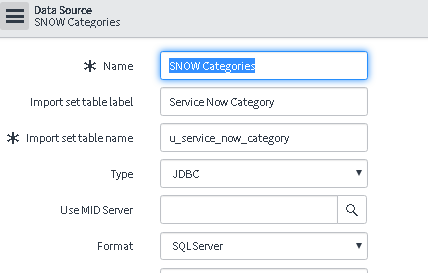
Steps To Re-Produce:
1. Create Data Source - SNOW Categories
2. Import Set Table Label - Service Now Category
3. Import Set Table Name - u_service_now_category

When i click on the below transform maps button and on the source table field is different..

- Labels:
-
Integrations
-
Scripting and Coding
- Mark as New
- Bookmark
- Subscribe
- Mute
- Subscribe to RSS Feed
- Permalink
- Report Inappropriate Content
05-13-2019 05:57 AM
I don't see any name difference. I see table is created with the appropriate syntax from the label what was provided.
Am I missing anything?
- Mark as New
- Bookmark
- Subscribe
- Mute
- Subscribe to RSS Feed
- Permalink
- Report Inappropriate Content
05-13-2019 06:34 AM
Hi Deepak,
After the data source is created the Table should be created. But here the table didn't got created . It just shows the name without label in the source table field.
-Dharani
- Mark as New
- Bookmark
- Subscribe
- Mute
- Subscribe to RSS Feed
- Permalink
- Report Inappropriate Content
05-13-2019 10:32 PM
Hi,
Check if you have below property on your instance "glide.import_set_row.dynamically_add_fields"
If might be because field creation would be prevented on your instance. If you are seeing fields are getting created, then please see in sys_documentation table whether you have an entry against the column for label.
Note: Please mark reply as correct / helpful based on impact it has created for answering this thread
- Mark as New
- Bookmark
- Subscribe
- Mute
- Subscribe to RSS Feed
- Permalink
- Report Inappropriate Content
05-14-2019 03:13 AM
Thanks for the reply!!
But i didn't had correct password and Mid Server selected while setting up the data source.
Once everything has been filled and ran the test load. It created the tables etc...
Regards,
Dharani