KB Article not visible in the portal

- Mark as New
- Bookmark
- Subscribe
- Mute
- Subscribe to RSS Feed
- Permalink
- Report Inappropriate Content
05-02-2025 11:42 AM
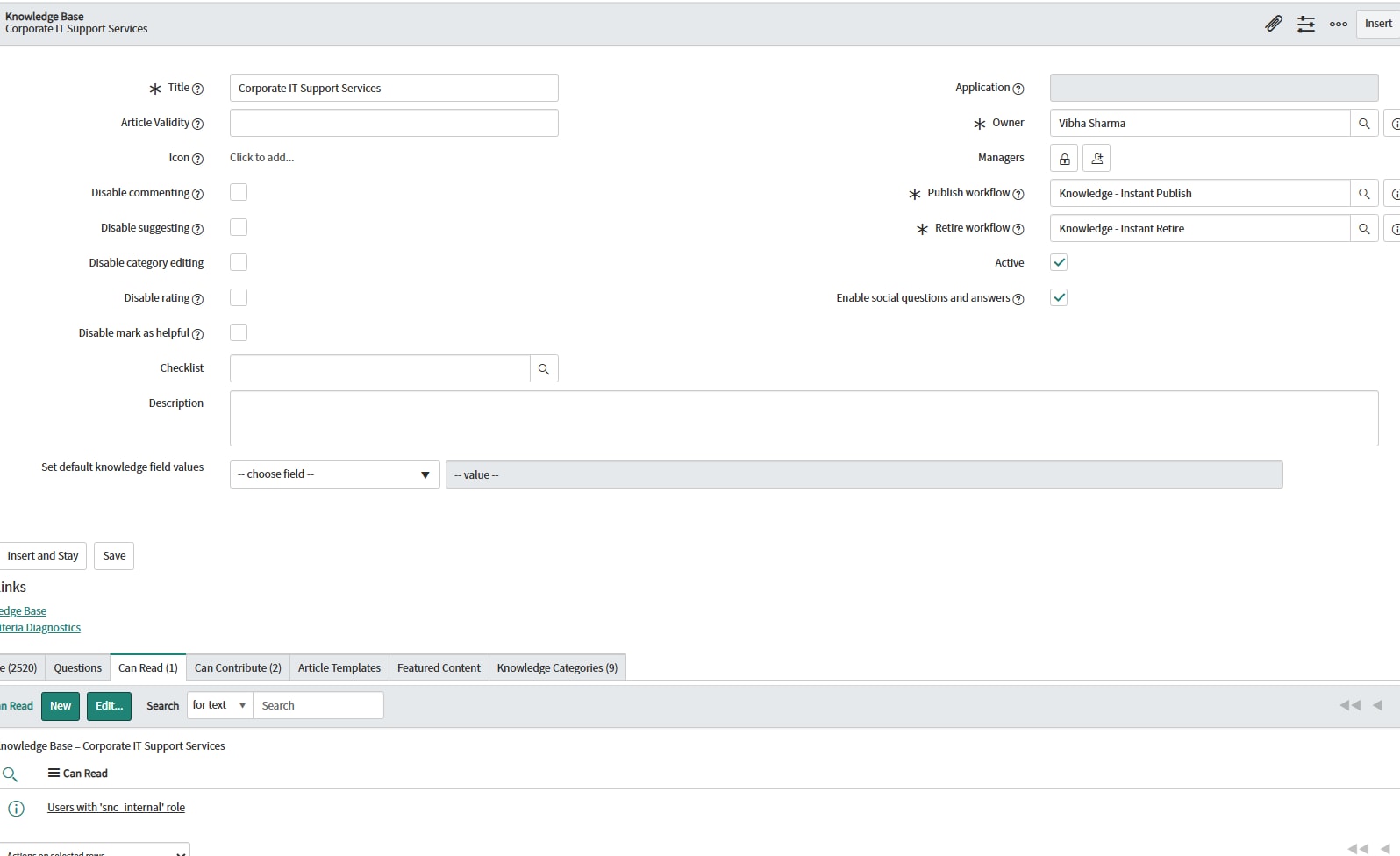
I have created a knowledge base with the Can read -snc_internal role.
But in the service portal that Knowledge base article is not visible to the user even though the user is having snc_internal role.
The kb article is published, and the knowledge base is article.
Have attached the screenshot.
Being an admin i can see the kb article in portal ,but the snc_internal user.

- Mark as New
- Bookmark
- Subscribe
- Mute
- Subscribe to RSS Feed
- Permalink
- Report Inappropriate Content
05-02-2025 12:04 PM
@Shivani_singh Try these steps
Here’s a checklist of the most common reasons a published KB won’t show up for a non-admin in the Service Portal—even when they have the “snc_internal” role on the KB record:
Portal assignment
By default, a KB only appears in portals you explicitly assign.Open your KB record (table kb_knowledge_base)
Look for the Portals (or “Available on”) multi-select field and make sure your Service Portal’s entry (e.g. “Service Portal” or whatever your portal title is) is in that list.
Save and clear cache (System Diagnostics → Cache.do).
“Use KB roles” vs. article-level roles
Each article can either inherit the KB’s “Can read” roles or use its own.Open your article record (table kb_knowledge)
Make sure Use roles from KB (sometimes a checkbox on the article form) is checked so it actually honors the KB’s “snc_internal” grant.
If it’s unchecked, either turn it on or add “snc_internal” to the article’s own roles list.
Article workflow state & date range
The portal widget only pulls Published articles within any valid date range.Verify each article’s Workflow state = Published
Check “Valid from” / “Valid to” fields (if populated) to ensure the current date (May 2, 2025) is within that window.
Portal widget configuration
If you’ve customized your portal’s Knowledge widget:Inspect the widget’s server script to ensure it isn’t filtering out your KB by context or hard-coded sys_id
By default it calls $sp.getKBs() which respects the KB’s portal assignments and roles—if yours is a custom widget, compare it to the out-of-the-box version.
Impersonate & debug
Impersonate a “snc_internal” user and load the KB page in the portal
Open your browser’s Network tab and watch the AJAX call to /api/now/sp/knowledge (or similar): you should see your KB in the JSON payload.
If it’s missing, you know it’s an ACL/assignment issue, if it’s there but not rendering, it’s a widget‐configuration issue.
- Mark as New
- Bookmark
- Subscribe
- Mute
- Subscribe to RSS Feed
- Permalink
- Report Inappropriate Content
05-03-2025 08:39 AM
Hi @anand-bhosle
It's still remain the same.