Knowledge Workflow

- Mark as New
- Bookmark
- Subscribe
- Mute
- Subscribe to RSS Feed
- Permalink
- Report Inappropriate Content
05-22-2026 10:06 AM
- 3,477 Views

- Mark as New
- Bookmark
- Subscribe
- Mute
- Subscribe to RSS Feed
- Permalink
- Report Inappropriate Content
05-22-2026 10:46 AM
Hello @Rooma1
Haven't seen this issue in the known Austrailia release issues:
https://www.servicenow.com/docs/r/release-notes/australia-all-other-fixes.html
https://www.servicenow.com/docs/r/release-notes/australia-security-notables.html
Personalized this list (click gear icon at the top right) to bring valid to, retired and retired by columns to find out which all articles are retired.
From this list view itself, you can make a right click on all such Knowledge bases and find out the "Publish flow" field value is "Knowledge - Approval Publish" or "Knowledge - Approval Retire".
It should be "Knowledge - Approval Publish".
Seems like all such articles are retired and they need to be bulk publish again with their valid to date being extended for x number of days/months/year.
Hope that helps!

- Mark as New
- Bookmark
- Subscribe
- Mute
- Subscribe to RSS Feed
- Permalink
- Report Inappropriate Content
05-22-2026 10:51 AM
Hi @Rooma1
Repair all ServiceNow Knowledge Management plugin (such as Knowledge Management Advanced or Core) and open Incognito/InPrivate browser to recheck.
Refer:
Additional plugins for Knowledge Management
Servicenow Doc: Article versioning changes
How to Get Only the Newest Knowledge Articles in ServiceNow (Explained Like You're 5!)
Regards
Tanushree Maiti
ServiceNow Technical Architect
LinkedIn: https://www.linkedin.com/in/tanushreemaiti
- Mark as New
- Bookmark
- Subscribe
- Mute
- Subscribe to RSS Feed
- Permalink
- Report Inappropriate Content
07-06-2026 04:47 AM - edited 07-06-2026 04:50 AM
I came here because I had the exact same problem as the OP, and this fixed it for me. Not that is probably mattered, but I repaired Knowledge Management Advanced and Knowledge Management Core in that order.
Thank you!
EDIT: Spoke too soon. This did fix it for a few minutes, before reverting. Investigating that there is a job/workflow running causing this to go back to the "broken" state.
- Mark as New
- Bookmark
- Subscribe
- Mute
- Subscribe to RSS Feed
- Permalink
- Report Inappropriate Content
06-29-2026 03:09 PM - edited 06-29-2026 03:10 PM
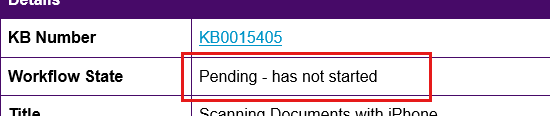
We're having the same issue. It is affecting everywhere that shows the workflow_state. In the list view the bubbles in the Workflow column are all empty, however, when you expand the field the correct state is in blue. In the kb_knowledge.do form, the Workflow field just says "Pending - has not started" regardless of what the workflow_state is. When viewing the article in kb_view or kb_article_view, the state shows "Pending - has not started" instead of the actual workflow_state name. Approval emails show "Pending - has not started" where it should show the workflow_state.
At first it seemed like a browser issue. I would clear cache or unregister the service worker for the site and it would resolve, but the issue would return and the previous "fixes" no longer worked. Occasionally the issue will resolve, especially if I've been logged out for a while, but it always returns. Plus, the email notifications have nothing to do with anyone's PC so it can't be a client-side issue.
When I change the knowledge base to use a FLOW instead of a WORKFLOW the issue seems to resolve but we can't just switch to that without testing so that's what I'm doing now. For all I know the issue will also occur with that, but just hasn't yet. There's an odd intermittency to this. Some approval emails show the correct workflow_state and some say "Pending - has not started" but there doesn't seem to be a common thread.


.png)
.png)