- Mark as New
- Bookmark
- Subscribe
- Mute
- Subscribe to RSS Feed
- Permalink
- Report Inappropriate Content
07-27-2017 09:24 AM
Hello,
I want to change Text Info color (and Warning, Danger) in branding-editor.
But only Test success is available.
How can the color be changed?

Solved! Go to Solution.
- Mark as New
- Bookmark
- Subscribe
- Mute
- Subscribe to RSS Feed
- Permalink
- Report Inappropriate Content
07-27-2017 02:27 PM
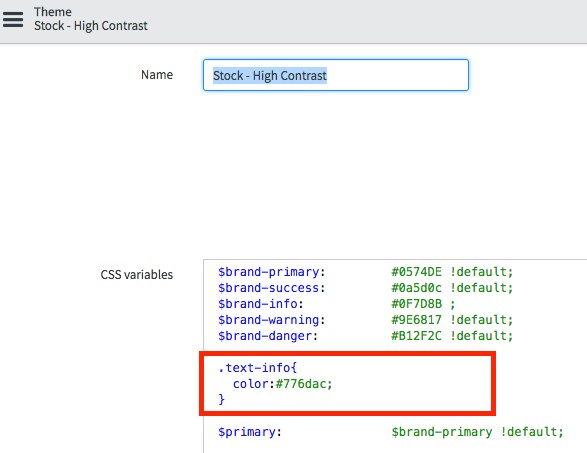
Ok so for circle icons the text and the image are set to have the same color, if you delete the CSS that links the info-text to $brand-info, then both the text and the image will be set to the .info-text color you define in your style, or in your local CSS.
Did you want the image and the text to be a different color? We would have to add a class to the HTML for that to occur.
Now that you removed the CSS did you edit the CSS at the style level?
CSS edit system wide for text-info

Local text-info edit

In the event that you want the text and image to be a different color:


Best,
Andrew
- Mark as New
- Bookmark
- Subscribe
- Mute
- Subscribe to RSS Feed
- Permalink
- Report Inappropriate Content
07-27-2017 02:27 PM
Ok so for circle icons the text and the image are set to have the same color, if you delete the CSS that links the info-text to $brand-info, then both the text and the image will be set to the .info-text color you define in your style, or in your local CSS.
Did you want the image and the text to be a different color? We would have to add a class to the HTML for that to occur.
Now that you removed the CSS did you edit the CSS at the style level?
CSS edit system wide for text-info
Local text-info edit
In the event that you want the text and image to be a different color:
Best,
Andrew
- Mark as New
- Bookmark
- Subscribe
- Mute
- Subscribe to RSS Feed
- Permalink
- Report Inappropriate Content
07-27-2017 02:39 PM
thanks a lot