- Mark as New
- Bookmark
- Subscribe
- Mute
- Subscribe to RSS Feed
- Permalink
- Report Inappropriate Content
01-21-2019 11:07 PM
Hi!
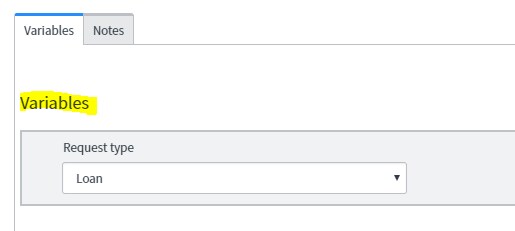
I added the Variable Editor to a "Variables" tab as shown in the screenshot. How do I remove the "Variables" text highlighted in yellow?

Thank you.
Solved! Go to Solution.

- Mark as New
- Bookmark
- Subscribe
- Mute
- Subscribe to RSS Feed
- Permalink
- Report Inappropriate Content
01-21-2019 11:28 PM
Hi
Create a onLoad Script on sc_req_item and add the below code (London specific)

function onLoad() {
var x=document.getElementsByClassName("veditor_header");
x[0].style.visibility = "hidden";
}
PS- The isolate Script checkbox on client script should be unchecked as this is a block added by servicenow to avoid DOM manipulations in client scripts.
Regards,
Omkar Mone.
www.dxsherpa.com
- Mark as New
- Bookmark
- Subscribe
- Mute
- Subscribe to RSS Feed
- Permalink
- Report Inappropriate Content
01-21-2019 11:28 PM
Hi
Create a onLoad Script on sc_req_item and add the below code (London specific)
function onLoad() {
var x=document.getElementsByClassName("veditor_header");
x[0].style.visibility = "hidden";
}
PS- The isolate Script checkbox on client script should be unchecked as this is a block added by servicenow to avoid DOM manipulations in client scripts.
Regards,
Omkar Mone.
www.dxsherpa.com
- Mark as New
- Bookmark
- Subscribe
- Mute
- Subscribe to RSS Feed
- Permalink
- Report Inappropriate Content
01-21-2019 11:41 PM

- Mark as New
- Bookmark
- Subscribe
- Mute
- Subscribe to RSS Feed
- Permalink
- Report Inappropriate Content
01-21-2019 11:51 PM
Hi
I don't think but i suggest you to apply CSS in onload script itself.