
- Mark as New
- Bookmark
- Subscribe
- Mute
- Subscribe to RSS Feed
- Permalink
- Report Inappropriate Content
08-23-2020 10:47 PM
I'm trying to search a string for keywords found on another table. If found I want to know what those keywords were and update the original record that had the search string with those keyword values in addition to the category.
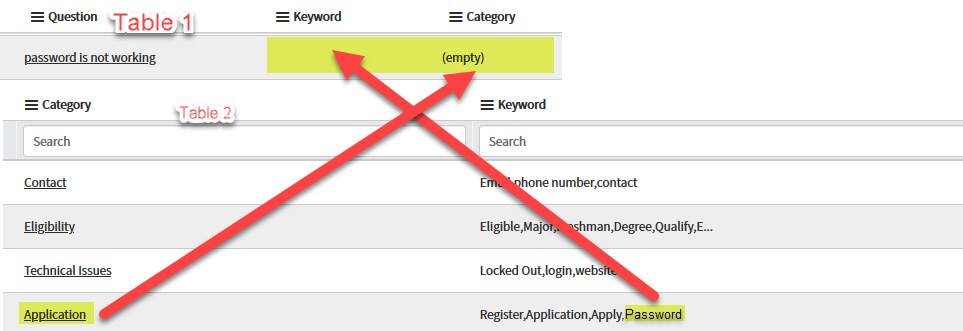
In this example, I want to search the string in the "Question" field on table 1 for keywords found on table 2. If found on table 2 I want to populate table 1s "Keyword" and "Category" fields with the applicable keyword(s) and category.
"Category" on table 1 is a reference directly to table 2, so the sys id of table 2.
The "Keyword" field on both tables are strings.

Solved! Go to Solution.
- Labels:
-
Scripting and Coding
- Mark as New
- Bookmark
- Subscribe
- Mute
- Subscribe to RSS Feed
- Permalink
- Report Inappropriate Content
08-24-2020 08:28 PM
Thanks for all the replies. Here's what ended up working for me.
var report = new GlideRecord('u_conversation_message_report');
report.addEncodedQuery("u_categoryISEMPTY^u_questionISNOTEMPTY");
report.query();

while (report.next()) {
    var question = report.u_question.toString().toLowerCase();
    var keywords = [];
    var i = 0;
    var category = '';
    var keywordsNoComma = '';

    var catTable = new GlideRecord("u_conversation_message_category");
    catTable.query();
    while (catTable.next()) {
        i = 0;
        keywords = catTable.u_keyword.toString().toLowerCase().split(',');
        while (i < keywords.length) {

            if (question.indexOf(keywords[i]) > -1) {
                if (keywordsNoComma != '') {  // This is removing the leading comma from the keywords
                    keywordsNoComma += ',';
                }
                keywordsNoComma += keywords[i];
                category = catTable.sys_id;

                report.u_keyword = keywordsNoComma;
                report.u_category = category;
                report.update();
            }
            i++;
        }

    }

}



- Mark as New
- Bookmark
- Subscribe
- Mute
- Subscribe to RSS Feed
- Permalink
- Report Inappropriate Content
08-23-2020 11:50 PM
Hi,
You can write a before update BR on table table 1 and populate the values from table 2.
var serach = 0;
var gr = new GlideRecord("table2");
gr.query();
while(gr.next()){
if(gr.keyword.indexOf(current.key) > -1){ //use proper backend value of keyword field
current.category = gr.category //updae the category field
search ++;
}
}

if(!search){
gs.addInfoMessage("No key found")
current.setAbortAction(true);

}
Mark it as correct or helpful if it helps.
/Hemanth
- Mark as New
- Bookmark
- Subscribe
- Mute
- Subscribe to RSS Feed
- Permalink
- Report Inappropriate Content
08-24-2020 06:07 AM
Thanks for your reply. I'm looking to do a scheduled job. I see you are setting the category where you found the keyword, but I don't see where you are setting the keyword that was found. I need both values updated on table 1 - the keyword and category found from table 2.
- Mark as New
- Bookmark
- Subscribe
- Mute
- Subscribe to RSS Feed
- Permalink
- Report Inappropriate Content
08-24-2020 07:49 AM
Hi,
The above logic is, if you put a key word in table 1 of the keyword filed and save the record it will search all the keyword fields in table 2 ,
if string found ,it will update the category field along with your input keyword else its will abort the submission with the error message.
- Mark as New
- Bookmark
- Subscribe
- Mute
- Subscribe to RSS Feed
- Permalink
- Report Inappropriate Content
08-24-2020 09:19 AM
Table 1 will never have a keyword manually input. The keyword and category fields are populated based on finding a matching keyword on table 2 from the question on table 1.
