- Mark as New
- Bookmark
- Subscribe
- Mute
- Subscribe to RSS Feed
- Permalink
- Report Inappropriate Content
10-16-2017 04:10 AM
Hello Everyone,
I am working on a scheduled job which will automatically remove users from groups.
Currently I have made a script to query users not logged in for 6 months and then remove these users from all the groups.
Here is the script:
var grUser = new GlideRecord('sys_user');
grUser.addQuery('last_login','<',gs.monthsAgoStart(6));
grUser.query();
while (grUser.next()) {
var grMember = new GlideRecord('sys_user_grmember');
grMember.addQuery('user', grUser.sys_id);
grMember.query();
while (grMember.next()) {
grMember.deleteRecord();
}
}
I also need to send and email to the affected users. Email should contain info from which groups they have been removed.
Could you advise what is the best way trigger event and also how to pass group names as variables to email template?
Thank you.
Solved! Go to Solution.
- Labels:
-
Best Practices
-
Scripting and Coding

- Mark as New
- Bookmark
- Subscribe
- Mute
- Subscribe to RSS Feed
- Permalink
- Report Inappropriate Content
10-17-2017 01:32 AM
Hi Lukas,
I see now, where you have difficulties. You used the line of code
gs.eventQueue('removed.from.groups', current, removedFromGroups, grUser.name);
where current variable is not defined. The second parameter of gs.eventQueue could be any GlideRecord instance. Thus you can use for example grUser:
gs.eventQueue('removed.from.groups', current, removedFromGroups, grUser.name);
Thus you should use sys_user as the table durin gregistration of the enevt.

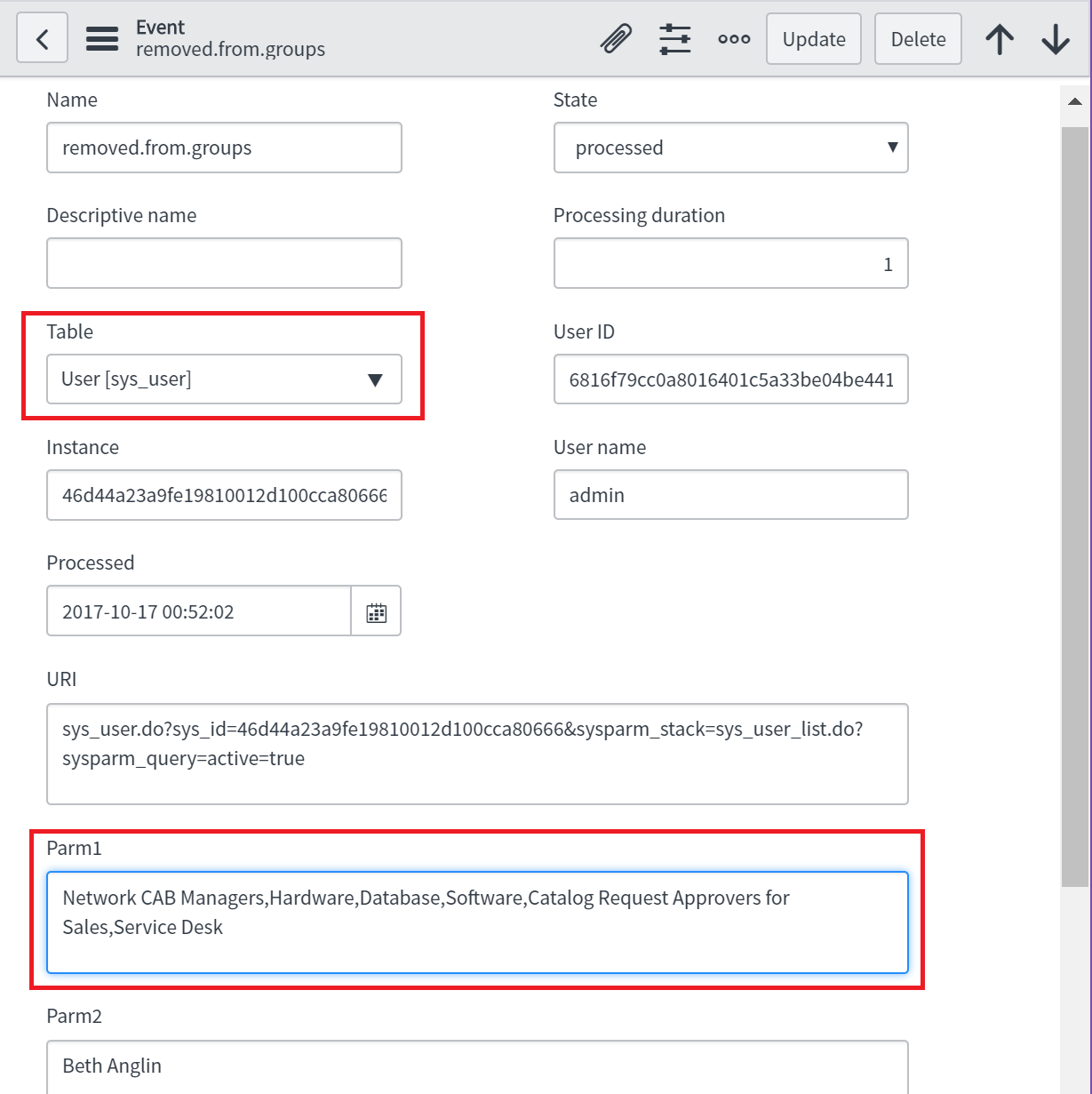
as a result the event log will automatically contains some details of user table (see URI field for example):

and you should create Notification on the table sys_user too.
I tried the described above approach and the emails was successfully generated. The email contained the list of groups as expected. The only change, which I need to do additionally is replacements last_login to last_login_time, because last_login was empty on all accounts of my ServiceNow instance:
grUser.addQuery('last_login_time', '<', gs.monthsAgoStart(6));
- Mark as New
- Bookmark
- Subscribe
- Mute
- Subscribe to RSS Feed
- Permalink
- Report Inappropriate Content
10-16-2017 07:45 AM
Sorry Lukas, but I can help you only if you post exact code/screenshorts which shows, what you do currently. System Policy > Events > Event Log can be used to see the properties of event, which you triggered by gs.eventQueue method. Usage of some sys_id (of the user , group or ...) is not a problem in general. It's just unclear what you do exactly now. You have many possibilities to fill param1 and param2.
For example you can use grUser.getValue("email") to get email address of the user and use it as param1. Then you check "Event param 1 contains recipient" in "Who will receive" tab of the notification. As the result the email will be sent to the user.
You can use grMember.group.getRefRecord().getValue("name") or just grMember.group.getDisplayValue() as the value of param2 to get the name of the group as string. Using .getRefRecord() you can get access to any field of the reference type.
There are of cause many other possibilities. Please just include the code, which you use currently, and screenshorts if you still have some problem.
- Mark as New
- Bookmark
- Subscribe
- Mute
- Subscribe to RSS Feed
- Permalink
- Report Inappropriate Content
10-16-2017 11:58 PM
Hi Oleg,
I will try to explain everything in details.
First of all this is the script which query users not logged in for 6 months and then it removes groups and also records group names to array and creates event:
var grUser = new GlideRecord('sys_user');
   grUser.addQuery('last_login','<',gs.monthsAgoStart(6));
   grUser.query();
       while (grUser.next()) {
           var grMember = new GlideRecord('sys_user_grmember');
               grMember.addQuery('user', grUser.sys_id);
               grMember.query();
           var removedFromGroups = [];
                   while (grMember.next()) {
                       grMember.deleteRecord();
                       removedFromGroups.push(grMember.group.getDisplayValue());
   }
   if ((typeof removedFromGroups !== 'undefined' && removedFromGroups.length > 0) ) {
   gs.print(grUser.name + " " + removedFromGroups);
   gs.eventQueue('removed.from.groups', current, removedFromGroups, grUser.name);
}
}
Below is the event that is generated. Note the User ID field, I get this value when I try print parameters to the notification.

That is the email script:
var groupNames =   event.parm1;
template.print("You have been removed from groups: " + groupNames);
And that is what I get in the notification:

So the question is how to pass data from Parm1 to the notfication?
Also I am not sure on which table to create event, currently it is on sys_user?
Any help is appreciated. Thanks
- Mark as New
- Bookmark
- Subscribe
- Mute
- Subscribe to RSS Feed
- Permalink
- Report Inappropriate Content
10-17-2017 01:32 AM
Hi Lukas,
I see now, where you have difficulties. You used the line of code
gs.eventQueue('removed.from.groups', current, removedFromGroups, grUser.name);
where current variable is not defined. The second parameter of gs.eventQueue could be any GlideRecord instance. Thus you can use for example grUser:
gs.eventQueue('removed.from.groups', current, removedFromGroups, grUser.name);
Thus you should use sys_user as the table durin gregistration of the enevt.
as a result the event log will automatically contains some details of user table (see URI field for example):
and you should create Notification on the table sys_user too.
I tried the described above approach and the emails was successfully generated. The email contained the list of groups as expected. The only change, which I need to do additionally is replacements last_login to last_login_time, because last_login was empty on all accounts of my ServiceNow instance:
grUser.addQuery('last_login_time', '<', gs.monthsAgoStart(6));
- Mark as New
- Bookmark
- Subscribe
- Mute
- Subscribe to RSS Feed
- Permalink
- Report Inappropriate Content
10-17-2017 02:21 AM
Thanks a lot, all the issues resolved and the solution works as needed
- Mark as New
- Bookmark
- Subscribe
- Mute
- Subscribe to RSS Feed
- Permalink
- Report Inappropriate Content
10-16-2017 08:25 AM
Hi Lukas,
One more simpler way is there you can have the a flag on user table and updates this flag=true just before the deleteRecord function.
Create a email notification on user table on update operation with condition flag to true.
Regards,
Vineet