- Mark as New
- Bookmark
- Subscribe
- Mute
- Subscribe to RSS Feed
- Permalink
- Report Inappropriate Content
10-16-2017 04:10 AM
Hello Everyone,
I am working on a scheduled job which will automatically remove users from groups.
Currently I have made a script to query users not logged in for 6 months and then remove these users from all the groups.
Here is the script:
var grUser = new GlideRecord('sys_user');
grUser.addQuery('last_login','<',gs.monthsAgoStart(6));
grUser.query();
while (grUser.next()) {
var grMember = new GlideRecord('sys_user_grmember');
grMember.addQuery('user', grUser.sys_id);
grMember.query();
while (grMember.next()) {
grMember.deleteRecord();
}
}
I also need to send and email to the affected users. Email should contain info from which groups they have been removed.
Could you advise what is the best way trigger event and also how to pass group names as variables to email template?
Thank you.
Solved! Go to Solution.
- Labels:
-
Best Practices
-
Scripting and Coding

- Mark as New
- Bookmark
- Subscribe
- Mute
- Subscribe to RSS Feed
- Permalink
- Report Inappropriate Content
10-17-2017 01:32 AM
Hi Lukas,
I see now, where you have difficulties. You used the line of code
gs.eventQueue('removed.from.groups', current, removedFromGroups, grUser.name);
where current variable is not defined. The second parameter of gs.eventQueue could be any GlideRecord instance. Thus you can use for example grUser:
gs.eventQueue('removed.from.groups', current, removedFromGroups, grUser.name);
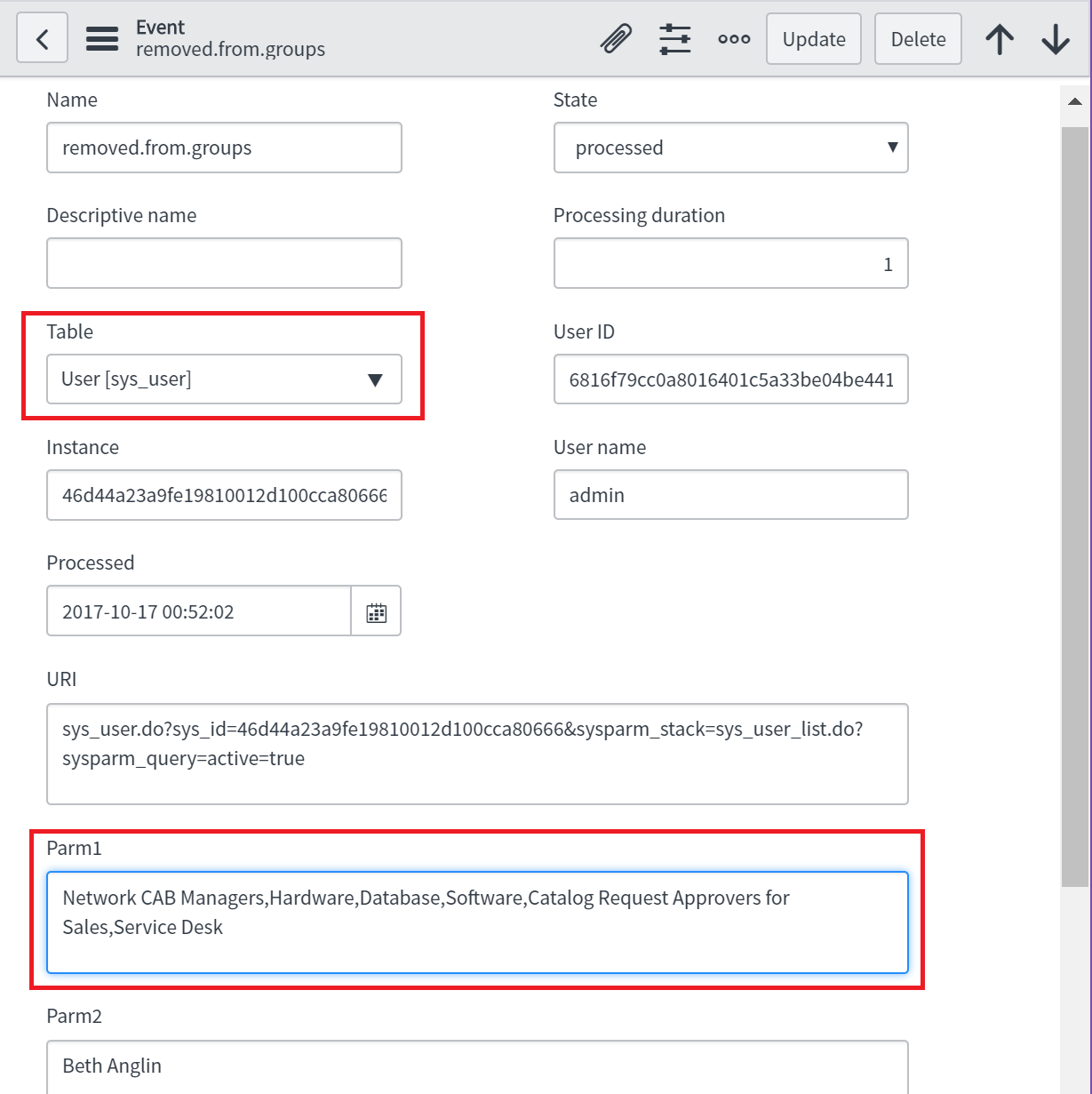
Thus you should use sys_user as the table durin gregistration of the enevt.

as a result the event log will automatically contains some details of user table (see URI field for example):

and you should create Notification on the table sys_user too.
I tried the described above approach and the emails was successfully generated. The email contained the list of groups as expected. The only change, which I need to do additionally is replacements last_login to last_login_time, because last_login was empty on all accounts of my ServiceNow instance:
grUser.addQuery('last_login_time', '<', gs.monthsAgoStart(6));
- Mark as New
- Bookmark
- Subscribe
- Mute
- Subscribe to RSS Feed
- Permalink
- Report Inappropriate Content
10-16-2017 04:25 AM
Hi Lukas
I think the easiest thing to do is to captured the group name in your scheduled job (grMember.group.getDisplayValue() ) and after the deletion then trigger an event and that event then triggers a notification.
http://wiki.servicenow.com/index.php?title=Events_and_Email_Notification#gsc.tab=0
In the event you can pass 2 values of your choice (could be Group name from above)
With email script then you can print out your parm1 and parm2 from you event:
http://wiki.servicenow.com/index.php?title=Scripting_for_Email_Notifications#gsc.tab=0
So catch your group name in the scheduled job.
use gs.eventQueue() to trigger an event.
Set up a notification to trigger on that event.
Use a mail script to print out the group parsed from the event
It sounds complex but its straight forward actually
- Mark as New
- Bookmark
- Subscribe
- Mute
- Subscribe to RSS Feed
- Permalink
- Report Inappropriate Content
10-16-2017 04:25 AM
You can use gs.eventQueue method to trigger event and to pass the group name as additional information. You can write notification, which send the email based on the information from the event. I'm not sure, which knowledge you have. So short reminder: one have to register the event first (see System Policy > Events > Registry) to be able to trigger it with respect of gs.eventQueue method. You can use grUser for example, as current parameter, grMember.sys_id as param1 and grMember.name as param2. It will allows you easy to write the corresponding email notification. The article will get you more details.
- Mark as New
- Bookmark
- Subscribe
- Mute
- Subscribe to RSS Feed
- Permalink
- Report Inappropriate Content
10-16-2017 07:13 AM
Thanks for answers guys. I have succeeded to pass the parameters in the event and when I open event I can see the value that I need.
However when i try to include event.parm1 or event.parm2 to the email script it returns sys_id of some kind. Any ideas why I get it instead of actual values in parm fields?

- Mark as New
- Bookmark
- Subscribe
- Mute
- Subscribe to RSS Feed
- Permalink
- Report Inappropriate Content
10-16-2017 07:23 AM
you need to use getDisplayValue() method to see the group names