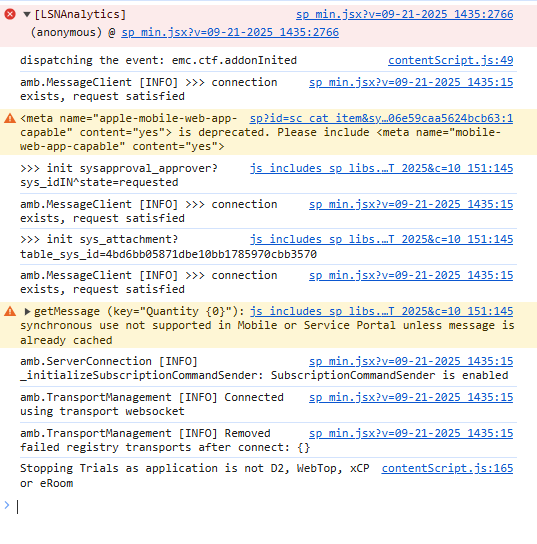
Service Portal Error: There is a JavaScript error in your browser console

- Mark as New
- Bookmark
- Subscribe
- Mute
- Subscribe to RSS Feed
- Permalink
- Report Inappropriate Content
11-17-2025 09:04 AM
We just moved our servicenow instance to fedramp. We are now getting the same error on an portal page: There is a JavaScript error in your browser console.
I've looked at the code and I think this is the error that's cause it to show up: <meta name="apple-mobile-web-app-capable" content="yes"> is deprecated. Please include <meta name="mobile-web-app-capable" content="yes">
But when I look in client scripts I'm not finding this anywhere. Has anyone seen this before?
- Mark as New
- Bookmark
- Subscribe
- Mute
- Subscribe to RSS Feed
- Permalink
- Report Inappropriate Content
11-22-2025 12:18 PM
Since I'm new to this too, I'm going to suggest investigating something.
(And ... even if you do fix this setting, I'm kind of skeptical it is responsible for causing errors in the Javascript being performed. This message seems like it's saying, "you set this meta tag, but it no longer means anything for execution.")
I googled with the following string and Google Gemini responded with some instructions that I was actually looking for, to see if this were the issue with the meta tag. Again, I'm not an experienced developer. I just ran across this as one thing you might investigate.
What I googled:
servicenow configuration settings "apple-mobile-web-app-capable"
What Google replied was essentially how to set up such a metatag:
For a Specific Service Portal Page
|
For the Entire Service Portal (Theme or System Property) While the page-level configuration is the standard approach, the platform also generally includes this meta tag by default in the base Service Portal template for optimal mobile display.
This configuration enhances the user experience, making the web portal function more like a native application when launched from an iOS home screen icon. |
- Mark as New
- Bookmark
- Subscribe
- Mute
- Subscribe to RSS Feed
- Permalink
- Report Inappropriate Content
11-22-2025 12:28 PM
If you fix the meta tag and it doesn't help you, I didn't want to leave you hanging as to "what next?"
Looking over your log image, I notice there's another error: something about "getMessage(...): synchronous use is not supported for ... Service Portal use." I am much, much more expecting this to be the real reason Javascript isn't executing. The log entry is saying , "[Wait, this function call] is not supported ..." The server has to cancel this Javascript, since it doesn't know what you're trying to do with this function call.
If you can locate this "getMessage()" call, a quick trial would be to see if the script crashes into an error in the code after this call -- maybe comment out the // getMessage() call, and see if you can get to the next line of Javascript?
This is dicey to remember you've done it, so for me, I always add "/\/\" at the end of the line so I can make a quick search of the code to see if I've done something by way of debugging.