Taking Input from user in Service Portal Widget

- Mark as New
- Bookmark
- Subscribe
- Mute
- Subscribe to RSS Feed
- Permalink
- Report Inappropriate Content
01-08-2018 05:18 AM
I am configuring a widget where i am giving the name of a user as input and there is a submit button,clicking on it it will show a message "Hello" with the Name of the user i given as input.
I have configured the widget but it is not showing any message after giving the input.
HTML:

Server Script:

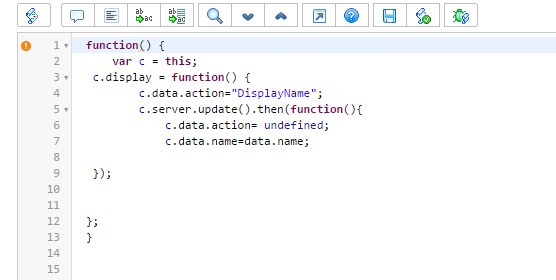
Client Script:

Can anyone tell me where i am doing wrong wrong in the code??

- Mark as New
- Bookmark
- Subscribe
- Mute
- Subscribe to RSS Feed
- Permalink
- Report Inappropriate Content
01-08-2018 05:28 AM
Can we see the HTML as well? It would be nice to know if did a bind from the input variable to the data.name variable.
- Mark as New
- Bookmark
- Subscribe
- Mute
- Subscribe to RSS Feed
- Permalink
- Report Inappropriate Content
01-08-2018 05:33 AM

- Mark as New
- Bookmark
- Subscribe
- Mute
- Subscribe to RSS Feed
- Permalink
- Report Inappropriate Content
01-08-2018 05:39 AM
I know we ran in to something similar when we created a Markdown editor in Service Portal. It was one of these videos...
Markdown Editor in Service Portal - Live Coding Happy Hour for 2017-10-06 - YouTube
More Markdown Editor in Service Portal - Live Coding Happy Hour for 2017-11-03 - YouTube
- Mark as New
- Bookmark
- Subscribe
- Mute
- Subscribe to RSS Feed
- Permalink
- Report Inappropriate Content
01-11-2018 02:45 AM
Hi
i have seen your videos but still i am not able to figure out where to change in widget code. Can u specifically say where to change the code in my widget??