- Mark as New
- Bookmark
- Subscribe
- Mute
- Subscribe to RSS Feed
- Permalink
- Report Inappropriate Content
12-16-2019 02:38 AM
Hi All,
I have a field on incident form as "follow up status" which is having 4 choices as below.

So, whenever this field changes to New, In progress and On Hold the incident state "Resolved" should be hidden.

I have tried the following UI Policy. It is working when the followup status is (New/In Progress/On Hold), I am able to hide the resolved choice from incident state without saving the form. If I save the form I can see the resolved state as normal.
And also it should be visible when the follow up state is completed. That is also not working.
UI Policy condition:

Script in UI Policy:

Please correct me If I am wrong.
Thank you,
Priya.
Solved! Go to Solution.
- Mark as New
- Bookmark
- Subscribe
- Mute
- Subscribe to RSS Feed
- Permalink
- Report Inappropriate Content
12-16-2019 02:56 AM
Hi DVP,
I have set on load to TRUE, it is working for New, In Progress and On Hold.
But when it comes to completed it is working only when I change the follow up status from None to completed. It is not working when I change it from New to Completed, In progress to Completed, On Hold to Completed.
please suggestion what is wrong in this..
Thank you,
Priya.
- Mark as New
- Bookmark
- Subscribe
- Mute
- Subscribe to RSS Feed
- Permalink
- Report Inappropriate Content
08-27-2021 02:13 PM
Hi All,
I have a requirement to restrict the problem closure based on role (problem manager) and group(with a prefix "xyz").
I was able to achieve this requirement partially i.e. for the role the restriction has been updated and works fine using below code. How do i add another condition to it for the second part i.e. group with prefix?
Any help would be really appreciated.
var isPrbMan = g_user.hasRole('Problem Manager');
if (!isPrbMan)
g_form.removeOption('state','6');
else if (isPrbMan) {
return;
}
This i am trying using client script, is there a way i can do it using UI policy where i can put a restriction on both role and group with prefix?
Regards,
Surabhi

- Mark as New
- Bookmark
- Subscribe
- Mute
- Subscribe to RSS Feed
- Permalink
- Report Inappropriate Content
12-16-2019 02:50 AM
Hi priyarao,
You can write Execute if false block script section
g_form.addOption('Incident_state','6');
And
Set OnLoad is True in When to apply section.
(If onLoad() is true it will work on both onLoad() and onChange() of form).
Please Mark Correct/Helpful answer if it helps you.
Regards,
Kunal.
- Mark as New
- Bookmark
- Subscribe
- Mute
- Subscribe to RSS Feed
- Permalink
- Report Inappropriate Content
12-16-2019 03:10 AM
Thanks Kunal 🙂

- Mark as New
- Bookmark
- Subscribe
- Mute
- Subscribe to RSS Feed
- Permalink
- Report Inappropriate Content
03-26-2021 11:05 AM
Hi
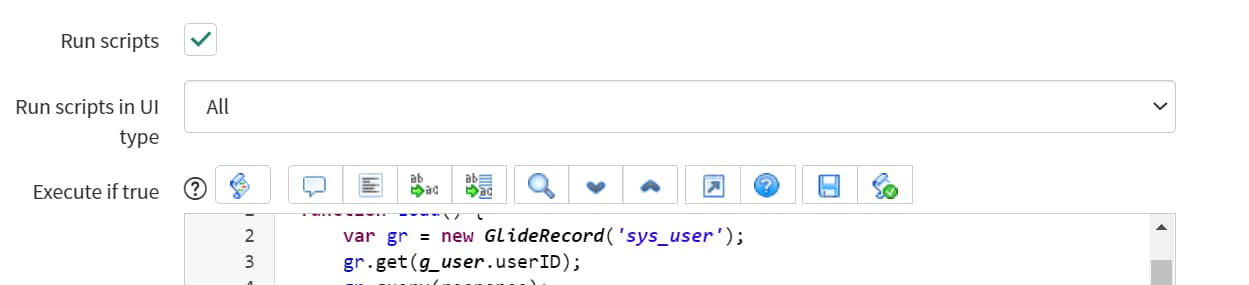
I am currently working on a similar requirement with a UI Policy. I am trying to restrict a choice option if the user that is making the request have a field check. Name of the field is u_employee_mall on the sys_user table. I tried with different scripts and so far this one below works but only thru the Service Portal and thru the legacy view.
function Load() {
    var gr = new GlideRecord('sys_user');
    gr.get(g_user.userID);
    gr.query(response);
    function response(gr) {
        while (gr.next()) {
            var MallEmp = gr.u_mall_employee;
            if (MallEmp == 'false')
              // Type the name of the field and then the choice to remove
              g_form.removeOption('request_type', 'Microsoft Teams Softphone');

              else {
		alert('You are not an employee mall');
            }
        }
    }
}
This only works thru the ServicePortal and not thru the legacy view. I got the script to run on all

Any idea?