- Mark as New
- Bookmark
- Subscribe
- Mute
- Subscribe to RSS Feed
- Permalink
- Report Inappropriate Content
06-21-2025 03:13 PM
Hi everyone, how are you?!
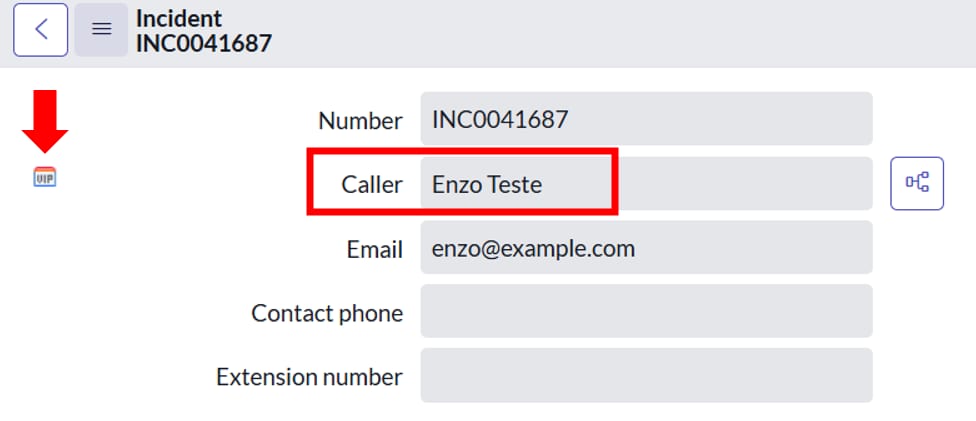
Every time a VIP user opens an INC, it must have the “VIP” icon and the font color “Red” (img1).
Note that I have already defined the user “Enzo” as VIP (img2), but when I access the Incident record, the font color is not Red (img3).
There is the option to right-click on the “Caller” field > Configure Styles (img4) (img4.1), but even defining “color: red” or “color: red !important” does not work.
Note: I tried using a Client Script (Incident table), but it does not work (img5)
Obs.: I also found this tip in the Community but it doesn't work:
Does anyone have any tips? please!
Thanks 😉
Solved! Go to Solution.


- Mark as New
- Bookmark
- Subscribe
- Mute
- Subscribe to RSS Feed
- Permalink
- Report Inappropriate Content
06-22-2025 03:41 AM
Hi @Elton2 check below script I try on pdi its working

- Mark as New
- Bookmark
- Subscribe
- Mute
- Subscribe to RSS Feed
- Permalink
- Report Inappropriate Content
06-22-2025 06:25 AM
Hi @Elton2
It appears to be an OOB feature where selecting a VIP user as the caller automatically changes the font color to red and displays the VIP logo in front of the field by default.
I recommend raising a HI ticket with the vendor.
Pic from fresh PDI.

Regards,
Siva
- Mark as New
- Bookmark
- Subscribe
- Mute
- Subscribe to RSS Feed
- Permalink
- Report Inappropriate Content
06-22-2025 07:24 AM
- Mark as New
- Bookmark
- Subscribe
- Mute
- Subscribe to RSS Feed
- Permalink
- Report Inappropriate Content
06-22-2025 07:26 AM
Hi @J Siva ,
I Accepted both solutions.
Thank you very much! 😉
- Mark as New
- Bookmark
- Subscribe
- Mute
- Subscribe to RSS Feed
- Permalink
- Report Inappropriate Content
06-22-2025 03:41 AM
Hi @Elton2 check below script I try on pdi its working
- Mark as New
- Bookmark
- Subscribe
- Mute
- Subscribe to RSS Feed
- Permalink
- Report Inappropriate Content
10-06-2025 10:50 AM
background-color: RGB(var(--now-color_alert--high-1, 255,99,71)) this is code priority Feild High orange cell or dot on cel edits but i want this on alm_asset state feild different color for each choice
- Mark as New
- Bookmark
- Subscribe
- Mute
- Subscribe to RSS Feed
- Permalink
- Report Inappropriate Content
06-22-2025 06:04 AM
Hi @Harish Bainsla , how are you?! 😉
I'd like to thank you for your support!!! 👏
I tried using here: g_form.setReadOnly('caller_id', true); but without success!
Note: Is it possible to make this color red when the field is "Read Only"
function onLoad() {
//Type appropriate comment here, and begin script below
var caller = gForm.getReference('caller_id', function(caller) {
Note if (caller.vip == 'true') {
g_form.setReadOnly('caller_id', true); //because the resolver will not be able to edit
gForm.setDisplayValue('caller_id', caller.name + ' (VIP)');
// Apply red font
var fieldElem = document.getElementById('label.caller_id');
if (fieldElem) {
fieldElem.style.color = 'red';
fieldElem.style.fontWeight = 'bold';
}
}
});
}
Note: I have attached 2 images as an example.
Thanks again for your support!!! 👍