- Mark as New
- Bookmark
- Subscribe
- Mute
- Subscribe to RSS Feed
- Permalink
- Report Inappropriate Content
06-21-2025 03:13 PM
Hi everyone, how are you?!
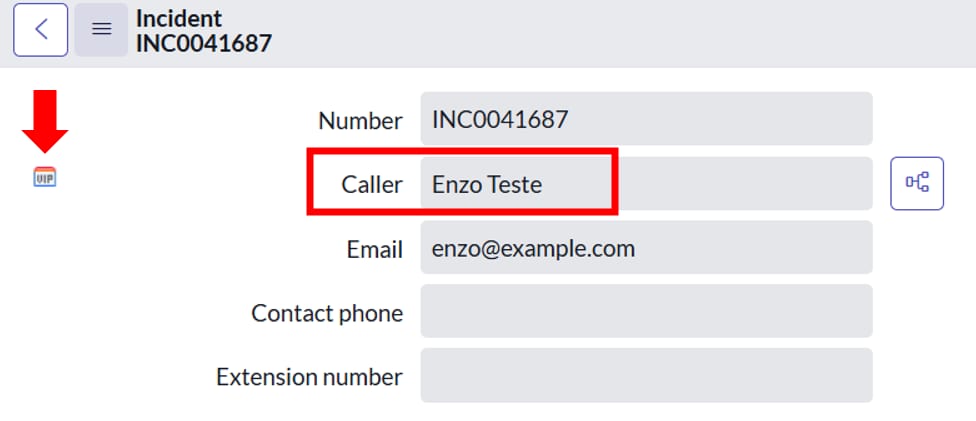
Every time a VIP user opens an INC, it must have the “VIP” icon and the font color “Red” (img1).
Note that I have already defined the user “Enzo” as VIP (img2), but when I access the Incident record, the font color is not Red (img3).
There is the option to right-click on the “Caller” field > Configure Styles (img4) (img4.1), but even defining “color: red” or “color: red !important” does not work.
Note: I tried using a Client Script (Incident table), but it does not work (img5)
Obs.: I also found this tip in the Community but it doesn't work:
Does anyone have any tips? please!
Thanks 😉
Solved! Go to Solution.


- Mark as New
- Bookmark
- Subscribe
- Mute
- Subscribe to RSS Feed
- Permalink
- Report Inappropriate Content
06-22-2025 03:41 AM
Hi @Elton2 check below script I try on pdi its working

- Mark as New
- Bookmark
- Subscribe
- Mute
- Subscribe to RSS Feed
- Permalink
- Report Inappropriate Content
06-22-2025 06:25 AM
Hi @Elton2
It appears to be an OOB feature where selecting a VIP user as the caller automatically changes the font color to red and displays the VIP logo in front of the field by default.
I recommend raising a HI ticket with the vendor.
Pic from fresh PDI.

Regards,
Siva
- Mark as New
- Bookmark
- Subscribe
- Mute
- Subscribe to RSS Feed
- Permalink
- Report Inappropriate Content
06-22-2025 06:25 AM
Hi @Elton2 you have written wrong gForm.setDisplayValue('caller_id', caller.name + ' (VIP)'); instead of it correct with below line
g_form.setDisplayValue('caller_id', caller.name + ' (VIP)');
if my answer helps you mark helpful and accept solution
- Mark as New
- Bookmark
- Subscribe
- Mute
- Subscribe to RSS Feed
- Permalink
- Report Inappropriate Content
06-22-2025 07:03 AM - edited 06-22-2025 07:05 AM
Hi @Harish Bainsla , how are you?!
I wrote it right! 👍
I just wanted to know if there is a possibility of it turning "red" when the "caller_id" field is read-only.
Obs.: When I leave the field read only, the red color doesn't work (img6), the red color only works when the field is open, example (img6.1).
In addition to the code you wrote, I included this line of code, but them not work:
- Mark as New
- Bookmark
- Subscribe
- Mute
- Subscribe to RSS Feed
- Permalink
- Report Inappropriate Content
06-22-2025 07:10 AM
Hi @Elton2 I don’t think OB it is possible
- Mark as New
- Bookmark
- Subscribe
- Mute
- Subscribe to RSS Feed
- Permalink
- Report Inappropriate Content
06-22-2025 07:11 AM
If you have another question ask in new question on community if my answer helps you accept solution
- Mark as New
- Bookmark
- Subscribe
- Mute
- Subscribe to RSS Feed
- Permalink
- Report Inappropriate Content
06-22-2025 07:24 AM
I have no other questions!
I'd like to thank you again for your support, I will "Accept Solution".
Thanks 😉