- Mark as New
- Bookmark
- Subscribe
- Mute
- Subscribe to RSS Feed
- Permalink
- Report Inappropriate Content
11-27-2024 11:11 PM
Hello Expert,
what is the Wait for condition in the flow , want to trigger the notification after the exact 7 day of termination date.
Could you help what condition need to be added in wait for condition in the flow
Solved! Go to Solution.


- Mark as New
- Bookmark
- Subscribe
- Mute
- Subscribe to RSS Feed
- Permalink
- Report Inappropriate Content
11-28-2024 01:12 AM
Hi,
The Wait for condition, is kind of a wait for a specific event to happen, before the flow continues to process further.
Be careful when using this option, it can lead to flows waiting forever, which is not a good thing, you should use the "Enable timeout" to prevent a neverending flow.
If you need the flow to wait for a specific amount of time to pass, there is also the "Wait for a duration of time" which can be found in Flow logic, this option can be set to wait in regards to a specific schedule if needed, for example if you have a schedule for business days, and you want the flow to wait for 7 business days.
Use the option that best suits your needs.
- Mark as New
- Bookmark
- Subscribe
- Mute
- Subscribe to RSS Feed
- Permalink
- Report Inappropriate Content
11-27-2024 11:51 PM
Hi @Rajveer ,
Wait for Condition
This action pauses a flow until specified conditions on a record are met.
Roles and Availability
- Available in Workflow Studio for users with the flow_designer or admin role.
Inputs
- Record: The record being monitored (from the trigger or previous flow step).
- Table: The table of the record (set automatically based on the selected record).
- Conditions: Define conditions to resume the flow (e.g., [State] [is] [Closed]).
- Enable Timeout: Limits the wait time; set to True/False.
- Duration: The time to wait (e.g., hours, minutes, seconds). Leave blank to wait indefinitely.
- Schedule: Optionally, define a business schedule for the timeout.
Outputs
- Outputs are available for use in subsequent flow steps.
Flow Trigger (e.g., when an employee record is updated or a termination is recorded).
- Wait for Condition:
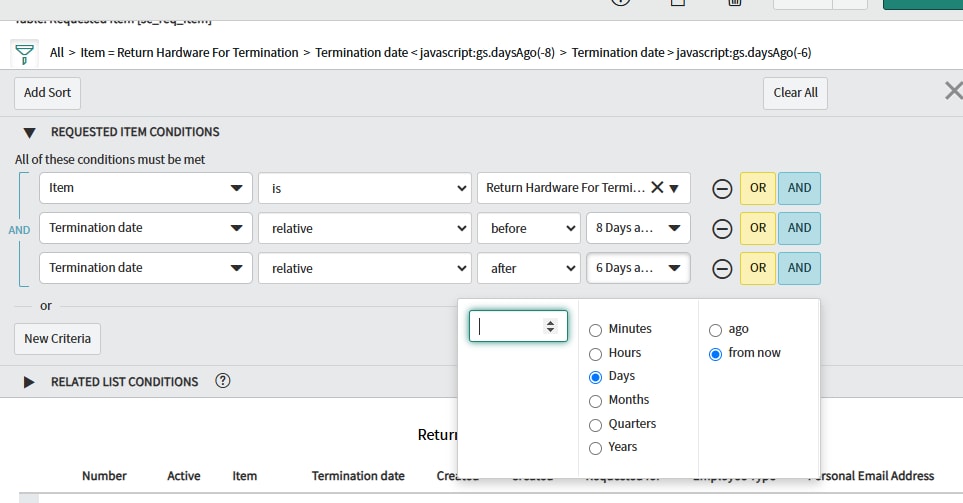
- Wait until the termination date is exactly 7 days ago.
- This can be done by comparing the termination date to the current date minus 7 days.
- Send Notification:
- Once the condition is met, trigger the notification.
- Please update the conditions according to the specific requirements. The conditions I provided are only for your understanding.

"Please Accept my solution if your issue is resolved."
Thanks and regards,
Badrinarayan
- Mark as New
- Bookmark
- Subscribe
- Mute
- Subscribe to RSS Feed
- Permalink
- Report Inappropriate Content
11-28-2024 12:23 AM

- Mark as New
- Bookmark
- Subscribe
- Mute
- Subscribe to RSS Feed
- Permalink
- Report Inappropriate Content
11-28-2024 12:53 AM
Hi @Rajveer ,
I selected '7 days from now', but it is displaying as '7 days ahead'.
Both are Same
Thanks Regards
Badrinarayan
- Mark as New
- Bookmark
- Subscribe
- Mute
- Subscribe to RSS Feed
- Permalink
- Report Inappropriate Content
11-28-2024 01:12 AM
Hi,
The Wait for condition, is kind of a wait for a specific event to happen, before the flow continues to process further.
Be careful when using this option, it can lead to flows waiting forever, which is not a good thing, you should use the "Enable timeout" to prevent a neverending flow.
If you need the flow to wait for a specific amount of time to pass, there is also the "Wait for a duration of time" which can be found in Flow logic, this option can be set to wait in regards to a specific schedule if needed, for example if you have a schedule for business days, and you want the flow to wait for 7 business days.
Use the option that best suits your needs.