- Mark as New
- Bookmark
- Subscribe
- Mute
- Subscribe to RSS Feed
- Permalink
- Report Inappropriate Content
07-06-2016 02:39 AM
Hi,
Where do i modify the navbar. I want to remove the "Service Catalog". See attachment.

Solved! Go to Solution.

- Mark as New
- Bookmark
- Subscribe
- Mute
- Subscribe to RSS Feed
- Permalink
- Report Inappropriate Content
07-06-2016 03:11 AM
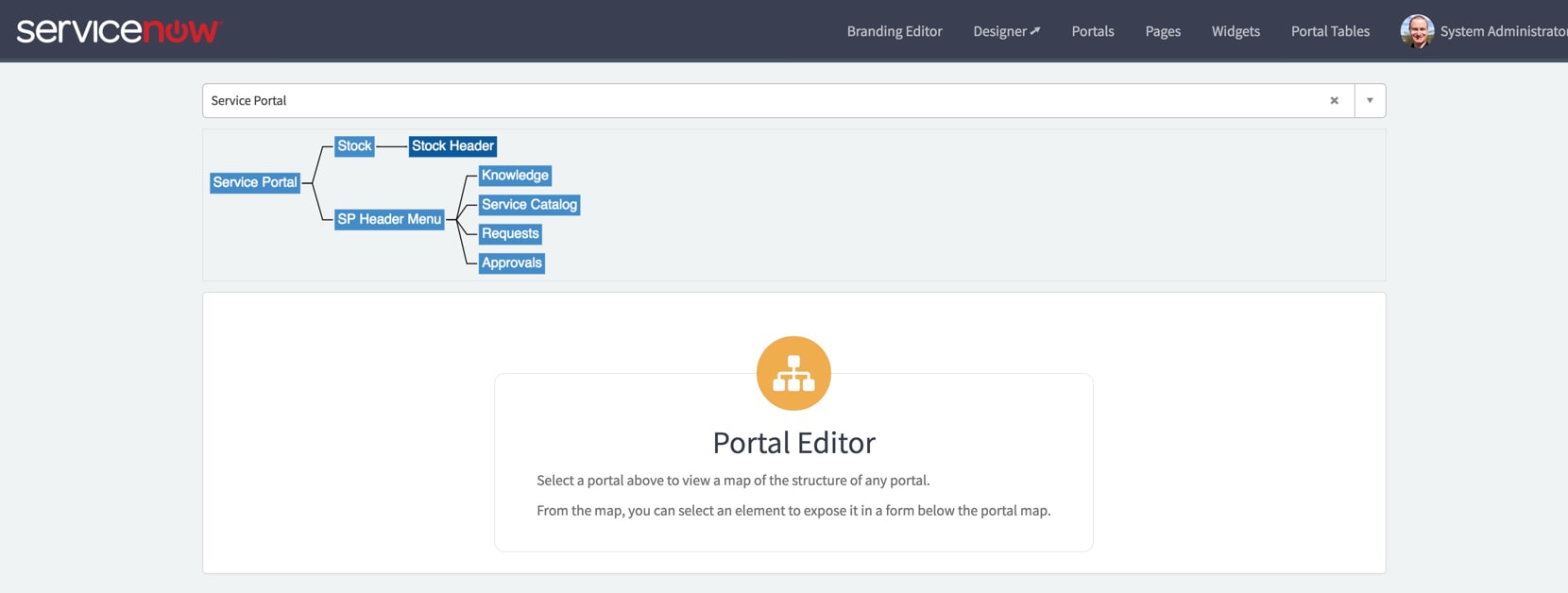
A little poking around brought me to this page:
https://yourinstance.service-now.com/sp_config
Go to the Portals menu on the top (almost exactly where Service Catalog appears.) There you will find a navigation map (shown below). Click the SP Header Menu and you can configure it to remove or add what you need.

- Mark as New
- Bookmark
- Subscribe
- Mute
- Subscribe to RSS Feed
- Permalink
- Report Inappropriate Content
10-28-2016 11:12 AM
HI Dan,
Look for some nice Service Portal enhancements in future releases.
- Mark as New
- Bookmark
- Subscribe
- Mute
- Subscribe to RSS Feed
- Permalink
- Report Inappropriate Content
03-20-2017 08:58 PM


- Mark as New
- Bookmark
- Subscribe
- Mute
- Subscribe to RSS Feed
- Permalink
- Report Inappropriate Content
03-20-2017 09:04 PM
Hi Chris,
The page layout isn't really meant to be edited this way. It's more of a 'map' how the page is put together.
When using this in Istanbul, it gives a link below the page chooser that tells you to edit in the page editor. Clicking any of the widgets brings up the properties/options for that widget instance.

- Mark as New
- Bookmark
- Subscribe
- Mute
- Subscribe to RSS Feed
- Permalink
- Report Inappropriate Content
03-20-2017 09:45 PM
Thanks Chuck
I found it by going in via the portal and linking across via the Main Menu.
A bit messy, but it got me there.
Thanks again
Chris