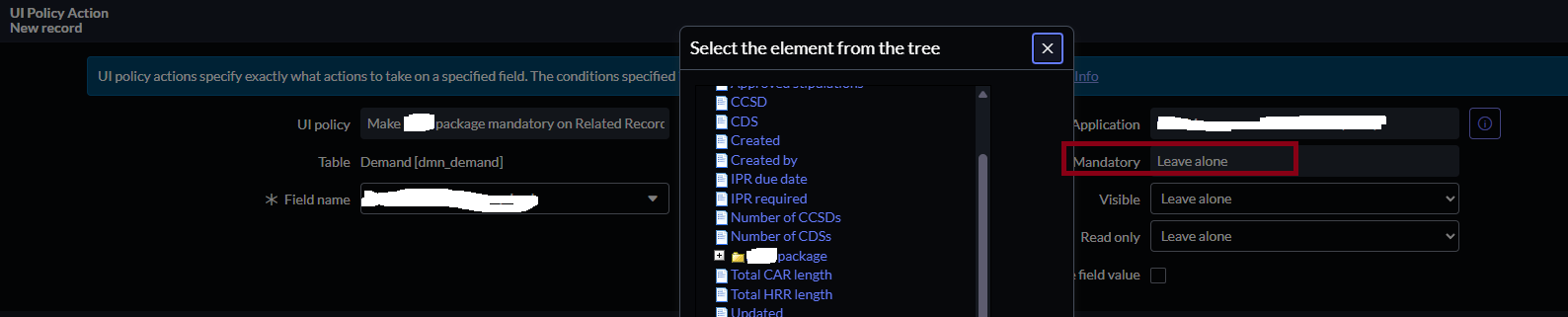
Why the UI Policy Action's Mandatory field is grayed out?

- Mark as New
- Bookmark
- Subscribe
- Mute
- Subscribe to RSS Feed
- Permalink
- Report Inappropriate Content
11-21-2025 07:50 AM - edited 11-21-2025 08:02 AM
The field I'm trying to make mandatory is a reference field in the dmn_demand table and is set as the display in the source table. The UI Policy was created in the applicable scope. The UI Policy Action shows the field as a Folder and when the Folder is selected, the Mandatory field is grayed out. Is there a way to make this field mandatory?

- Mark as New
- Bookmark
- Subscribe
- Mute
- Subscribe to RSS Feed
- Permalink
- Report Inappropriate Content
11-21-2025 07:56 AM
You can create a client script - onChange / On Load.
g_form.setMandatory('field Name', true);
If my Answer helps you , Please mark it as helpful and solution.
- Mark as New
- Bookmark
- Subscribe
- Mute
- Subscribe to RSS Feed
- Permalink
- Report Inappropriate Content
11-21-2025 09:50 AM


- Mark as New
- Bookmark
- Subscribe
- Mute
- Subscribe to RSS Feed
- Permalink
- Report Inappropriate Content
11-21-2025 07:59 AM
Hi @Runel
Please check what type of field it is in the Demand table. The UI policy might not have worked on that.
Regards
Dr Atul G. - Learn N Grow Together ServiceNow Techno - Functional Trainer
LinkedIn: https://www.linkedin.com/in/dratulgrover
YouTube: https://www.youtube.com/@LearnNGrowTogetherwithAtulG
******************************************************************************************
- Mark as New
- Bookmark
- Subscribe
- Mute
- Subscribe to RSS Feed
- Permalink
- Report Inappropriate Content
11-21-2025 08:54 AM