Cannot Change the SP Tag Line Colour

- Mark as New
- Bookmark
- Subscribe
- Mute
- Subscribe to RSS Feed
- Permalink
- Report Inappropriate Content
03-29-2023 04:28 AM - edited 03-29-2023 04:30 AM
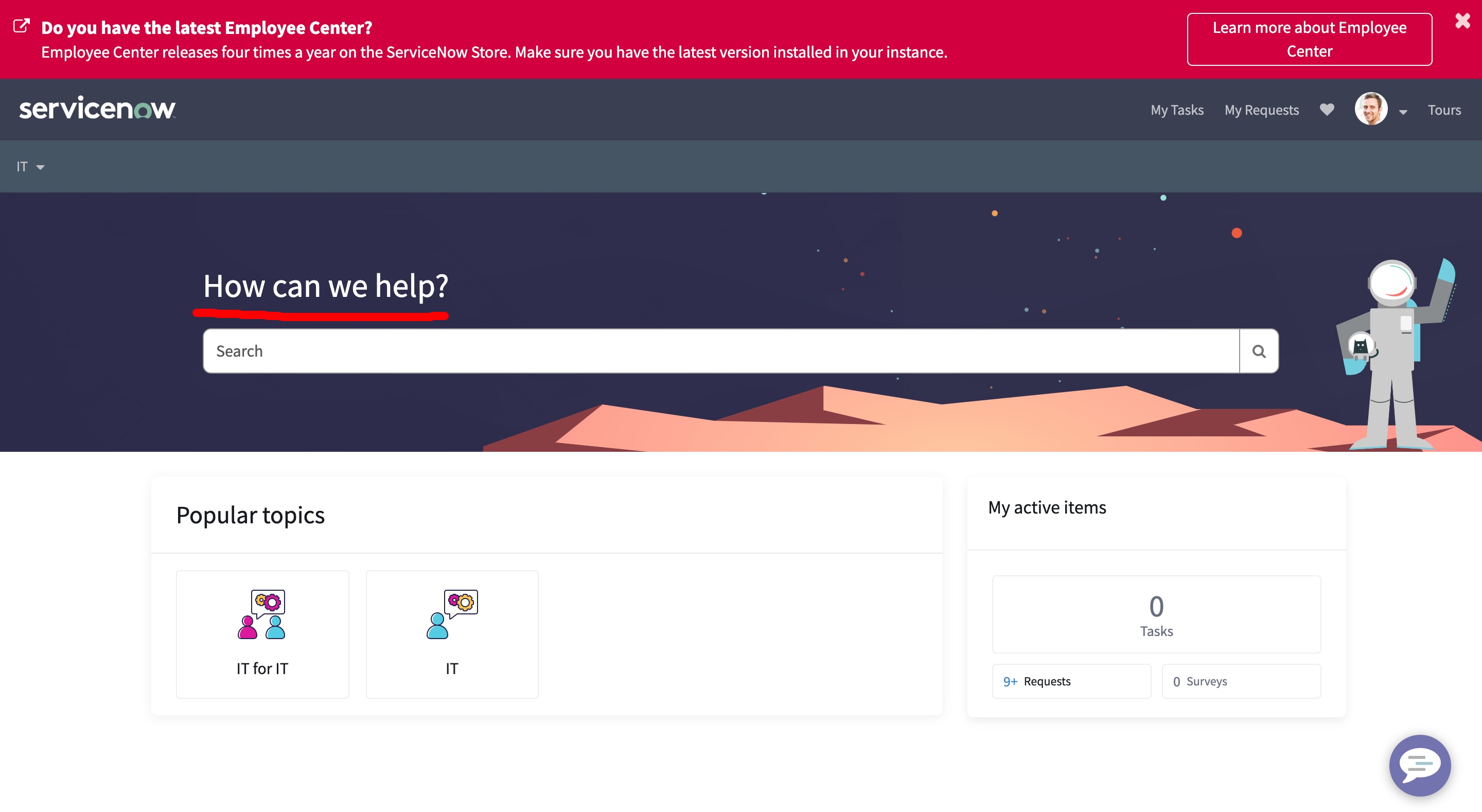
I am trying to change the font colour for the 'How can we help' text that appears in Employee Center. Attaching a screenshot for reference.
I tried already using 'Branding Editor' and that is not working.
I tried modifying the $sp-tagline-color within the 'EC theme' and that did not work either.
Does anyone know how this can be done?

- Mark as New
- Bookmark
- Subscribe
- Mute
- Subscribe to RSS Feed
- Permalink
- Report Inappropriate Content
03-29-2023 11:39 AM
@Justin21 , OOB Homepage Search instance included in Employee Center sets color for H2 ($text-white). And due to specificity that color takes preference over sp-tagline-color.
Please edit color specified for h2 in the Homepage Search instance CSS.
~BR
Pooja Patil
Please mark this as helpful and accepted solution if applicable.
