- Mark as New
- Bookmark
- Subscribe
- Mute
- Subscribe to RSS Feed
- Permalink
- Report Inappropriate Content
05-20-2026 07:11 PM
Hello,
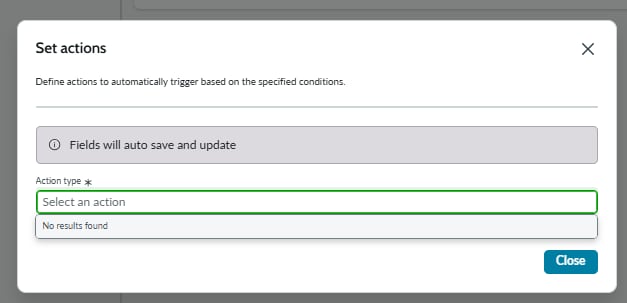
I'm in the process of configuring an RTO assessment for a BIA smart assessment template and am having difficulty setting the action portion of my action set (see the attached screenshot). The "Set action" field is empty and says, "No results found." In demonstrations that I've seen, the "Set recovery time objective and recovery tier" action is typically used to map the question response to a recovery timeframe. I have not configured a Smart Assessment BIA template before and I'm unsure whether this issue is due to missing a step prior to creating the smart assessment template, or whether it's due to an automation issue I'm having.
Any guidance or tips would be greatly appreciated. Can you please advise why I'm encountering this issue?
Thanks!
Solved! Go to Solution.

- Mark as New
- Bookmark
- Subscribe
- Mute
- Subscribe to RSS Feed
- Permalink
- Report Inappropriate Content
05-20-2026 10:40 PM
Hi,
make sure you create a subflow in the right scope AND category.

Then you should set up your smart asmt purpose accordingly to "Business impact assessment".
This purpose is linked to the Category in the BCM Scope (see sn_smart_asmt_template_category_list).
If you set it up correctly, your automation should be available now
Kind regards
and "accepted solutions"This motivates others to take part, post solutions and find answers. Thanks! - Mat

- Mark as New
- Bookmark
- Subscribe
- Mute
- Subscribe to RSS Feed
- Permalink
- Report Inappropriate Content
05-21-2026 12:03 AM
Hi @josephpro
Validate your subflow category mapping and ensure your template is correctly configured.
Refer Servicenow Documentation :
Create Smart Assessment templates for BIA
Configure RTO and RPO Smart Assessment templates workflow
KB2209247 BCM : Assessments tab is blank in BIA
Regards
Tanushree Maiti
ServiceNow Technical Architect
LinkedIn: https://www.linkedin.com/in/tanushreemaiti
- Mark as New
- Bookmark
- Subscribe
- Mute
- Subscribe to RSS Feed
- Permalink
- Report Inappropriate Content
05-20-2026 10:40 PM
Hi,
make sure you create a subflow in the right scope AND category.
Then you should set up your smart asmt purpose accordingly to "Business impact assessment".
This purpose is linked to the Category in the BCM Scope (see sn_smart_asmt_template_category_list).
If you set it up correctly, your automation should be available now
Kind regards
and "accepted solutions"This motivates others to take part, post solutions and find answers. Thanks! - Mat
- Mark as New
- Bookmark
- Subscribe
- Mute
- Subscribe to RSS Feed
- Permalink
- Report Inappropriate Content
05-21-2026 12:03 AM
Hi @josephpro
Validate your subflow category mapping and ensure your template is correctly configured.
Refer Servicenow Documentation :
Create Smart Assessment templates for BIA
Configure RTO and RPO Smart Assessment templates workflow
KB2209247 BCM : Assessments tab is blank in BIA
Regards
Tanushree Maiti
ServiceNow Technical Architect
LinkedIn: https://www.linkedin.com/in/tanushreemaiti