- Mark as New
- Bookmark
- Subscribe
- Mute
- Subscribe to RSS Feed
- Permalink
- Report Inappropriate Content
06-13-2022 02:41 AM
where can i find the workflow which governs the status of a control during its life cycle .
I mean i am after the workflow which decides that on taking a particular action , the control status will move to this .
please guide , where to find the oob wokflow for control ( draft -> attest -> review -> monitor -> retired ) .
Also if there is no OOB workflow , how does a control move from one status to another . what is orchestrating all this OOB ?
Thanks a lot in advance
Solved! Go to Solution.


- Mark as New
- Bookmark
- Subscribe
- Mute
- Subscribe to RSS Feed
- Permalink
- Report Inappropriate Content
06-13-2022 04:30 AM
Hello Gary,
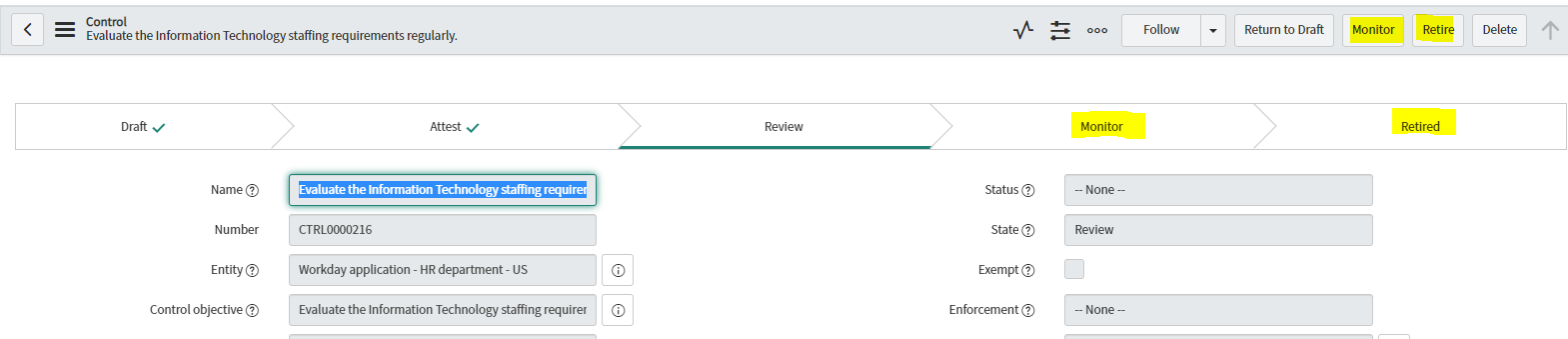
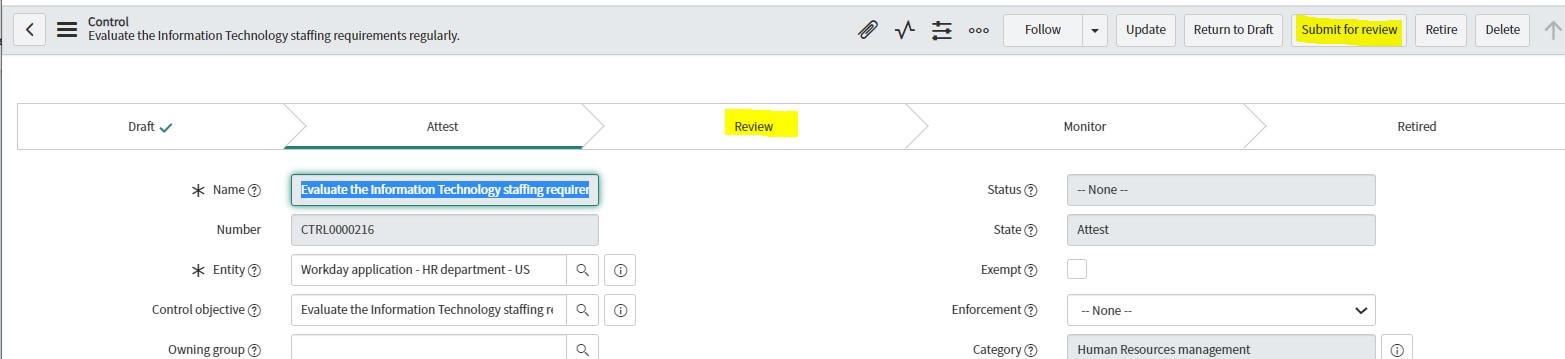
There is no workflow/flow on Control table (sn_compliance_control) as the controls states are changed from the UI actions mentioned on the control form.
1) Attest UI action - Move state from Daft to Attest

2) Submit for Review UI Action - To move the state from "Attest" to "review"

3) Monitor and Retired UI Action - To move the state to Monitor or retired from "Review",

Hope it helps!!
Please Mark ✅ Correct/helpful, if applicable, Thanks!!
Regards
Sulabh Garg
Regards
Sulabh Garg
- Mark as New
- Bookmark
- Subscribe
- Mute
- Subscribe to RSS Feed
- Permalink
- Report Inappropriate Content
06-13-2022 02:44 AM
Also if there is no OOB workflow , how does a control move from one status to another . what is orchestrating all this OOB ?
- Mark as New
- Bookmark
- Subscribe
- Mute
- Subscribe to RSS Feed
- Permalink
- Report Inappropriate Content
06-13-2022 04:30 AM
Hello Gary,
There is no workflow/flow on Control table (sn_compliance_control) as the controls states are changed from the UI actions mentioned on the control form.
1) Attest UI action - Move state from Daft to Attest
2) Submit for Review UI Action - To move the state from "Attest" to "review"
3) Monitor and Retired UI Action - To move the state to Monitor or retired from "Review",
Hope it helps!!
Please Mark ✅ Correct/helpful, if applicable, Thanks!!
Regards
Sulabh Garg
Regards
Sulabh Garg
- Mark as New
- Bookmark
- Subscribe
- Mute
- Subscribe to RSS Feed
- Permalink
- Report Inappropriate Content
06-15-2022 12:34 AM

- Mark as New
- Bookmark
- Subscribe
- Mute
- Subscribe to RSS Feed
- Permalink
- Report Inappropriate Content
02-20-2023 05:08 PM
@Sulabh Garg This is very helpful to know that the Control has got no workflow. The OOB suggestion is to move from Draft > Attest > Review > Monitor > Retired. Will there be any challenges if we move the workflow around to Draft > Attest > Monitor > Review > Retired?
Will there be any downstream implications if we change this flow? Thanks in advance!