Catalog client script not working

- Mark as New
- Bookmark
- Subscribe
- Mute
- Subscribe to RSS Feed
- Permalink
- Report Inappropriate Content
12-18-2023 01:57 AM
Hi
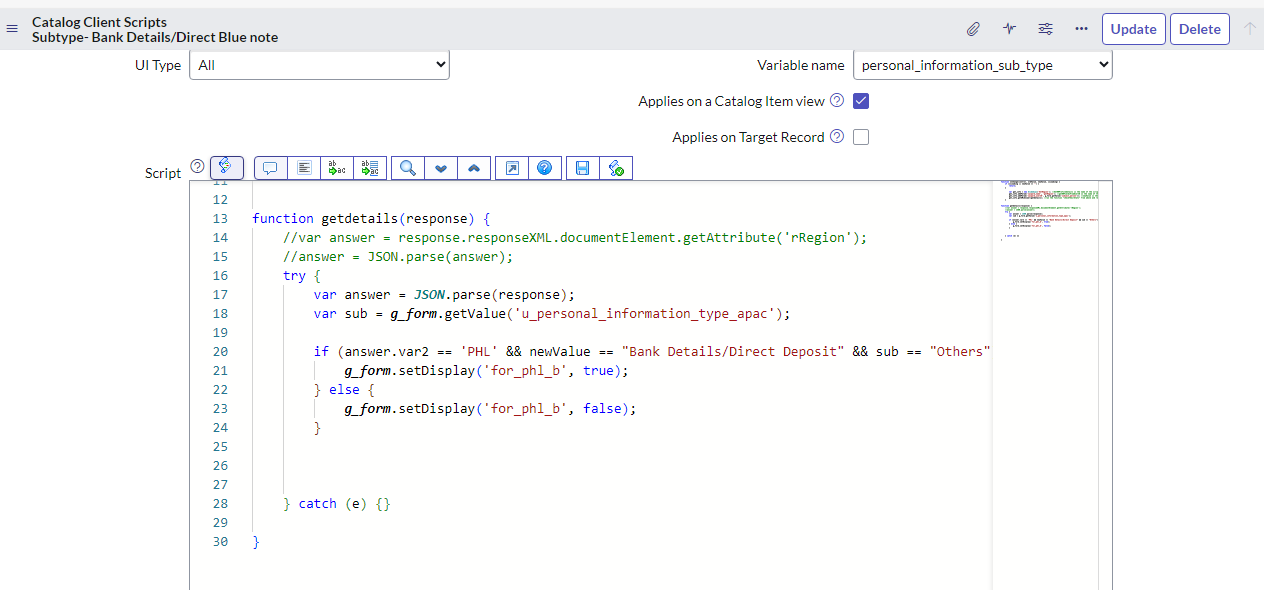
i have 2 fields in record producer form which is 1.personal information type(choice field) 2.personal information change type(choice field), we have a condition to show the label on form as below
if personal information type= "other" and personal information change type="bank details/bank deposit" and the person should be from philipines- it should show label as per screenshot
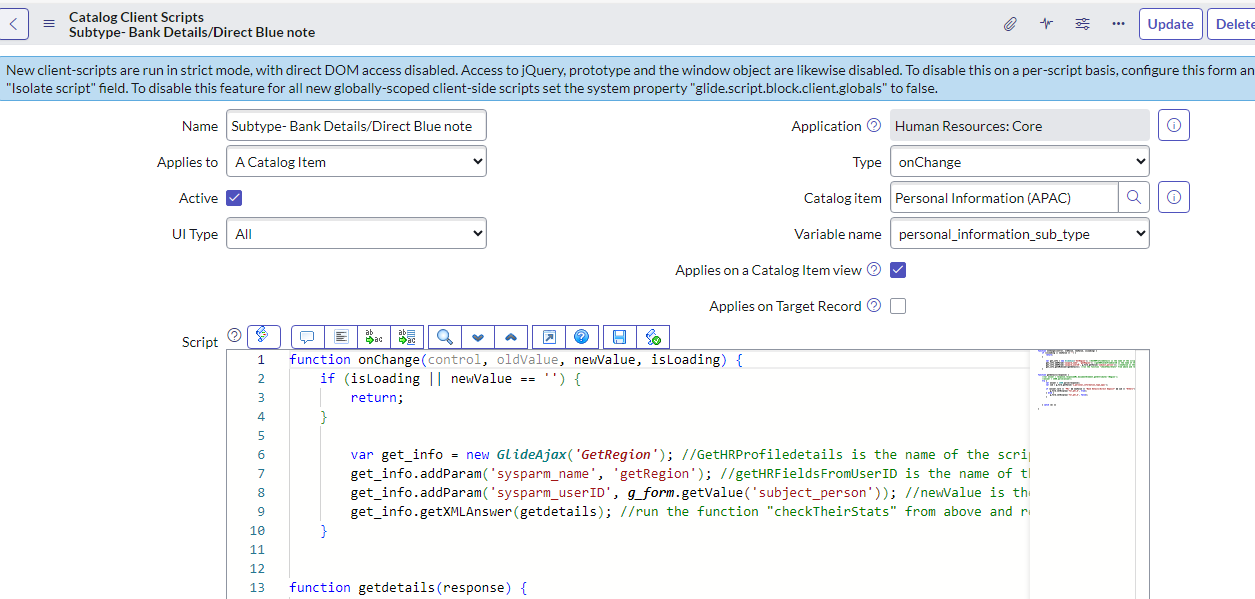
so i wrote a catalog client script(Attaching screenshots) which is working fine in this above condition but when we suddenly change to personal information type= to another option while keeping the personal information change type=bank details/bank deposit same as it is then also label is showing on form which should not be visible
Please help me to resolve the issue
@Dr Atul G- LNG @Danish Bhairag2 @Tai Vu



- Mark as New
- Bookmark
- Subscribe
- Mute
- Subscribe to RSS Feed
- Permalink
- Report Inappropriate Content
12-18-2023 02:34 AM - edited 12-18-2023 02:37 AM
Hi @sri vijaya
It's because there's no OnChange Client Script for this u_personal_information_type_apac variable.
When the user change the personal_information_sub_type variable, your Client Script trigger and display the for_phl_b variable. Then when you change the u_personal_information_type_apac, nothing happens.
So let's define one more Client Script or you can have an UI Policy.
=> If the personal_information_sub_type is not Others, the hide the for_phl_b variable.
You should also change your current client script if there's a None option in the personal_information_sub_type.
From
if (isLoading || newValue == '') {
	return;
}
To (or just remove the newValue part to let the GlideAjax do the job)
if (isLoading) {
	return;
}

if (newValue === "") {
	g_form.setDisplay('for_phl_b', false);
	return;
}
Cheers,
Tai Vu
- Mark as New
- Bookmark
- Subscribe
- Mute
- Subscribe to RSS Feed
- Permalink
- Report Inappropriate Content
12-18-2023 03:33 AM
Hi @Tai Vu
I applied the above logic its working fine for my issue
But for non phillipiness employee, when i clicked first time as Bank details option its working fine as expected that label is hidden, and when i toggle between the options to and fro and when i clicked again the bank details options the label is showing for them which is not expected for non philippines employee
