HRSD Module - Manage HR Skills Related Query

- Mark as New
- Bookmark
- Subscribe
- Mute
- Subscribe to RSS Feed
- Permalink
- Report Inappropriate Content
08-01-2026 06:40 AM
Hi ServiceNow Community,
Currently, I’m doing lab activities for the HRSD Module Fundamentals. Can anyone help me with the following?
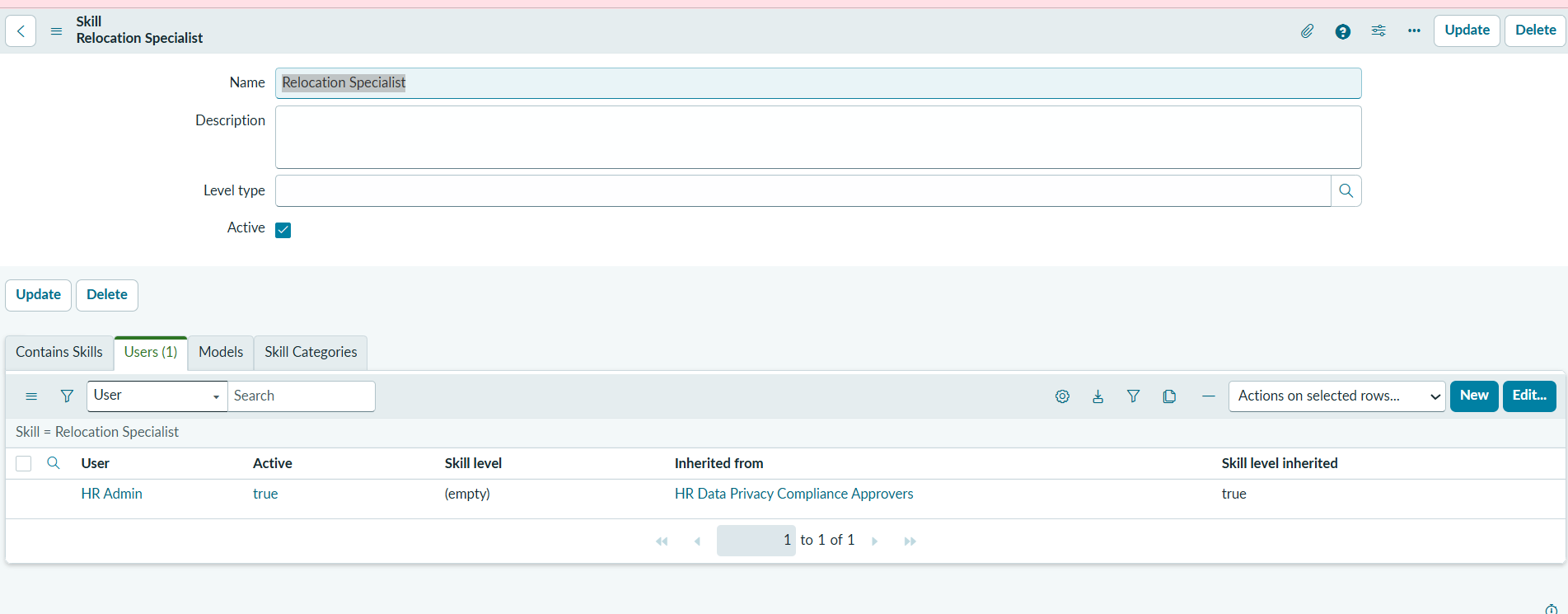
Issue: Why is the HR Admin user not listed with the Relocation Specialist skill, even though we assigned the skill to the group and the HR Admin is part of that group?
Discussion: The HR Admin user is not appearing under the Relocation Specialist skill. Why?
Thanks
Saurav Kumar
- Mark as New
- Bookmark
- Subscribe
- Mute
- Subscribe to RSS Feed
- Permalink
- Report Inappropriate Content
08-01-2026 01:54 PM - edited 08-01-2026 01:55 PM
Hello @Saurav_Kumar
I replicated this scenario in my PDI. Below are my observations
1) when you assign a skill to a group, everyone in that group automatically gets that skill
2) Created a Relocation Specialist Skill, as that skill is not available in my PDI. I did 2 things
Group A: added the user first, then gave the skill to the group --> the user showed up under the skill's Users list, with Inherited from set to the group name
Group B: gave the skill to the group first, then added the user --> same result
Let me prove it via Screenshots
I picked HR Systems Group from my PDI and added a skill(Relocation specialist) to the group and then added a group member, Abel Tuter.
Now, Open the Relocation Specialist Skill and check for users tab(Refer screenshot Relocation Specialist - users), there you will find Abel Tuter. The reason you find Abel tuter is because of the "inherits" field on the sys_group_has_skill table. refer screenshot inherits field.
Now set the Inherits to false and open the Relocation Specialist Skill, check for users tab, you can notice that Abel Tuter is gone.
So, to conclude inherits field on the sys_group_has_skill table defines this behavior,
Please mark "Helpful" If my reply added any value.
Regards
Raghavendra G

- Mark as New
- Bookmark
- Subscribe
- Mute
- Subscribe to RSS Feed
- Permalink
- Report Inappropriate Content
08-02-2026 09:09 AM
Check this post ,if helps:
https://www.servicenow.com/community/developer-forum/unable-to-assign-skills-to-users/m-p/3149289
Regards
Tanushree Maiti
ServiceNow Technical Architect
LinkedIn: https://www.linkedin.com/in/tanushreemaiti
- Mark as New
- Bookmark
- Subscribe
- Mute
- Subscribe to RSS Feed
- Permalink
- Report Inappropriate Content
08-02-2026 09:04 PM
Hi @Saurav_Kumar ,
If you open the HR admin user record, you'll find the skill is assigned to the HR agent but it is not visible in the HR skills management page.
The reason is mentioned in the book itself.

Assign HR department to HR agent you will see the HR agent listed in the HR Skills management.
Thanks
Anand
- Mark as New
- Bookmark
- Subscribe
- Mute
- Subscribe to RSS Feed
- Permalink
- Report Inappropriate Content
08-02-2026 09:46 PM
The HR Admin user is not displayed under the Relocation Specialist skill because the skill was assigned to the group, not directly to the user. Group membership provides skill inheritance for HR case routing, but inherited users are not automatically shown as direct skill assignments.
please refer this links - [servicenow.com], [servicenow.com]
Why is HR Admin not listed with the Relocation Specialist skill?", the expected answer is:
Because the skill is assigned to the group and inherited through group membership. The user is not directly assigned to the skill, so they do not appear in the skill's user list. [servicenow.com], [servicenow.com]