Multiple Surveys generated

- Mark as New
- Bookmark
- Subscribe
- Mute
- Subscribe to RSS Feed
- Permalink
- Report Inappropriate Content
02-08-2017 08:33 PM
Hi All,
We have surveys that gets generated once HR case state is changes to Closed complete. However, I could see two surveys being generated.
Couldn't find any issue with the Trigger conditions.
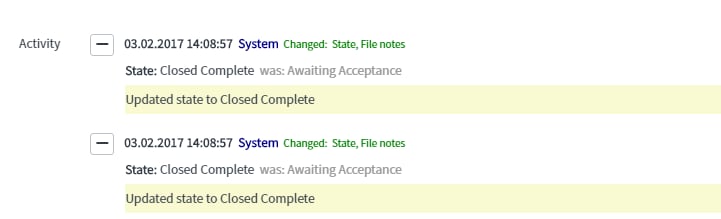
I have checked activity on the HR case, and could see 'Close Complete' state being generated twice. I think this is what has triggered two surveys, but unable to find the reason behind multiple activity for the same state. I have checked other cases as well, but this doesn't happens for all, but only for few cases.

Regards,
Manjyot
- Labels:
-
HR Service Delivery

- Mark as New
- Bookmark
- Subscribe
- Mute
- Subscribe to RSS Feed
- Permalink
- Report Inappropriate Content
02-09-2017 02:04 PM
Navigate to asmt_assessment_instance and search with the survey number . Verify the column "trigger Condition" for both the survey . From there you can confirm if both the survey generated due to trigger condition.
- Mark as New
- Bookmark
- Subscribe
- Mute
- Subscribe to RSS Feed
- Permalink
- Report Inappropriate Content
02-09-2017 04:02 PM
Hi Sumanta,
Thanks for your response.
I am quite new to Service now so struggling a bit apply your suggestion. So as per your suggestion I went to Table>>asmt_assessment_instance , but when in next screen I can only see column label, type, reference and so on. Not sure how to search for Survey number from this screen.
- Mark as New
- Bookmark
- Subscribe
- Mute
- Subscribe to RSS Feed
- Permalink
- Report Inappropriate Content
02-09-2017 06:32 PM
Hi Sumanta,
Also I have tried running a report on asmt_assessment_instance and could find Assessment Instance numbers for both Surveys. Under Trigger ID, both has got same case number. But even here I couldn't find anything relating to trigger condition.
- Mark as New
- Bookmark
- Subscribe
- Mute
- Subscribe to RSS Feed
- Permalink
- Report Inappropriate Content
02-10-2017 10:51 AM