How to show Record Producer variables on Incident form for agents.

- Mark as New
- Bookmark
- Subscribe
- Mute
- Subscribe to RSS Feed
- Permalink
- Report Inappropriate Content
11-11-2025 06:17 AM
Hello Everyone,
I have a requirement related to the Incident form in ServiceNow, and I would appreciate your suggestions on how to achieve this.
We have several Record Producers that create incident records. Each record producer has its own set of variables, apart from the standard incident fields (like Category and Subcategory).
Now, we want to enable agents (on the platform UI) to create incidents directly from the Incident form, but with an option to select a Record Producer, so that:
• All the variables associated with that selected Record Producer should be displayed (ideally in a popup or a widget).
• The agent can fill those variable values directly while creating the incident.
• Once submitted, those variable values should be stored along with the incident record (just like they are when the record is created via the Record Producer).
In short, the goal is to have a way for agents to select a Record Producer on the Incident form and dynamically show all the variables related to it — similar to how the portal record producer form behaves.
We are considering adding a field on the Incident form (e.g., “Record Producer”) from which the agent can select the record producer, and then the related variables should be displayed for input.
Has anyone implemented something similar or can suggest the best approach (maybe a UI page, UI Macro, or Service Portal widget)?
Thanks,
Siddharth


- Mark as New
- Bookmark
- Subscribe
- Mute
- Subscribe to RSS Feed
- Permalink
- Report Inappropriate Content
11-11-2025 06:38 AM
you can create a form UI action which displays record producers associated to incident using UI page and then based on record producer they select open the record producer within the native
how to invoke UI page using GlideModal
something like this
HTML:
<?xml version="1.0" encoding="utf-8" ?>
<j:jelly trim="false" xmlns:j="jelly:core" xmlns:g="glide" xmlns:j2="null" xmlns:g2="null">
    <g:ui_form>
        <g:evaluate jelly="true" object="true">
            var gr = new GlideRecord('sc_cat_item');
            gr.addQuery('sys_class_name', 'sc_cat_item_producer');
            gr.addQuery('table', 'incident');
            gr.query();
            gr;
        </g:evaluate>
        <select id="producerSelect">
            <j:while test="${gr.next()}">
                <option value="${gr.sys_id}">${gr.name}</option>
            </j:while>

        </select>
        <button onclick="openProducer()">Open Record Producer</button>
        <script>
            function openProducer() {
                var select = document.getElementById('producerSelect');
                var sysId = select.value;
                if (sysId) {
                    window.open('/com.glideapp.servicecatalog_cat_item_view.do?sysparm_id=' + sysId, '_blank');
                }
            }
        </script>
    </g:ui_form>
</j:jelly>
Output:

I hope this much information is sufficient for you to get started and you can enhance it further from here based on your requirement and developer skills.
💡 If my response helped, please mark it as correct ✅ and close the thread 🔒— this helps future readers find the solution faster! 🙏
Ankur
✨ Certified Technical Architect || ✨ 10x ServiceNow MVP || ✨ ServiceNow Community Leader
- Mark as New
- Bookmark
- Subscribe
- Mute
- Subscribe to RSS Feed
- Permalink
- Report Inappropriate Content
11-11-2025 01:06 PM
Hi Ankur,
Thanks for your response, but my expectation is not to redirect the incident form to any other page, I want it to be visible in the same incident form, either like a popup window or in form of variables without creating them manually for incident form.
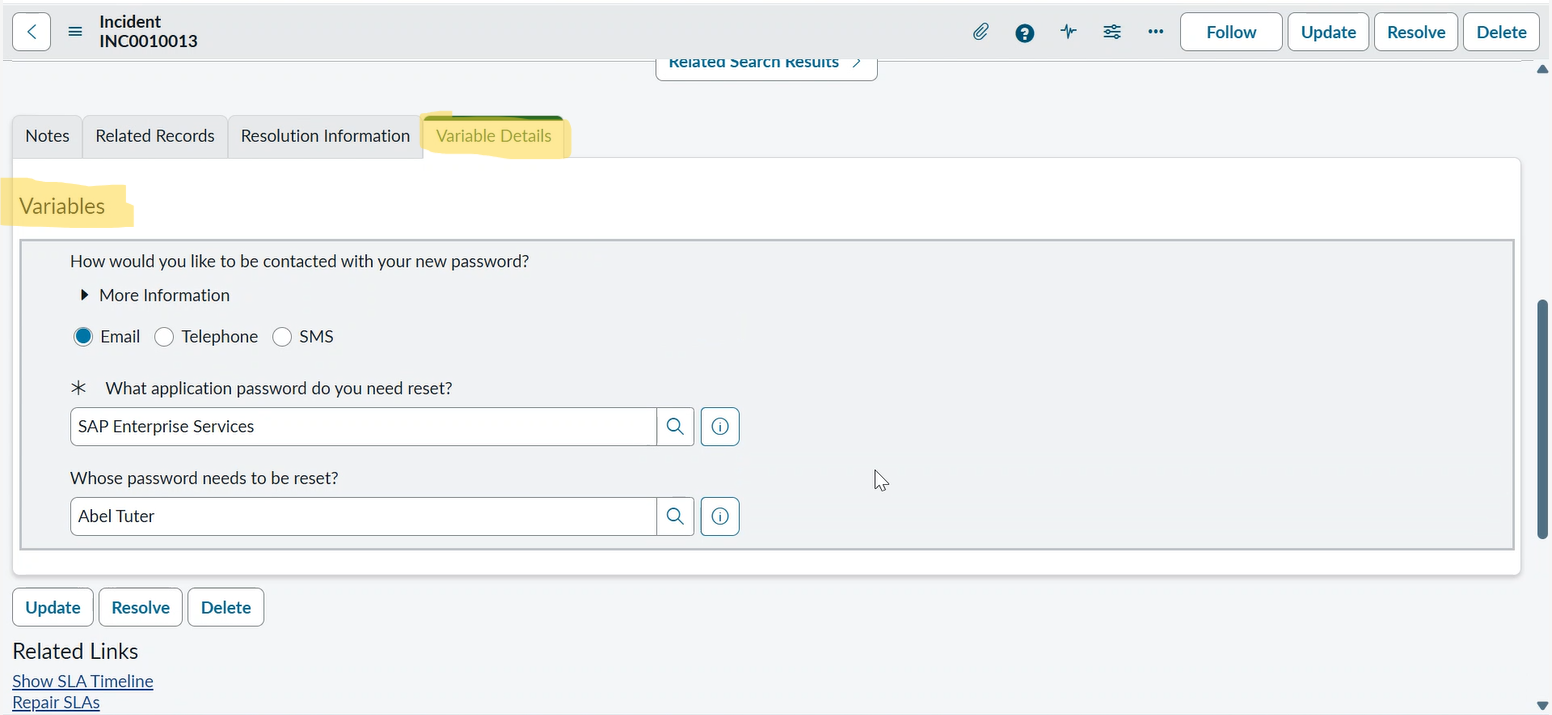
Attaching my screenshots for your reference, where when user selects a category and a subcategory for incident then automatically Record Producer should get populated and on that basis we will populate the associated variables in variables section.
But now I am able to bring variables to incident form, but it is populating once we save the incident record. We need those as soon as Record Producer field gets populated with some value in it.
Thanks,
Siddharth
- Mark as New
- Bookmark
- Subscribe
- Mute
- Subscribe to RSS Feed
- Permalink
- Report Inappropriate Content
11-11-2025 07:08 PM
the screenshot you shared has variable editor added on form and will appear if the current INC got created from some record producer.
If INC is not created from record producer then that variable editor won't be shown.
You can't show variable editor for INC which is not created from record producer.
I believe you should discuss this requirement with your stakeholder as it deviates from the standard incident creation process.
Let end users raise it from portal and agents can create it from native.
Why they want variables to capture the details if they can enter everything in short description of the incident?
It's part of user/agent training and this requirement is not necessary.
💡 If my response helped, please mark it as correct ✅ and close the thread 🔒— this helps future readers find the solution faster! 🙏
Ankur
✨ Certified Technical Architect || ✨ 10x ServiceNow MVP || ✨ ServiceNow Community Leader


- Mark as New
- Bookmark
- Subscribe
- Mute
- Subscribe to RSS Feed
- Permalink
- Report Inappropriate Content
11-11-2025 08:21 PM
Hi there @siddharthjain09
You can’t show Record Producer variables directly on the Incident form out of the box since they aren’t tied to the task record. The best option is to create a custom UI page or macro that loads variables dynamically based on the selected Record Producer. Add a reference field for Record Producer, use GlideAjax to fetch its variables, and display them for input. Once filled, store those values (as JSON or in a related table). It’s a small customization but works well to replicate the record producer experience for agents.
Kind Regards,
Azar
Serivenow Rising Star ⭐
Architect@ KPMG.


.png)
