- Mark as New
- Bookmark
- Subscribe
- Mute
- Subscribe to RSS Feed
- Permalink
- Report Inappropriate Content
03-12-2019 06:45 AM
Hello All,
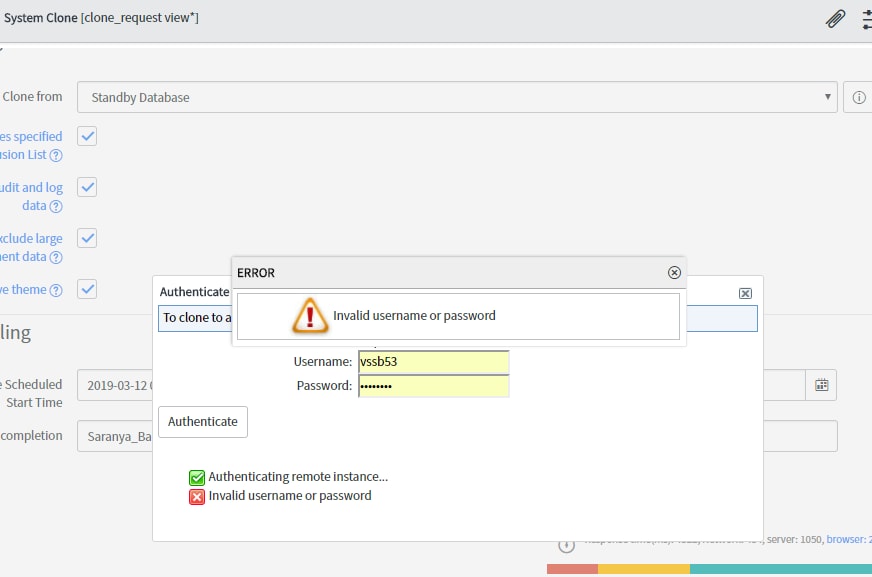
I have successfully cloned our dev instance from production instance.When am trying to clone our test environment am getting error like authentication failed.But user name and password is correct and also I have admin access in test environment.Can some one please help?

Its bit urgent!!!!
Solved! Go to Solution.
- Labels:
-
Operational Intelligence

- Mark as New
- Bookmark
- Subscribe
- Mute
- Subscribe to RSS Feed
- Permalink
- Report Inappropriate Content
06-11-2019 03:21 PM
Hi Salu,
You need to use a LOCAL admin account in the target instance to perform a clone, you cannot use LDAP / ADFS credentials to request a clone of an instance.
below is the documentation on how to request a clone, see step 11:
https://docs.servicenow.com/bundle/madrid-platform-administration/page/administer/managing-data/task/t_StartAClone.html
I Hope this helps.
Regards
Nic
- Mark as New
- Bookmark
- Subscribe
- Mute
- Subscribe to RSS Feed
- Permalink
- Report Inappropriate Content
02-09-2022 12:53 AM
You may need to turn off MFA if you have enabled multi-factor authentication in target instance (go to Multi-factor Authentication > Properties)