Identification Engine: Discovery status is FAILURE, Identification sections in pattern failed

- Mark as New
- Bookmark
- Subscribe
- Mute
- Subscribe to RSS Feed
- Permalink
- Report Inappropriate Content
02-18-2026 09:51 AM
Hi everyone,
I am facing an issue when running a Quick Discovery for an Oracle Database.
I have already created the Applicative Credential for Oracle Instance
(cmdb_ci_db_ora_instance), but the Oracle Glass Data still shows the following errors and the discovery ends with FAILURE:
Identification Engine: Discovery status is FAILURE, Identification sections in pattern failed: section: Lightweight identification for Oracle DB, error: Match step predicate is not matched. Failed Condition(s): [(${pre_cmdb_running_process[1].command} : value=ora_pmon_gbp) CONTAINS "tnslsnr"] . section: Identification for Oracle DB entry point type(s) - no instance on solaris, error: Match step predicate is not matched. Failed Condition(s): [(${computer_system.osType} : value=aix) STARTS WITH "solaris"] . section: no process tcp EP, error: Match step predicate is not matched. Failed Condition(s): [(${sid} : value=) IS NOT EMPTY ] . section: Identification for Oracle DB entry point type(s) - no instance, error: Match step predicate is not matched. Failed Condition(s): [(${process.commandLine} : value=) STARTS WITH "ora_pmon_", (${process.executable} : value=) EQUALS "tnslsnr"] .Environment details:
OS: AIX
Discovery type: Quick Discovery
Target: Oracle Database
Credential: Applicative credential for Oracle Instance
Observed processes: ora_pmon_<SID> is running
It seems that:
The Oracle PMON process is detected
The listener (tnslsnr) is either not detected or not accessible
The SID is not being populated
Process command Line values are empty during identification
Has anyone faced a similar issue on AIX where Oracle processes are not fully detected by Discovery?
Are there any additional permissions, sudo requirements, or environment variables (ORACLE_HOME / TNS_ADMIN) that need to be configured for the MID Server user? I used this documentation to create the user that I used on the applicative credential: Oracle GLAS data collection • Zurich IT Operations Management • Docs | ServiceNow
Additional info:
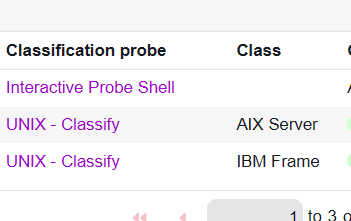
On Image 2, you can find the Classification and Class configuration used for this Quick Discovery.
Please let me know if that setup looks correct or if any changes are required.
Thanks in advance!

- Mark as New
- Bookmark
- Subscribe
- Mute
- Subscribe to RSS Feed
- Permalink
- Report Inappropriate Content
02-19-2026 02:14 AM
Hi @edgardordonez ,
The error is coming from the ServiceNow Discovery Identification Engine. It means that the Oracle Database identification pattern executed, but none of the required match conditions were satisfied. Because of that, the Discovery status is marked as Failure and the Oracle Database CI was not identified or created.
From the log, multiple match step predicates were not met.
First, the pattern expected a process containing tnslsnr, which represents the Oracle Listener. However, the value found was ora_pmon_gbp. Since the condition required the process to contain tnslsnr, it failed.
Second, there is an operating system mismatch. The pattern section expected the OS type to start with solaris, but the actual OS value was aix. Because of this mismatch, that identification section did not execute successfully.
Third, the SID value was empty. The pattern expected the SID to be not empty, but the log shows that it was blank. If the SID cannot be extracted, the Oracle instance cannot be confirmed.
Fourth, additional process matching conditions failed. The command line was expected to start with ora_pmon_gbp and the executable was expected to equal tnslsnr. These conditions were not satisfied, which caused the identification to fail.
In simple terms, Discovery ran the Oracle DB pattern but could not confirm the presence of a valid Oracle instance because the required listener process, SID, or OS conditions were not met.
Recommended checks:
Verify that the Oracle listener process tnslsnr is running on the target server.
Run ps -ef | grep pmon and confirm that ora_pmon_ is visible.
Ensure the MID Server has sufficient permissions to retrieve full process details.
Confirm that the correct pattern for the operating system, especially AIX, is active.
Once these conditions are satisfied, the Identification Engine should be able to match the Oracle Database correctly.
If this answers your question, please mark it as helpful and accept the solution for better community visibility.
Thanks,
Vishnu