Removing Group Memberships for Inactive Users

- Mark as New
- Bookmark
- Subscribe
- Mute
- Subscribe to RSS Feed
- Permalink
- Report Inappropriate Content
10-16-2014 05:21 AM
Right now we don't have direct LDAP integration w/ Servicenow (we're playing w/ some various 3rd party apps to control other aspects in our environment, so are not sure yet from what level we want to control what) - however,
I'm wondering if there is any easy script and/or app to quickly deactivate users in Servicenow AND remove their group memberships. (Maybe via import file of disabled users?)
Recently I saw where a user I had (manually) deactivated is still showing up in various group memberships. While I know he can't actually "do" anything, it still needs to be cleaned up so I was wondering what options are out there.
Thx,
A
- Labels:
-
Service Mapping
- Mark as New
- Bookmark
- Subscribe
- Mute
- Subscribe to RSS Feed
- Permalink
- Report Inappropriate Content
02-06-2018 09:10 AM

- Mark as New
- Bookmark
- Subscribe
- Mute
- Subscribe to RSS Feed
- Permalink
- Report Inappropriate Content
08-13-2019 12:13 PM
Hello!
Can I add to this Business Rule, to include removing Skills (sys_user_has_skill) from the User profile as well as Groups? I would that be done?
Mike
- Mark as New
- Bookmark
- Subscribe
- Mute
- Subscribe to RSS Feed
- Permalink
- Report Inappropriate Content
08-13-2019 12:15 PM
Or at least inactivate the skills. I guess I don't really need to remove them.
- Mark as New
- Bookmark
- Subscribe
- Mute
- Subscribe to RSS Feed
- Permalink
- Report Inappropriate Content
11-18-2019 11:41 PM
Hi David,
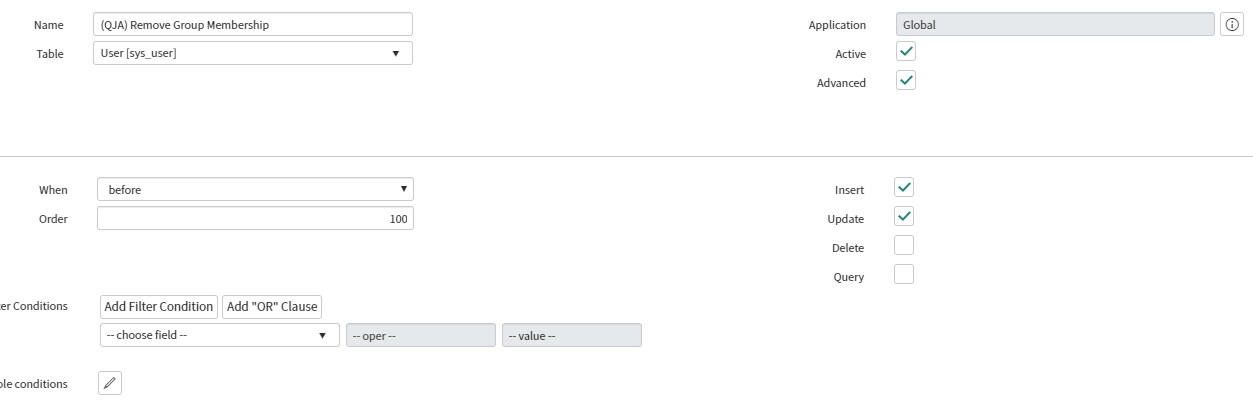
I would love to get this business rule working and followed your instructions to the letter but can't seem to get it working as in I don't see it removing any group membership for inactive accounts (or logging in the u_grouphistory) field i added.

I copied the script into the advanced section.
To test, I edited a name of a user and was expecting the business rule to remove groups of a user who i know is inactive but also still in groups but i didn't see the expected outcome.
I am using Madrid release if that makes a difference.
Thanks,
James
- Mark as New
- Bookmark
- Subscribe
- Mute
- Subscribe to RSS Feed
- Permalink
- Report Inappropriate Content
08-18-2016 04:09 AM
it worked thanks